
You are here:
Pricing Recipes Setup
Pricing Recipes in Salesforce Pricing enable you to create and manage detailed pricing strategies. These recipes associate data from selected objects with decision tables to develop comprehensive pricing procedures. Understanding pricing recipes is crucial for successfully leveraging Salesforce Pricing.
Required Editions
| Available in: Lightning Experience |
| Available in: Enterprise, Unlimited, and Developer Editions of Revenue Cloud where Salesforce Pricing is enabled |
| User Permissions Needed | |
|---|---|
| To manage pricing recipes: | Salesforce Pricing Design Time |
How Pricing Recipes Work
A pricing recipe groups decision tables that serve as a data source for your pricing infrastructure. Pricing recipes also provide a one-point configuration for how decision tables are used within procedures.
Salesforce Pricing offers you flexible, data-model independent pricing, retrieving values from any field. You can map a pricing recipe to a decision table, then use Dynamic Output Mapping to define custom outputs for your elements. This provides precise control over pricing calculations. We simplify setup with a predefined recipe and standard decision tables, accelerating your procedure creation.
Select a Pricing Recipe for Your Salesforce Org
Every Salesforce org requires a pricing recipe to define its pricing strategy. When Salesforce Pricing is activated, your org is automatically set up with a predefined recipe, though you can only have one active pricing recipe at a time. This recipe is essential for managing detailed pricing procedures.
- From Setup, in the Quick Find box, enter Salesforce Pricing, and then select Salesforce Pricing Setup.
-
In the Select a Pricing Recipe section, select the pricing recipe.
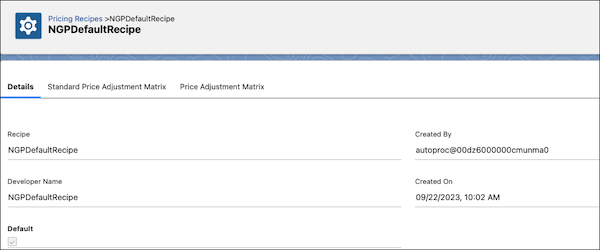
The default NGPDefaultRecipe, included with the Salesforce Pricing solution, is associated with all predefined decision tables shipped with Salesforce Pricing.
To customize and build a pricing recipe that suits your organization's business needs, proceed further.
Create a Pricing Recipe
Learn how to create a custom pricing recipe to group and associate your custom decision tables, enabling precise control over pricing calculations in your Salesforce org. This task is essential when the predefined recipe doesn't meet your specific business needs.

- From Setup, in the Quick Find box, find and select Pricing Recipes.
- Enter a name for the new recipe.
-
Save your changes.
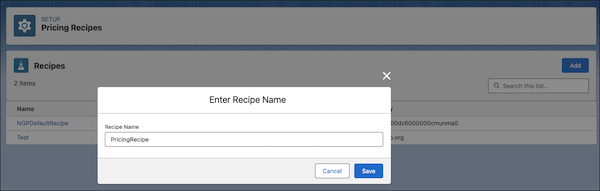
- Select the recipe that you created to open its details page.
- On the recipe's detail page, select the Price Adjustment Matrix tab.
-
To add decision tables, click Modify and then select the
decision tables you want to associate with this recipe.
When you create a pricing procedure with the usage type set to Pricing, you will see the predefined decision tables and any custom ones you associated with this recipe.
- Save your changes.
- To activate your pricing recipe, go to the Salesforce Pricing Setup page and set your new recipe as the default.
Modify Price Adjustment Matrices
Customize your pricing recipes by associating them with decision tables, allowing you to offer customers discounts based on specific conditions.
- From Setup, in the Quick Find box, find and select Pricing Recipes.
- Choose the pricing recipe that you want to modify.
-
On the Price Adjustment Matrix tab, click Modify.
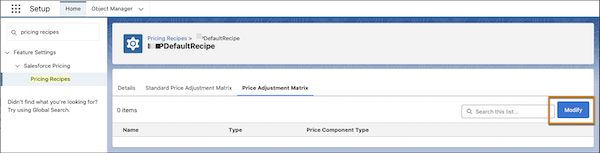
- Select or deselect the decision tables you want to associate or disassociate with this recipe.
-
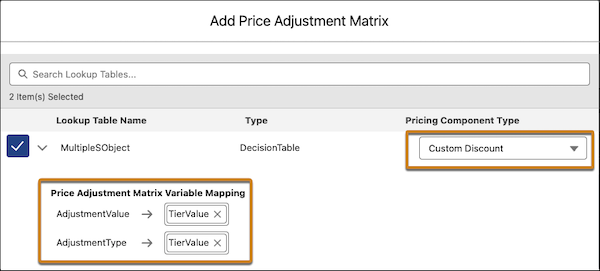
If necessary, set the default mapping to the output variables for your pricing
elements.
- Select a pricing component type.
- Map the rule variables associated with the decision table.
- Save your changes.
