
You are here:
Select a Pricing Procedure
To apply pricing rules and logic to calculate the final net price of a product, you must first clone a predefined pricing procedure available with Salesforce Pricing or build a custom one. This is necessary because Salesforce ships a predefined template, not an executable procedure, meaning templates can’t be directly configured for use.
Required Editions
| Available in: Lightning Experience |
| Available in: Enterprise, Unlimited, and Developer Editions of Revenue Cloud where Salesforce Pricing is enabled |
| User Permissions Needed | |
|---|---|
| To create, update, delete, and clone pricing procedures: | Salesforce Pricing Design Time User |

Important Before you start working with pricing procedures, you'll need
to understand the different pricing procedures used in Revenue Cloud.
- The pricing procedure selected in Product Discovery Settings is used to calculate the list price of a product.
- The pricing procedure selected in Salesforce Pricing Setup is used to make headless calls only.
- The pricing procedure selected in Revenue Settings is used to determine accurate pricing for quotes and orders.
Here are some important things to remember when you're cloning your procedure.
- When saving the cloned expression set as a new pricing procedure, you can assign a custom context definition.
- You can only provide a version name and version number to a cloned expression set when you save it as a new pricing procedure version.
- The cloned procedure's start date must be later than the Effective From date of it's context definition.
-
Let's start by cloning an expression template.
- From the App Launcher, find and select Expression Set Templates.
-
Select the expression set template that you want to clone.
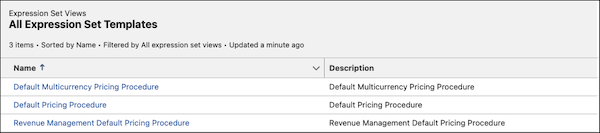
 Note To price quotes and orders, use the Revenue Management Default Pricing Procedure.
 -
Click Save As.
The template can be cloned and saved as a new pricing procedure or a new version of a pricing procedure. You can find the newly cloned pricing procedure in the Pricing Procedures list.
-
To select a pricing procedure in the Product Discovery Settings page.
- From Setup, in the Quick Find box, enter Product Discovery, and then select Product Discovery Settings.
- In the Select a Pricing Procedure section, select the pricing procedure.
-
To select a pricing procedure in the Salesforce Pricing Setup page.
- From Setup, in the Quick Find box, enter Salesforce Pricing, and then select Salesforce Pricing Setup.
- In the Select a Pricing Procedure section, select the pricing procedure.
-
To set a default pricing procedure for your Revenue Cloud org, do the following:
- From Setup, in the Quick Find box, enter Revenue Settings, and then select Revenue Settings..
- In the Set Up Salesforce Pricing section, select the pricing procedure.
Did this article solve your issue?
Let us know so we can improve!
