
You are here:
Create Product Specification Type and Product Specification Record Type
Ensure that your products have the terminology that’s unique to your industry. Use Product Catalog Management to define a specification type for the products that are specific to your industry and create corresponding product record types.
Required Editions
| View supported products and editions. |
| User Permissions Needed | |
|---|---|
| To create product specification type and product specification record type: | Manage Product Catalog |

Important Only Salesforce Admins can set up Specification Types.
See:
While you can use the specification types that are shipped out-of-the-box for your industry, you can also create custom product specification types. Additionally, you can use APIs to query products by product specification type.
Product specification types and product specification record types are optional configurations. You can create them while you set up Product Catalog Management.
-
Perform these steps only if you aren’t using an out-of-the-box specification
type that your industry license provides.
- From Setup, in the Quick Find box, enter Product Specification Type, and then select Product Specification Type.
- Click New Product Specification Type.
-
Enter a name, description, and label for the product specification type
and save your work.
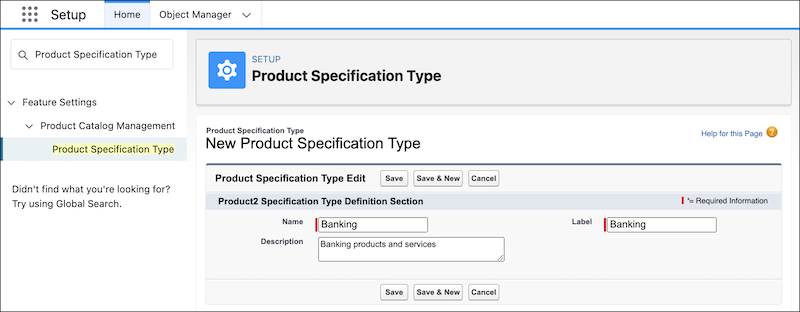
 Note You can translate the values of the label and description fields in the Product Specification Type Object.
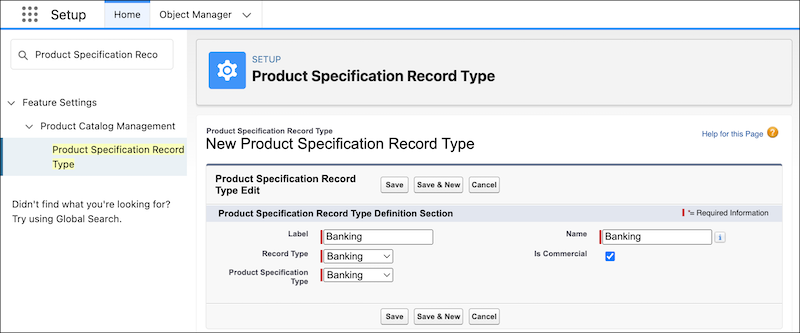
- From Setup, in the Quick Find box, search for Product Specification Record Type, and then click Product Specification Record Type.
- Click New Product Specification Record Type.
-
Enter these details:
- Enter a name and a label for the product specification record type.
-
Select the Product Specification Type that this record type is
associated with.
Select None for products that don’t have a specification type.
-
Select a Record Type. If you haven’t created any record types on the
Product object, see Create Record Types.
Ensure that the Record Type, Product Specification Type, and the Name are unique. You can associate only one product specification record type with a record type.Note You can’t delete a product specification type that’s related to a record type on the product object.
-
Select Is Commercial when your product specification is
commercial type. Keep Is Commercial deselected when the product
specification is non-commercial type. When you create a product and select an
associated record type, the correct specification type is updated on the product
record.
Note You can’t update the IsCommercial field after creating the product specification record type.
- Save your changes.
Did this article solve your issue?
Let us know so we can improve!
