
You are here:
Create a Bundled Product Structure
After you create a bundled product (static or configurable), use the Structure tab in the bundled product to add child components such as groups, products, and product classifications.
Required Editions
| View supported products and editions. |
Product Bundle Components
Here's a product bundle structure with home furniture as the example, along with a description of each of the bundle components.
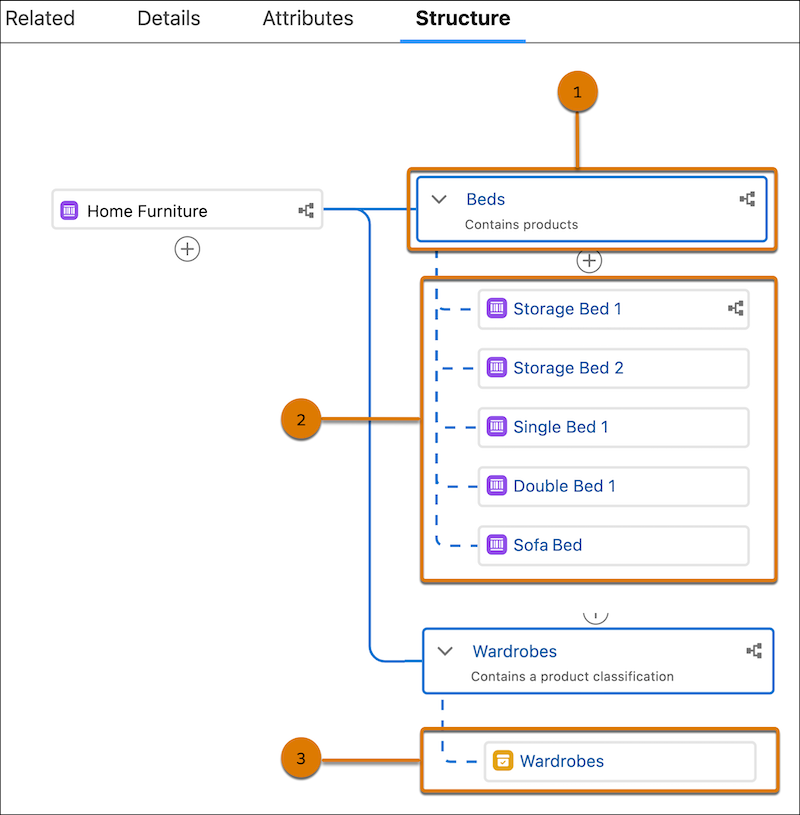
| Bundle Components | Things to note |
|---|---|
| Product Group (1) |
|
| Product Components (2) |
|
| Product Classification Components (3) |
When you add a product classification component to a group, all products that are based on the product classification are automatically added to the product bundle at run time. If you have multiple products based on a product classification, you don’t need to add each product as a product component to a group. Instead, you can add the product classification component that automatically adds all the products at run time. |
To create a product bundle structure, follow these instructions:
- Add Components to a Static Product Bundle
Static products are non-configurable at run time. That means you can’t add or remove child products, alter product quantities, or configure product attributes at run time. You can add product and product group components to a static product bundle. Product Group components are optional. - Add Components to a Configurable Product Bundle
You can add multiple groups, multiple product components, or one product classification component under a product group in configurable bundles. - Product Relationship Management in Revenue Cloud
Bundle products consist of components such as groups, products, and product classifications. These components are related to each other through product relationships.
