
You are here:
Build Your Product Catalog in Agentforce Revenue Management
Product Catalog Management enables administrators and designers to create robust catalogs for any business. Accelerate your sales with personalized, browsable product offerings. Simplify complex catalog management, and ensure relevant products reach customers across all channels, from brick-and-mortar stores to ecommerce platforms and beyond.
Required Editions
| View supported products and editions. |
Learn About Product Catalog Management
Listen to this podcast-style Audio Tour which introduces the key features of Product Catalog Management and how they work together. The audio features an AI-generated conversation between two database administrators.

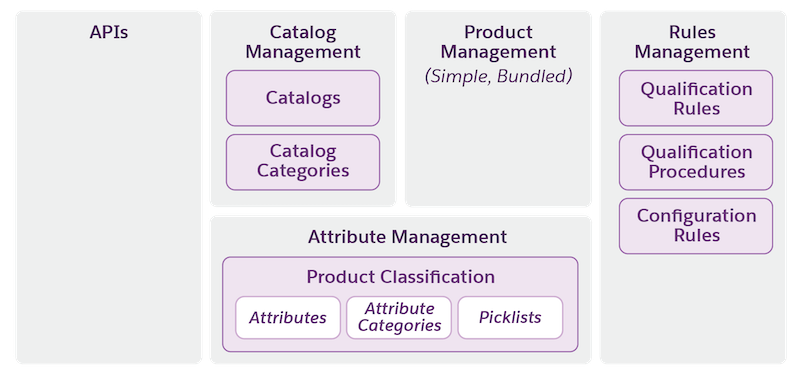
Product Catalog Management Architecture
For quick reference, here's a diagram showing how the key elements of Product Catalog Management fit together.
Ready to Jump In?
To get started with Product Catalog Management, refer to these resources. In general, we recommend working through these sections in order.
- Begin Using Product Catalog Management
Review the supported products, editions, and permission sets for Product Catalog Management (PCM). Tailor the experience of using PCM for all users using permission sets to give them precise access to what they need. - Product Catalog Management Set Up
Product Catalog Management includes different permission sets for users. These users or personas perform various roles in implementing and managing your product portfolio. Configure your users to use Product Catalog Management and assign permission sets so that the users can access catalogs, products, attributes, rules, context definitions, product bundles, and more. To complete the setup of Product Catalog Management, adjust the page layout and field access on the product object. - Plan Your Product Catalog
Learn how to plan your product catalog implementation and explore sample catalog configurations. - Organize Your Products with Catalogs and Categories
A catalog is a collection of the products that you sell, organized into categories for easier browsing. You must create a catalog before you create catalog categories and assign products to the categories. - Manage Dynamic Attributes in Agentforce Revenue Management
Attributes are the key characteristics or properties of products. Define your attributes, and then assign them to your products using product classifications. - Create Product Templates Using Product Classifications
Product classifications are templates that organize your product catalog and streamline product creation. Define attributes once, and let subclassifications automatically inherit them, while still allowing you to manually override attributes as needed. Product classifications help you maintain data consistency and reduce repetitive manual tasks, allowing you to quickly define and launch products with shared characteristics. - Create Products and Product Bundles in Agentforce Revenue Management
Products are all the items and services that you sell to customers. There are two types of products: simple products and bundled products. Simple products are single-element products with no dependencies on any other products. Bundled products are a group of products that are sold together as one unit. - Create Product Variants in Agentforce Revenue Management
Use product variants to group related products that share a common identity but differ by specific characteristics. Instead of creating separate, disconnected entries in your catalog for every minor difference, variants help you organize these options logically under a single umbrella record. - Manage Qualification Rules for Products in Agentforce Revenue Management
Use qualification rules to define the customer eligibility and availability for products, or product categories. Configure qualification rules using criteria such as location, account attributes, purchase history, and more. - Manage Product Selling Model in Agentforce Revenue Management
Product selling models define how you sell products. The models can be one time, term-defined, or evergreen. - Product Ramp Segments in Ramp Deals for Lines
A ramp deal is a type of sales agreement where price and volume vary across time periods. A ramp segment is a specific period within a ramp deal during which certain prices and volume are in effect. - Product Discovery and Guided Product Selection
Use Product Discovery to provide a simple, structured product browsing experience for sales reps and customers to efficiently identify the most suitable products. Users can see product information such as images, description, pricing, product bundle details, and product attributes in a single comprehensive view. - Product Catalog Management Limits
Before you plan and create products, attributes, and a bundled product hierarchy in Product Catalog Management, make sure that you’re aware of the capabilities and limits.
