
You are here:
Plan Your Product Catalog
Learn how to plan your product catalog implementation and explore sample catalog configurations.
Required Editions
| View supported products and editions. |

Core Concepts
Planning your product catalog starts with assessing all your product and service offerings and translating them into the data model that Product Catalog Management uses.
At its core, Product Catalog Management consists of catalogs, categories, dynamic attributes, product specification templates, and of course the products themselves.
Catalogs and categories are your high-level organizational tools. Dynamic attributes specify the characteristics of each individual product. You assign attributes to products using product specification templates. Additionally, products can be sold individually or bundled and sold together as a package.
Let's unpack these elements a bit more and explore how you can implement your product catalog using this model.
Product Catalog Implementation Workflow
- First, define your catalogs. Catalogs are your curated collection of products and the highest-level container in the Product Catalog Management model. You need to create at least one catalog, but some companies have many catalogs. Catalogs can represent types of products, services, or even sales territories or business units. It's all up to you.
- Second, define your categories. Categories are hierarchical groupings within a catalog that organize similar products and services. Categories can have subcategories for even more granular organization. For example, within a Software catalog, you might have categories for Collaboration Tools, Security Apps, or Games. Under Security Apps, you could have an Antivirus subcategory.
- Next, define the characteristics for each of your products using dynamic attributes. These attributes are assigned through templates called product specifications. Attributes offer product personalization and customization, for example, size, color, storage, resolution, and so forth. A big benefit of attributes is that they reduce the number of individual products you need to build. Imagine a new model of mobile phone. You only need one product with attributes that define the different colors, storage options, and data plans.
- Finally, create your products! This is the fun part where it all comes together. Products can be plain simple products like a bottle of shampoo, simple but configurable products like a t-shirt offered in various sizes, or complex groupings of products associated together in a product bundle.
Now, let's explore some examples and see how all the components interact with each other to create the rich detail found in a complete product catalog.
Example 1: Men's Polo Shirt
In this example, we'll explore a simple product with configurable options. One product SKU along with attributes so customers can choose their shirt size and color. Here are the elements required to create this product in PCM:
- Catalog: Men's Clothing
- Category: Men's Shirts
- Attributes
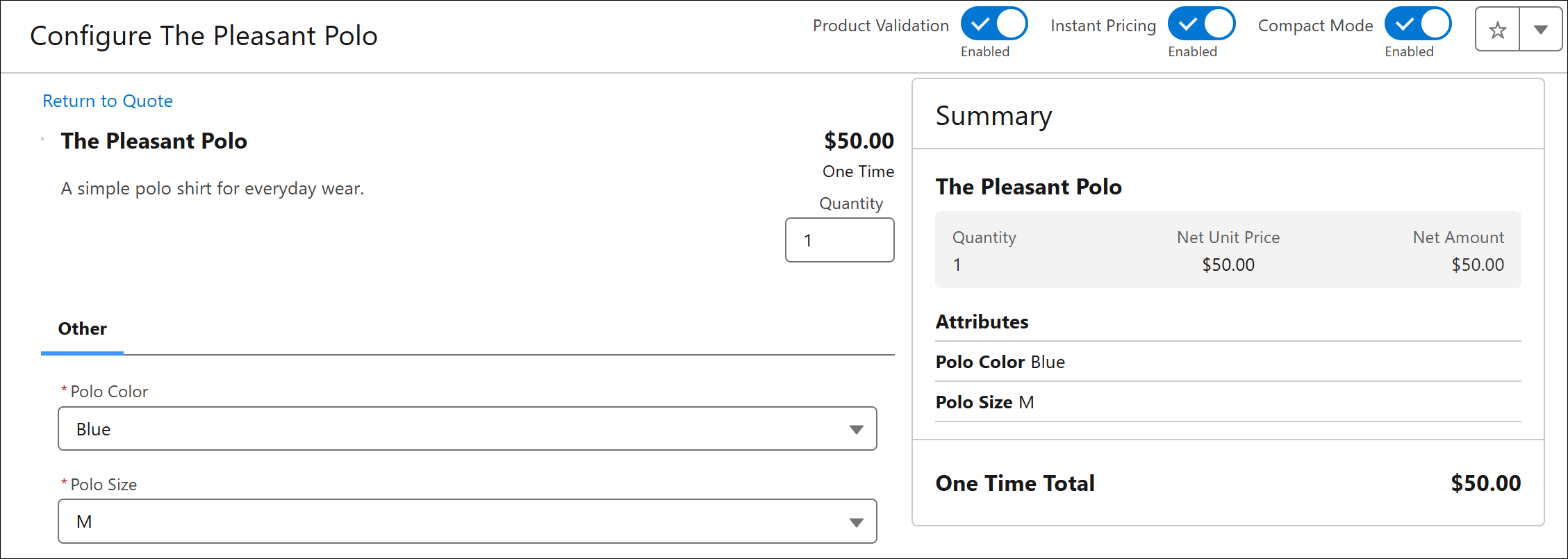
- Polo Color: navy, black, gray, striped, yellow, white
- Polo Size: small, medium, large, extra large
- Product Classification: Polo Attributes
- Contains both Polo Color and Polo Size attributes.
- Product Name: The Pleasant Polo
Here's an example of The Pleasant Polo as it appers for configuration in a quote:
Going further, imagine a large product catalog where you have dozens or even hundreds of color combinations in your clothing catalog. To help organize and manage large attribute lists, use Attribute Categories. For example, you could create an Attribute Category for Shirt Size and another for Shirt Color, that groups all available colors and sizes into categories. This helps product designers manage large lists of attributes.
Example 2: Laptop Packages
In this example, we need several products bundled together. There's the laptop itself and then its accessories, software, and services like an extended warranty and technical support. Here are the elements required to create a product bundle like this in PCM:
- Computer Hardware Catalog
- Categories: Laptops, Desktops, Tablets
- Attributes: Memory, CPU Speed, Storage, Color
- Product Classification: Laptop Attributes
- Products: Travel Laptop, Developer Desktop, Handy Tablet
- Accessories Catalog
- Categories: Keyboards, Pointing Tools, External Monitors, USB Hubs, Webcams
- Attributes: Monitor Size, Monitor Resolution, Connection Type (wireless, bluetooth)
- Product Classification: Monitor Attributes, Connectivity Attributes
- Products: Basic Keyboard, Gaming Keyboard, Basic Mouse, Personal Webcam
- Software Catalog
- Categories: Collaboration, Security, Productivity, Media
- Attributes: License Type (commercial, educational), Operating System (Windows, Linux, MacOS)
- Product Classification: Software Attributes
- Products: Awesome Anti-Virus, Spreadsheets 3.0, Home Video Editor
- Product Support Catalog
- Categories: Warranties, Support Plans
- Attributes: Warranty Period (2-year, 3-year, 5-year), Support Tiers (basic, standard, enterprise, premium)
- Products: Laptop Warranty, Desktop Warranty, Technical Support Add-On
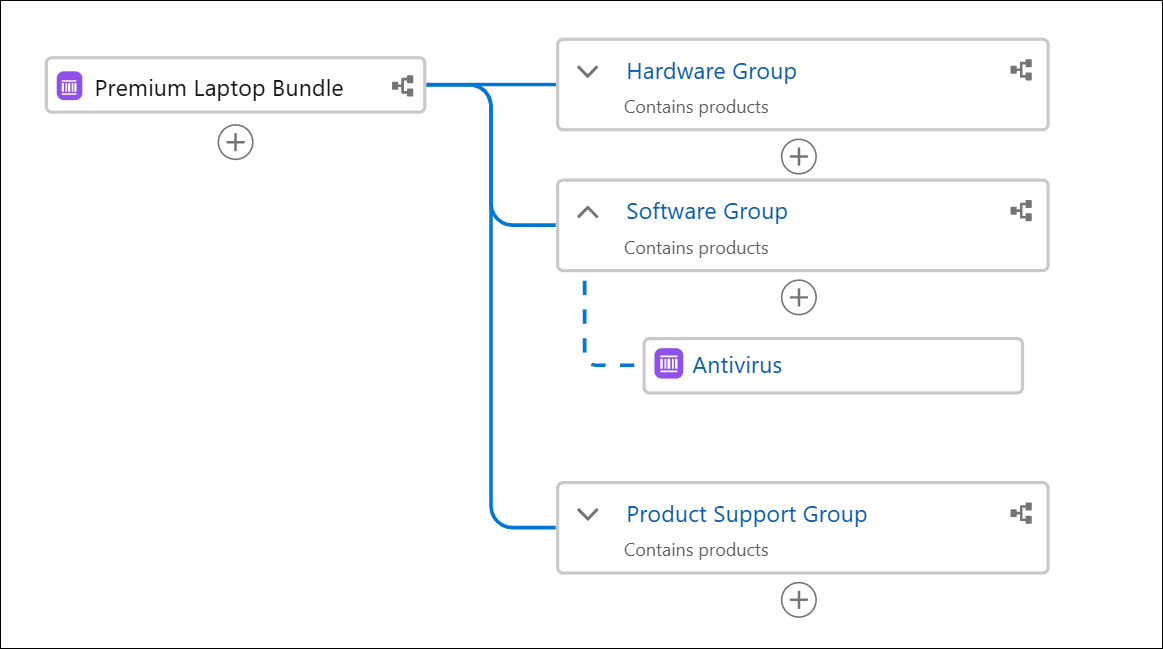
After defining all of these product catalog details, product attributes, and product records, you can assemble the products into bundles. There are many possible combinations we could create. For example, a premium laptop bundle could have this configuration:
- Laptop with 1TB storage, 2.33Ghz processor, and 32GB of RAM.
- Wireless Keyboard and Mouse
- 4K resolution external monitor
- Antivirus software
- 5-year extended warranty with premium support plan
Here's an example of the product bundle structure as it appears in the bundle editor:
Going further, some companies create two kinds of complimentary catalogs: commercial, and technical product catalogs.
The distinction between a commercial and a technical catalog is crucial for bridging the gap between sales and fulfillment. The commercial catalog is what your customers see and interact with – it showcases the finished products or services they can browse and purchase. The technical catalog contains the granular, underlying components and services that are necessary to actually provision and deliver what the customer bought from the commercial catalog. It's the detailed blueprint for order fulfillment, and part of order orchestration.
These distinctions in the product catalogs are handled using Product Specification Types and Product Specification Record Types.
What's Next
As part of your catalog planning process, it's a good idea to get some hands-on experience. In a developer edition or sandbox, build out a sample product catalog using your company's actual products or services as examples. Once you've worked through the process a couple of times, you'll have a better understanding of how to scale up and tackle your entire catalog.
There's even more to discover about Product Catalog Management and related Revenue Cloud features like Salesforce Pricing and Product Discovery. As you're working on your product catalog, explore the rest of Revenue Cloud to understand how your product catalog fits into the bigger picture of your CRM solution.
