
Create Product Templates Using Product Classifications
Product classifications are templates that organize your product catalog and streamline
product creation. Define attributes once, and let subclassifications automatically inherit them,
while still allowing you to manually override attributes as needed. Product classifications help
you maintain data consistency and reduce repetitive manual tasks, allowing you to quickly define
and launch products with shared characteristics.
Product classifications are attribute templates that you can reuse to quickly define and
create products that share similar attributes. These classifications are required to assign
attributes to products. Configure and override the inherited attributes for each product if
necessary. You can also define and manage attribute properties, such as whether an attribute
is required, optional, visible, or hidden.
Product subclassifications helps you organize your product catalog into a hierarchy of up to
three levels, where a parent can have up to five child nodes at a given level.
Subclassifications automatically inherit all attributes from their parent classification,
while still allowing you to manually override attributes as needed. This functionality
streamlines the creation and maintenance of related product classes, ensuring data consistency
and reducing redundant assignments.
Example
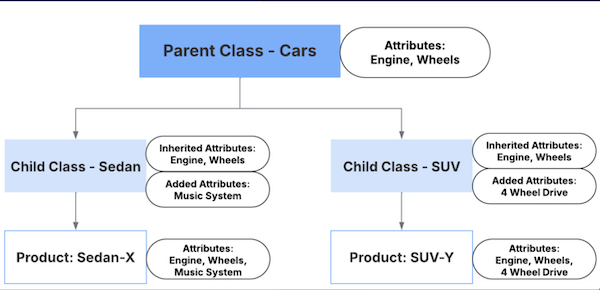
Autz, an automobile company that sells cars and uses product classifications to manage its
catalog. Instead of creating each car model from scratch, Autz establishes a parent
classification called Cars that includes common attributes like Engine and Wheels.
To handle specific vehicle types, Autz then creates subclassifications under the Cars
parent, such as Sedan and SUV.
The Sedan subclassification automatically inherits the Engine and Wheels attributes from
its parent. Autz can also add a unique attribute like Music System to it. When a new
product, like Sedan-X, is associated with this subclassification, it receives all the
attributes: Engine, Wheels, and Music System.
Similarly, the SUV subclassification also inherits the Engine and Wheels attributes from
the parent. Autz can add a unique attribute like 4 Wheel Drive to it. When a new product,
like SUV-Y, is associated with this subclassification, it receives all the attributes:
Engine, Wheels, and 4 Wheel Drive.
This tiered system streamlines the product creation process. It ensures that common
attributes are automatically applied, saving time and ensuring consistency across all car
models.
Create a Product Classification A product classification is a template that you use to create products with similar characteristics. Product classifications are the primary tool for assigning attributes to products.
Create a Product Subclassification Create and manage product classification hierarchies up to three levels deep to enhance the product catalog’s structure. Subclassifications automatically inherit attributes from their parent, simplifying attribute management and reducing redundant work.
Assign Attributes to a Product Classification After you create a Product Classification, assign attributes to it. You can assign individual attributes to a product classification or a collection of attributes through attribute categories.
Include or Exclude Picklist Values in a Product Classification Attribute For product classification attributes of the data type picklist, all the picklist values are included by default. To exclude specific picklist values and ensure they’re unavailable to products at run time, use Include or Exclude Picklist Values. Use the same functionality to include picklist values when your requirements change.
Explore Product Classification with an Example Streamline the creation of a car product template by engineering a product classification hierarchy. Create a parent classification to automatically share attributes with child subclassifications, and curate valid options for specific models to reduce data entry errors.
Did this article solve your issue?
Let us know so we can improve!
Loading
Salesforce Help | Article
Cookie Consent Manager
General Information
Required Cookies
Functional Cookies
Advertising Cookies
General Information
We use three kinds of cookies on our websites: required, functional, and advertising. You can choose whether functional and advertising cookies apply. Click on the different cookie categories to find out more about each category and to change the default settings.
Privacy Statement
Required Cookies
Always Active
Required cookies are necessary for basic website functionality. Some examples include: session cookies needed to transmit the website, authentication cookies, and security cookies.
Functional Cookies
Functional cookies enhance functions, performance, and services on the website. Some examples include: cookies used to analyze site traffic, cookies used for market research, and cookies used to display advertising that is not directed to a particular individual.
Advertising Cookies
Advertising cookies track activity across websites in order to understand a viewer’s interests, and direct them specific marketing. Some examples include: cookies used for remarketing, or interest-based advertising.