
You are here:
Configure Products with Product Configurator
Create complex product configurations with ease by using Product Configurator. Define attributes, variants, and metadata. Test and verify your product configurations with the built-in run-time experience. Your users can use the Product Configurator to easily configure the product options during the purchase process and view the relevant pricing.
Required Editions
| Available in: Lightning Experience |
| Available in: Enterprise, Performance, Unlimited, and Developer Editions of Revenue Cloud with the Revenue Cloud Growth license or the Revenue Cloud Advanced license |
Products are all the items and services that you sell to customers. There are two types of products: simple products and bundled products. Simple products don’t have an associated product hierarchy while bundled products generally have one.
Bundled products are a group of products that are sold together as one unit. A bundled product consists of a parent product and child products. The child products are listed as options in the Product Configurator. The product bundle definition determines the option group that is shown during product configuration.
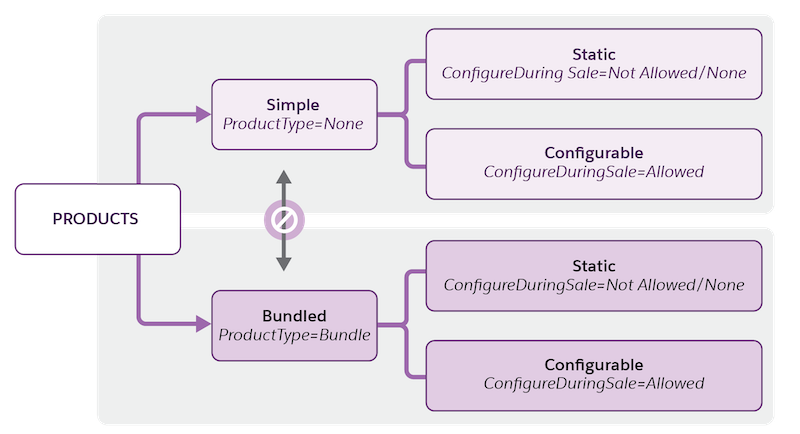
Simple and bundled products are further classified into static or configurable products, depending on whether the products can be configured at run time.
The Type and Configure During Sale fields are available during the creation of product records.
- The Product Type field determines whether the product is a simple product or a bundled product.
- The Configure During Sale field determines whether the product is static or configurable.

Static Simple Product: A 10 GBPS SFP+ transceiver is a single, standalone component with one specification. A customer buys it as-is to plug into a switch.
Simple Configurable Product: A fiber optic patch cable is a single product. However, customers must select a specific length and connector type before adding it to the cart.
Static Product Bundle: A quick-start rack mounting kit is a bundle that always contains the same fixed items: two steel rails, a bag of M6 screws, a cable management arm, and a physical installation guide. There are no choices for the buyer. It’s a pre-packaged set of items sold under one SKU.
Configurable Product Bundle: A next-gen rack server has a chassis comes with a pre-selected motherboard and a base cooling system. Customers must choose the CPU and RAM capacity. They can also add redundant power supplies, an enterprise RAID controller, or an extended 3-year Mission-Critical support tier.
- Configure Simple Products
Configure a simple product to update its quantity and default attribute values. - Configure Bundled Products
Configure a bundled product to update the quantity of products, and view the default options within option groups and the default values of attributes. You can select attributes for the parent bundle and child products. - Get the Latest Pricing
Use Instant Pricing to control the pricing calls made for each configuration change. When you change product selections, the prices shown in the summary component change immediately. - Validate Product Configuration
Product validation rules enhance the performance and address potential errors before saving a configuration. - Save and Reuse Configurations
After you configure simple and bundled products, you can save the configurations and reuse them. You can also edit and delete saved configurations. - Considerations for Configuring Products with Ramp Deals
When sales reps make configuration updates to products within a time-based ramp segment, the configurations in subsequent ramp segments are also impacted.
