
You are here:
Understand What’s Included with Public Sector Solutions
Discover how the Salesforce platform, a dedicated data model, and a layer of common components help you to implement a solution that meets your agencies' needs.
Required Editions
| View supported product editions. |
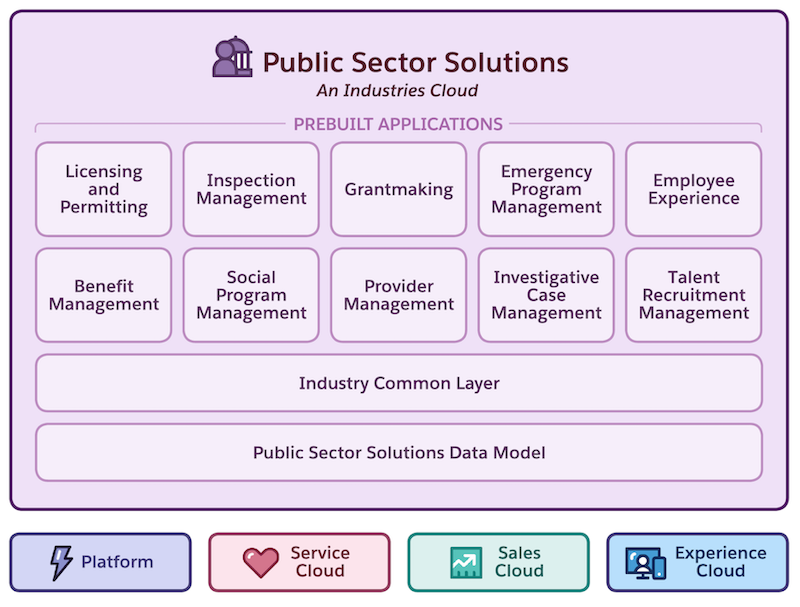
Whether you're implementing Public Sector Solutions for a municipality, state or province, or at the federal or national level, every public agency has different requirements for serving constituents with digital tools and workflows. That's why Public Sector Solutions eschews a one-size-fits-all approach. Instead, with Public Sector Solutions, you can combine a variety of components and tools to create a solution that addresses your specific needs.
The Salesforce Platform
The cloud-based Salesforce platform, which includes Sales Cloud, Service Cloud, and Experience Cloud, is the foundation of Public Sector Solutions and is included with the product. The platform provides relationship management, case management, collaboration, integration, and data insight capabilities that give you a 360-degree view of constituents so that you can serve, manage, and interact with them more effectively. And it adheres to stringent data security regulations, so you can deploy and scale it quickly, with the flexibility to expand your implementation when and how you want to.
The Data Model
The Public Sector Solutions data model is tailor-made for government agencies. Objects in the data model let you define regulatory agencies, authorization types, and codes; represent constituents as business or person accounts; create entities for visits, complaints, and violations; and much more. Whether you use Public Sector Solutions to issue licenses and permits, conduct inspections and assessments, or manage and disburse social services programs and benefits—or to do all of those things—the Public Sector Solutions data model accommodates your work.
Industry Common Layer
A suite of no-code and low-code components and tools puts the platform and data model to work. Omnistudio, Action Plans, Document Tracking and Approvals, Omnistudio Document Generation, Business Rules Engine, and other components and tools help you to automate traditionally paper-based and cumbersome processes. Use common layer components to create dynamic forms that constituents can access from a public portal, review and approve applications, calculate complex policy decisions, and much more.
The Prebuilt Apps
All of these elements roll up into several prebuilt applications. Each prebuilt app combines specific elements of the platform, the data model, the industry common layer, and automation to serve a different need.
- License and Permit Management
- Publish dynamic forms on a public portal, where constituents can easily submit and track applications for individual and business licenses and permits. Review and approve applications using automated processes that ensure integrity and consistency across the workflow.
- Inspection Management
- Conduct and manage inspections and assessments to ensure routine regulatory compliance, issue licenses and permits, and address public complaints.
- Social Program Management
- Provide timely assistance to individuals and families facing hardship with programs and goals. Assess complaints and referrals and perform investigations to better understand the situation. Intake and screen cases, and develop individualized, comprehensive care plans to help constituents reach positive outcomes.
- Benefit Management
- Accelerate benefit assistance to individuals and families. Configure an online web page for your agency to help constituents find relevant benefits. Include a pre-screening form to help potential applicants find benefit programs they may be eligible for based on defined criteria. Create online application forms so that constituents can apply for benefits through the online portal, and provide visibility into application statuses, eligibility decisions, and disbursement amounts and frequencies.
- Provider Management
- Manage networks of service providers and map them to the benefits that your agency manages for streamlined constituent referral. Set up schedules and sessions for each provider facility and track service delivery and constituent participation.
- Investigative Case Management
- Manage your investigative process from case creation to its resolution from the Investigative Case Management console app. Provide investigators and caseworkers a single interface to quickly understand a case and manage critical case data that includes related complaints, case participants, evidence, and violation details.
- Talent Recruitment Management
- Manage talent recruitment and hiring activities from position creation to rolling out employment offers. Publish job postings on a public site so that job seekers can search and apply for jobs. Offer an employee site for hiring managers to review and approve requisitions and job postings, and for interviewers to assess applicants.
- Grantmaking
- Track, manage, and disburse grants across the entire funding lifecycle, with effective collaboration among staff, applicants, and program managers.
- Emergency Program Management
- Quickly prioritize and mobilize resources during a crisis, provide real-time status updates, create and process applications for emergency services, and manage volunteers using your public portal.
- Employee Experience
- Streamline HR and IT processes with digital forms, create automated processes for service requests, and provide self-service resources for employees in a unified, and scalable workspace.
Implementation and Add-Ons
When you buy Public Sector Solutions, you choose from a variety of configuration options that include one or more prebuilt apps. The configurations grant licenses to use the apps or a combination of apps, on different Salesforce editions and with various usage limits. The configurations also provide differing levels of Service Cloud functionality. You can also choose a Customer Community licensing plan to accommodate the type and volume of usage you need for your public portal.
Round out your Public Sector Solutions implementation with add-ons. Combine various configurations and add-ons to get exactly the functionality you need to serve your constituents effectively, securely, and at scale. Public Sector Solutions add-ons include:
- Agentforce for Public Sector: Provides AI capabilities. Available in Enterprise, Performance, and Unlimited editions.
- Employee Experience for Public Sector: Provides access to Employee Service and Public Sector Solutions functionalities for employees. Available in all editions.
- Salesforce Shield: Provides enhanced security features to help you protect sensitive data. Available in all editions.
To see the licenses in your org, from Setup, in the Quick Find box, search for and then select Company Information. Look at the User Licenses and Permission Set Licenses related lists. To add licenses, contact your Salesforce account executive.

