
You are here:
Talent Recruitment Management in Public Sector Solutions
Transform your recruitment and hiring process to make it more intuitive, transparent, and efficient. Provide your recruiters and HR specialists with a console app, tools, and workflows to manage activities from position creation to rolling out employment offers. Offer job seekers an engaging career site where they can discover and quickly apply for jobs that interest them. Give hiring managers and interviewers a user-friendly employee site to easily evaluate applicants and collaborate with the recruiters.
Required Editions
| View supported product editions. |
Here’s how Talent Recruitment Management streamlines the recruitment workflow for all
stakeholders.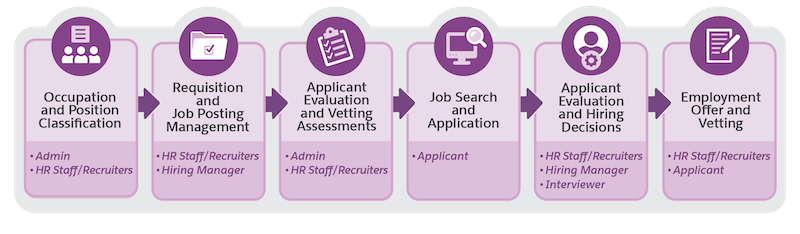
| Stage | Description |
|---|---|
| Occupation and Position Classification | With the Talent Recruitment Management data model, HR staff can define and group occupations, classify positions and pay grades, and add job positions based on your workforce needs. Admin can help import the data in bulk. |
| Requisition and Job Posting Management | Recruiters can work with hiring managers to create requisitions, which are formal requests to fill specific job positions. Additionally, recruiters draft and publish job postings on your career site. Admins can set up approval processes to streamline requisition and job posting reviews. |
| Assessments for Applicant Evaluation and Vetting | Recruiters and the hiring team can identify assessment criteria to evaluate and vet applicants. With Dynamic Assessments, admin can build action plan templates to make it easy for recruiters to create assessment tasks. These tasks enable the hiring team to provide feedback on applicants through interviews, panel evaluations, and other assessments. Additionally, recruiters can create assessment tasks to administer vetting procedures, such as investigations and evaluations, to determine applicants' suitability, fit, and eligibility. |
| Job Search and Application | On your career site, job seekers can search for jobs that interest them. They can use a guided application process to quickly complete their job application, and then track their application status. |
| Applicant Evaluation and Hiring Decisions | On your employee site, hiring managers and interviewers can evaluate applicants and provide their feedback in the assessments that recruiters share with them. Recruiters and hiring managers can then use the feedback to make informed hiring decisions. |
| Employment Offer and Vetting | HR specialists can create tentative employment offers for the selected applicants, and work with the applicants and vetting agencies to complete the vetting assessments. HR specialists can then roll out the final offer to the applicants who clear the vetting assessments. |
Agentforce for Talent Recruitment Management
Use an Agentforce agent to help recruiters quickly find and engage with qualified candidates. The agent instantly filters past applications, shortlists suitable candidates, and sends personalized emails to reduce time to hire. Also, recruiters can use an agent for application screening. The agent can summarize application forms and share them with hiring managers, helping recruiters quickly evaluate applicants.
For more information, see Candidate Sourcing with Agentforce and Application Screening with Agentforce.
- Talent Recruitment Management Prerequisites
Before you set up Talent Recruitment Management in Public Sector Solutions, complete the prerequisites. With Salesforce Go, you can set up and configure Talent Recruitment Management from one streamlined setup location. - Manage Users for Talent Recruitment Management
Create the required roles, profiles, and user records for recruiters and HR specialists, hiring managers, and interviewers. Give users the permissions they need to complete their recruiting and hiring tasks. - Customize the Person Account Page to Show Employee Information
Add the Employee Profile Card and Employee Details components to the Person Account record page. These components provide your HR specialists quick access to employee information. - Set Up Compliant Data Sharing for Talent Recruitment Management
Configure compliant data sharing for the Application Form, Application Form Evaluation, and Recruitment Requisition objects to control user access to their records. - Build an Employee Site for Talent Recruitment Management in Public Sector Solutions
Offer your hiring managers and interviewers a user-friendly interface that simplifies the hiring and evaluation process and empowers them to concentrate on securing top talent. Create an Experience Cloud site where hiring managers can easily work with recruiters to review and approve requisitions and job postings; and hiring managers and interviewers can assess the applicants that they’re assigned. - Build a Career Site for Talent Recruitment Management in Public Sector Solutions
Help job seekers learn about your organization, career opportunities, and the work environment. Enable them to search and apply for jobs that match their preferences, and track their job applications. - Set Up Search Experiences for Recruiters and Job Seekers
On the Talent Recruitment Management app, enable recruiters to search for job applications that match specific hiring criteria. And on your career site, enable job seekers to search for job postings that match their preferences. Design the search experiences by using the Criteria-Based Search and Filter framework in Public Sector Solutions. - Overview of Applicant Profile Guided Flow
On your career site, give job seekers a guided flow to create and maintain their applicant profile. Use the profiles to personalize job recommendations, build your talent pool, and identify potential candidates for job openings. When job seekers apply for a job, prefill the applications with information from their profile to eliminate repeated data entry and ensure a smooth and easy application process. - Overview of Job Application Guided Flow
Give job seekers a guided flow to provide their personal, educational, and work experience details, upload supporting documents, and submit their job application. If someone previously applied with your organization or created a profile, prefill their information so that they can quickly review and update details, and complete their job application. - Multi-Section Job Applications
Make your application process more flexible, organized, and user-friendly by adding sections to your job applications. Build your job applications with Talent Recruitment Management and Form Framework. - Set Up the Create Recruitment Posting Guided Flow
Give recruiters a guided flow to quickly create recruitment postings for approved requisitions. Recruiters can specify whether the posting is for internal or external use, and the portal where they want to publish it. And create the content to be included in the posting or reuse previously created content. - Set Up Approval Processes for Talent Recruitment Management
Configure sequences of automated steps and actions to streamline approvals of recruitment requisitions and job postings. - Overview of Application Summary and Review Panes
Recruiters, hiring managers, and interviewers can quickly look at the key details from a job application on the application summary pane. Recruiters, hiring managers, interviewers, and applicants can use the application review pane to check all the information and supporting documents in a job application. - Overview of Screen Flows for Managing Employees
Your HR specialists can use screen flows to create and update employee records. - Define Assessments for Talent Recruitment Management
Collaborate with recruiters and the hiring team to develop a comprehensive database of assessments that enables hiring managers and interviewers in applicant evaluations and supports recruiters in vetting evaluations. - Classify Occupations and Positions
Use the Talent Recruitment Management data model to streamline how you classify occupations and positions in your organization. For a position, specify the competency and qualification requirements to efficiently identify the qualified candidates and ensure compliance. - Manage Requisitions and Job Postings
Work with hiring managers to create requisitions and job postings for vacancies in your organization. - Search and Apply for Jobs
On the career site, find jobs that match your preferences. Review hiring requirements and responsibilities in job postings, and apply to the jobs that interest you. - Screen and Evaluate Applicants
Identify job applications that meet the screening criteria. Create assessment tasks for interviewers and the hiring manager to evaluate the applicant. Review interviewers' feedback with the hiring manager and make a hiring decision. - Make Employment Offers and Vet Applicants
Create tentative employment offers and conduct vetting evaluations for selected applicants. Confirm offers for applicants who clear the vetting evaluations. - Create an Employee Record
To onboard a new hire, create an employee record for them. - Create an Employment Record for an Employee
Capture the employment details of an employee in your organization. For example, their employment start date, status, and schedule type.
