Divide Subscription Transactions into Segments with Ramp Deals for Lines
With ramp deals for lines in quotes and orders, show a subscription-based product as a
single transaction line such as a quote line item divided into segments.
Required Editions
Available in: Lightning Experience
Available in: Enterprise, Unlimited, and Developer Editions of
Revenue Cloud where Transaction Management is enabled
Each segment can vary in price, quantity, and discount over different time periods. Your
sales reps can use ramp deals to capture their customer’s evolving needs over time within a
single transaction. With greater flexibility in the pricing strategy, they can maintain
long-term relationships with their customers, and help your business grow with predictable
profits.
You can create ramp segments over the transaction line’s subscription term and segment type.
The subscription term defines the duration of the transaction line and the segment type is
applied on the subscription term. The segment type for a ramp deal is Yearly, Custom, or
Trial.
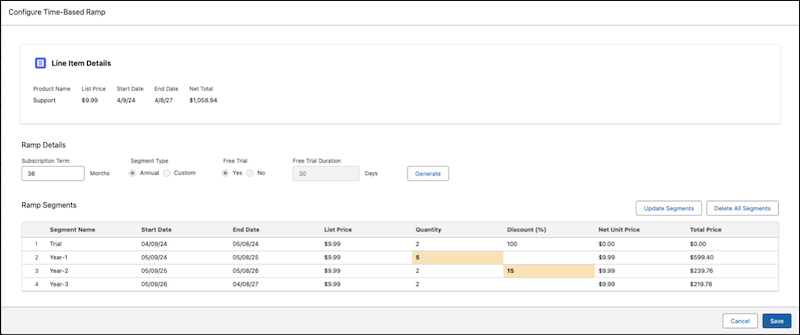
For example, let’s consider a transaction line with a subscription term of 36 months, an
Annual segment type, and a free trial of 30 days. This setup generates four segments: one for
each year and one for the trial. Each segment can have its own quantity and discount.
Segments created for a transaction line appear on the transaction line's related list. To
view or modify these segments, open the Ramp Deal window from the transaction line. After you
save the segments, the total price of the transaction line is shown on the Line Item Details
tab. If Instant Pricing is off, you can view the updated prices in the Transaction Line Editor
component.
Configure Ramp Segments in Ramp Deals for Lines Divide a transaction line such as a quote line item or an order product into multiple ramp segments, each with its own unique price and quantity over different time periods.
Did this article solve your issue?
Let us know so we can improve!
Loading
Salesforce Help | Article
Cookie Consent Manager
General Information
Required Cookies
Functional Cookies
Advertising Cookies
General Information
We use three kinds of cookies on our websites: required, functional, and advertising. You can choose whether functional and advertising cookies apply. Click on the different cookie categories to find out more about each category and to change the default settings.
Privacy Statement
Required Cookies
Always Active
Required cookies are necessary for basic website functionality. Some examples include: session cookies needed to transmit the website, authentication cookies, and security cookies.
Functional Cookies
Functional cookies enhance functions, performance, and services on the website. Some examples include: cookies used to analyze site traffic, cookies used for market research, and cookies used to display advertising that is not directed to a particular individual.
Advertising Cookies
Advertising cookies track activity across websites in order to understand a viewer’s interests, and direct them specific marketing. Some examples include: cookies used for remarketing, or interest-based advertising.