
You are here:
Ramp Deals in Revenue Cloud
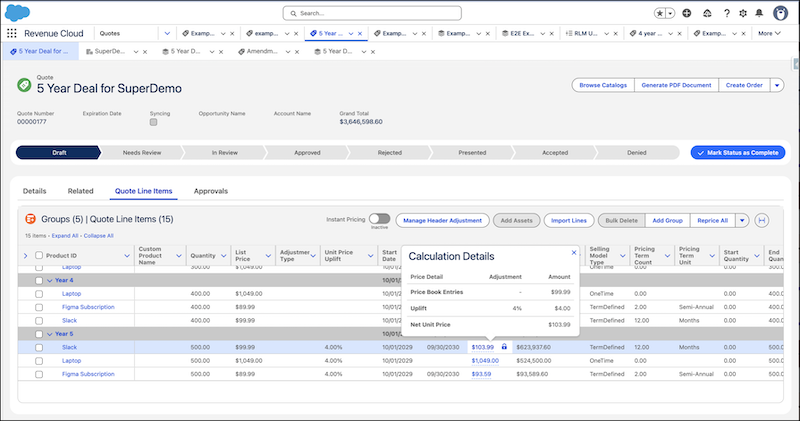
Use ramp deals for groups to break down a long-term deal into smaller time-based segments, each with different products, quantities, discounts, and price uplifts. Ramp deals for groups make it easier to secure long-term commitments and provide customers with clear, upfront pricing for all terms.
Required Editions
| Available in: Lightning Experience |
| Available in: Enterprise, Unlimited, and Developer Editions of Revenue Cloud where Transaction Management is enabled |
Creating a ramp deal for a group converts the group into a group ramp segment and creates a group ramp schedule. You can clone segments to easily copy the lines from one segment to the next and then configure the products based on your requirements.
For each segment, Transaction Management automatically sets the start and end dates of the lines to align with the segment dates.

If necessary, add discounts and price uplifts, providing clear pricing for long-term deals. Salesforce Pricing immediately applies price uplifts and discounts, and then shows the updated prices for lines in each segment.

After a transaction is completed and an order is assetized, Transaction Management creates a single asset for all the related line items of a ramped product across groups. This simplifies asset management, amendments, renewals, and cancellations.
- Set Up Ramp Deals for Groups in Revenue Cloud
To make it easier for sales reps to break down complex, long-term deals for multiple products into smaller, time-based segments, turn on Ramp Deals for Groups in Quotes and Orders. So users can create multiple ramp schedules with different segment types and dates in a single transaction, turn on Multiple Ramp Schedules Per Transaction. - /apex/HTViewHelpDoc?id=ind.Chunk1817816782.htm#qocal_ramp_deals_for_groups_transition
- Considerations for Creating Ramp Deals for Groups in Quotes and Orders
To effectively use Ramp Deals for Groups, familiarize yourself with its product, structural, and functional aspects and limits. - Create a Ramp Deal for Groups with Single Ramp Schedule Per Transaction
If your admin turned on only the Ramp Deals for Groups in Quotes and Orders setting and not the Multiple Ramp Schedules Per Transaction setting, use the Is Ramped setting to create a ramp deal for a group. When you turn on the Is Ramped setting, Transaction Management creates a group ramp schedule and converts the group into the first segment in the schedule. Clone the segments to create the ramp deal structure. Next, add products to segments. Then, edit the lines to change quantity, discounts, and configurations. - Create Ramp Deals for Groups with Multiple Ramp Schedules Per Transaction
If your admin turned on the Multiple Ramp Schedules Per Transaction setting, create a ramp schedule for each ramp deal. To create one, create a group ramp schedule and then add group ramp segments to it. Next, add products to the segments. Then, edit the lines to change quantity, discounts, and configurations. - Actions for Managing a Ramp Deal for Groups
After you create a group ramp schedule, perform these actions to manage segments and lines. - Basic Example of Ramp Deals for Groups in Revenue Cloud
Let’s see how sales reps can structure a simple, multiyear deal with phased rollouts, segment-specific pricing, and consolidated assets. - Advanced Example of Ramp Deals for Groups in Revenue Cloud
Let’s see an example of adding products to specific segments, dynamic configuration, varying rates, and asset management. - Divide Subscription Transactions into Segments with Ramp Deals for Lines
With ramp deals for lines in quotes and orders, show a subscription-based product as a single transaction line such as a quote line item divided into segments.
