Apply renewal price uplifts to subscriptions, including adjustments based on the
Consumer Price Index (CPI). Sales reps negotiate renewal price uplifts during the initial sale and
modify uplift percentages on assets and line items during renewals to ensure accurate pricing and
maintain data integrity.
Required Editions
Available in: Lightning Experience
Available in: Enterprise, Unlimited, and Developer Editions of
Revenue Cloud where Transaction Management is enabled
User Permissions Needed
To create price uplifts:
Manage Revenue Cloud
AND
Create Orders from Quotes
AND
Renew
Assets
AND
Sales Rep permission group
Important Review these requirements before applying uplifts to your records.
Renewal price uplifts apply only to products with a term-defined product selling
model.
The pricing procedure includes the uplift as a calculation by using the Formula-Based
Pricing element.
Ensure accurate pricing by applying uplifts after discounts when you use Last Transaction
Pricing.
Set the asset's Pricing Source to Last Transaction Pricing before
adding the asset to a new quote or order and selecting an uplift percentage.
Modify uplift percentages on items and verify the results on the generated renewal
record.
Specify the uplift percentage for the unit price in a quote line item or an order
item.
Save your changes.
Select Create Order and activate the order to assetize it.
Review the asset to verify the applied unit price uplift.
Generating a renewal quote applies the negotiated price uplift.
Create and activate a new order from the renewal quote that includes the unit price uplift.
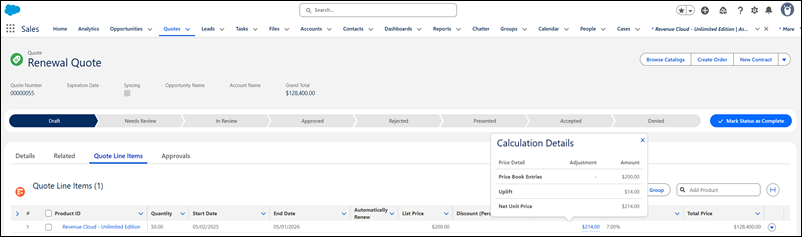
View unit price uplift details in the waterfall by hovering over the Net Unit Price field.
CPI and Renewal Price Uplift Considerations
Familiarize yourself with the supported product types, field behaviors, and system logic
for applying Consumer Price Index (CPI) and renewal price uplifts. Understanding these constraints
ensures accurate pricing calculations during asset renewal and helps you determine where uplift
data appears in the price waterfall.
Product and Field Support
Review these functional limitations for price
uplifts to ensure your products and quote lines support the feature.
CPI renewal price uplifts apply only to termed assets.
One-time and evergreen assets don’t support price uplifts.
Usage-based products don’t support price uplifts.
Derived pricing products don't support price uplifts.
Ramped quote line items and order line items don’t support the Price Uplift field.
System Behavior and Pricing Logic
Understand how the system processes uplift data during the renewal phase.
Renewal uplift percent appears in the price waterfall.
If the asset pricing source is list price, the system ignores the uplift field and doesn’t
uplift the price at renewal time.
Did this article solve your issue?
Let us know so we can improve!
Loading
Salesforce Help | Article
Cookie Consent Manager
General Information
Required Cookies
Functional Cookies
Advertising Cookies
General Information
We use three kinds of cookies on our websites: required, functional, and advertising. You can choose whether functional and advertising cookies apply. Click on the different cookie categories to find out more about each category and to change the default settings.
Privacy Statement
Required Cookies
Always Active
Required cookies are necessary for basic website functionality. Some examples include: session cookies needed to transmit the website, authentication cookies, and security cookies.
Functional Cookies
Functional cookies enhance functions, performance, and services on the website. Some examples include: cookies used to analyze site traffic, cookies used for market research, and cookies used to display advertising that is not directed to a particular individual.
Advertising Cookies
Advertising cookies track activity across websites in order to understand a viewer’s interests, and direct them specific marketing. Some examples include: cookies used for remarketing, or interest-based advertising.