
You are here:
Service Process Studio
Service Process Studio helps you design seamless customer service processes quickly and efficiently. Service agents can launch these service processes to get started with their customer service operations.
Required Editions
| Available in: Lightning Experience |
| Available in: all editions with the Industry Service Excellence licenses |
Watch this video to learn how to streamline customer service operations with Service Process Studio.
If you aren’t able to watch the view in full screen, open the video on a new tab:
 Streamline Customer Service Operations with Service Process
Studio.
Streamline Customer Service Operations with Service Process
Studio.
Use Service Process Studio to create a service process definition to configure and organize multiple actions or tasks required to design the request intake and fulfill the request. A service process definition consists of data attributes, request form, business logic, fulfillment flow, and integration definition details.
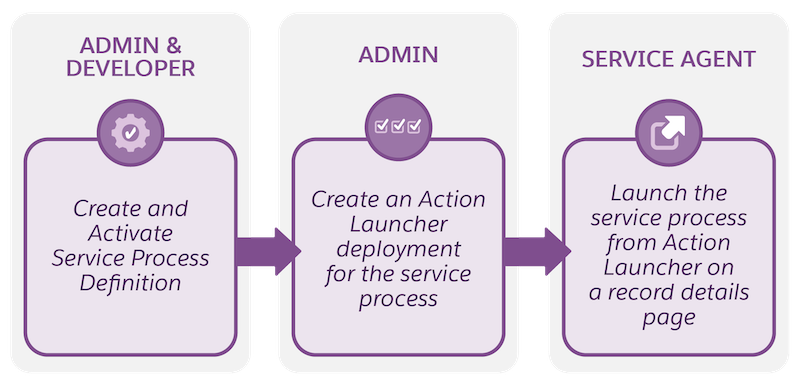
After you activate a service process definition, you can associate an Action Launcher deployment for this service process, and service agents can launch this process from the Action Launcher component on a record details page.
Before you create and activate service process definitions, understand the end-to-end workflow and the key steps involved.
- Service Process Studio Permissions
Review the required permissions for Service Process Studio and learn how to assign them. - Explore Service Process Studio
Get to know the Service Process Studio before you work with it. - Service Process Studio Basics
Use Service Process Studio to create a service process definition from end to end. The Service Process Studio is a setup framework that helps you to create service process definitions seamlessly. The studio takes you through a set of steps starting from providing the basic details to associating a fulfillment flow. - Create and Activate Service Process Definitions
Create a service process definition in the Service Process Studio and activate it so that service agents can launch it through the Action Launcher component on a record details page. - Clone Service Process Definitions
Clone existing service process definitions to customize them to meet your business needs. A cloned service process definition retains all the data attributes of the original definition. - Associate a Request Form to an Action Launcher Deployment
After activating a service process definition, link a request form (Omniscript or screen flow) associated with the service process definition to one of the Action Launcher deployments. Agents can search for and launch this Omniscript or screen flow from a record details page using the Action Launcher component. - Launch Service Processes with Action Launcher
Service agents can launch service processes created in the Service Process Studio using Action Launcher from a record details page. - Add the Case Details Lightning Component to the Case Record Page
To show your agents all the data attributes associated with a service process request for a case, add the Case Details Lightning component to the case record page. - Eligibility Rules and Access Control for Service Processes
Integrate Service Process Studio with Product Catalog Management to enable controlled access for service processes. Configure customer eligibility rules and user access control for service processes so that your users and customers see only the relevant service processes in the Action Launcher.
