
You are here:
Draft Clauses in Microsoft 365 Word Add-In with Contracts AI
Use Contracts AI to draft legal clauses in the Microsoft 365 editor based on input parameters or user queries. Insert drafted clauses into document templates and contract documents, and add reusable clauses to the clause library.
| REQUIRED EDITIONS |
|---|
| Available in: Lightning Experience |
| Available in: Enterprise, Unlimited, Professional, and Developer Editions |
| USER PERMISSIONS NEEDED | |
|---|---|
| To create and edit document clauses | Contracts AI Clause Designer AND Contracts AI User AND Prompt Template User AND NLP Service AND Scoring Framework Admin |
| To edit in Microsoft 365 editor | Microsoft 365 Word Designer |
| To view clauses from the contract record | Clause User AND CLM Runtime User |
- From the contract record page, open a contract in the Microsoft 365 editor.
- Click the Salesforce Contracts Connector for Word add-in on the Home tab.
-
Draft a clause with Contracts AI.
- From the Insert New dropdown, select Draft with Contracts AI.
- When you open Contracts AI, a disclaimer message for Einstein appears. Click Got it.
- You can enter a clause description to draft clauses or use Suggest More to draft clauses using parameters.
- After you’re satisfied with the drafted clause, click + to add the clause as a draft. The selected clause moves to the clause draft state. This action doesn’t add the clauses to the clause library.
-
To add the clause to the Microsoft 365 document, click Insert Clause.
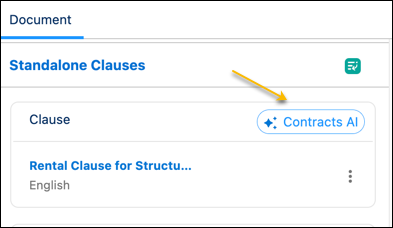 The label Contracts AI is associated with the clauses drafted using generative AI.
See Also
Did this article solve your issue?
Let us know so we can improve!
