
You are here:
Electronic Signature Configuration
Using the Electronic Signature Configuration setup, the system admin must define the required configurations to support the e-signature APIs and UI.
The settings include configurations such as enabling the e-signature vendor DocuSign, location in the document for signing and adding the required values to support multiple signers.

Note In Spring ‘23 release, Salesforce only supports DocuSign.
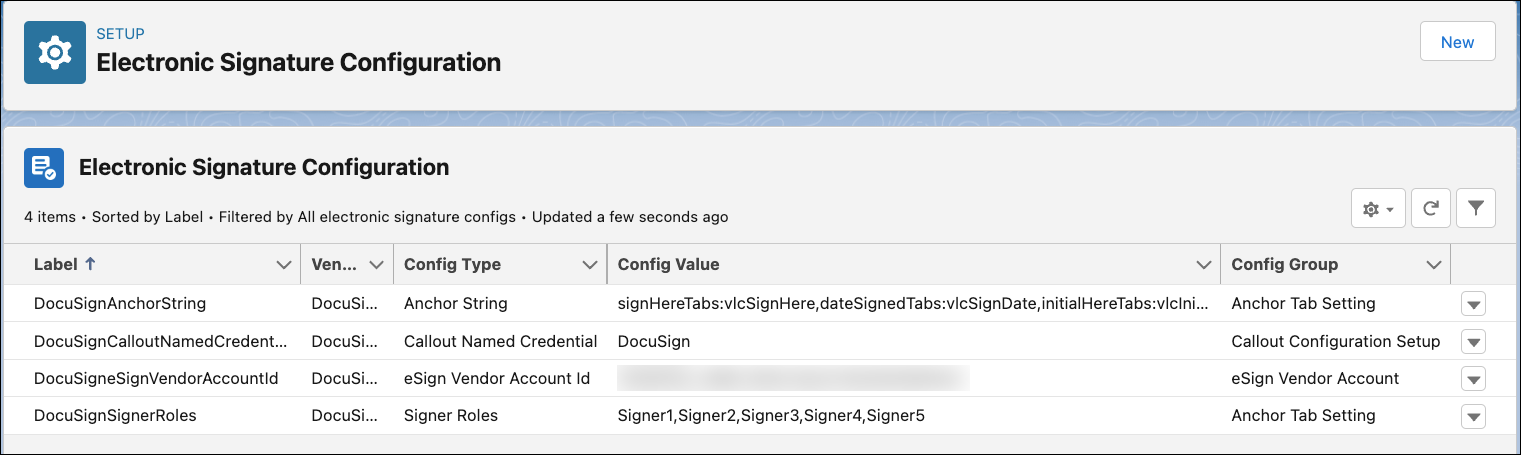
- Create Electronic Signature Configuration
The system admin must create and define four mandatory config type settings for the electronic signature configuration. It includes anchor string, signer roles, callout named credential, and eSign vendor account id. - List of Electronic Signature Configurations
The system admin must create and define four mandatory config type settings for the electronic signature configuration. It includes anchor string, signer roles, callout named credential, and eSign vendor account id. - Edit Electronic Signature Configurations
You can edit the config type settings for the electronic signature configuration such as anchor string, signer roles, callout named credential, and eSign vendor account id.
Did this article solve your issue?
Let us know so we can improve!
