
You are here:
Service Process Studio Fulfillment Flows
A fulfillment flow represents the automation of the tasks required to complete a service process request after the case is created.
Required Editions
| Available in: Lightning Experience |
| Available in: all editions with the Industry Service Excellence licenses |
Creating a fulfillment flow is optional. If an external or back-office system doesn’t want to automate the tasks required to fulfill a service process request, then the Case management capabilities can be leveraged to route a case manually to fulfill it.
However, if an external or back-office system wants to automate the tasks required to fulfill a service process request, Salesforce recommends you to use record-triggered flows to design a fulfillment flow.
You can use one of these flow types according to the complexity of a fulfillment flow:
- Record-Triggered Flow: Use this flow type for a simple straight-through service process request. For example, for blocking a credit card service process request, after the case is created, the record-triggered flow is invoked, which gets the details from the Case, and the Service Catalog Request base and extended attributes and then calls an external API to send the information to a banking system, and closes the case.
- Record-Triggered Orchestration Flow: Use this flow type if the service process is complex
and requires multi-stage, multi-user, cross department collaboration. These are appropriate
uses for this flow type:
- Model complex workflows into work items.
- Coordinate step-by-step activities.
- Show team members where handoffs occur.
- Support parallel workstreams.
- Combine both automated actions and manual work items.
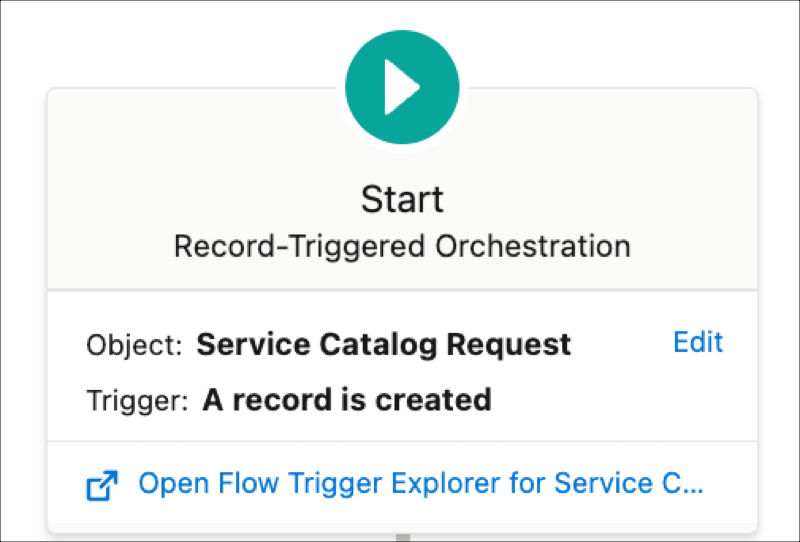
Set the trigger condition in a record-triggered flow such that it’s invoked when a case is created for a service process request and a Service Catalog Request record is created as shown in this example:
Learn more about Flow Orchestration in Salesforce Help.
Significance of Associating a Fulfillment Flow with a Service Process Definition in the Service Process Studio
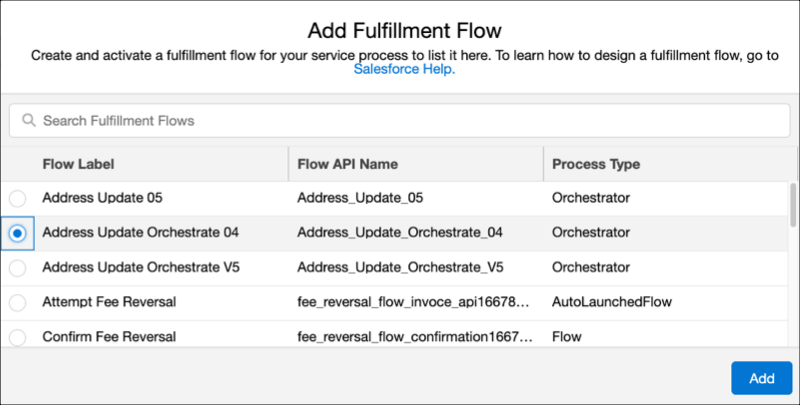
You can associate the fulfillment flow that you plan to use for a service process request. When creating a service process definition in the Service Process Studio, add the fulfillment flow as shown in this example. Associating a fulfillment flow with the service process definition ensures easy migration. When you plan to migrate Service Process Definitions across the org, the associated fulfillment flows are also migrated making the post migration process easy.
Fulfillment Flows that Need Integration with External Systems
If a fulfillment flow requires Salesforce org to connect to an external API to send details to an external system such as a banking system or healthcare system, or any other line-of-business systems, use the Data Consumption Framework, which is scalable and can integrate with external systems easily and quickly. For more information, see Data Consumption Framework.
Example: Address Update Service Request Fulfillment Flow
The following example illustrates a fulfillment flow created using the flow orchestrator for an address update service process request. The address update service process request is a multistage process containing both manual steps and automated actions. The flow orchestrator can manage these complexities with ease.
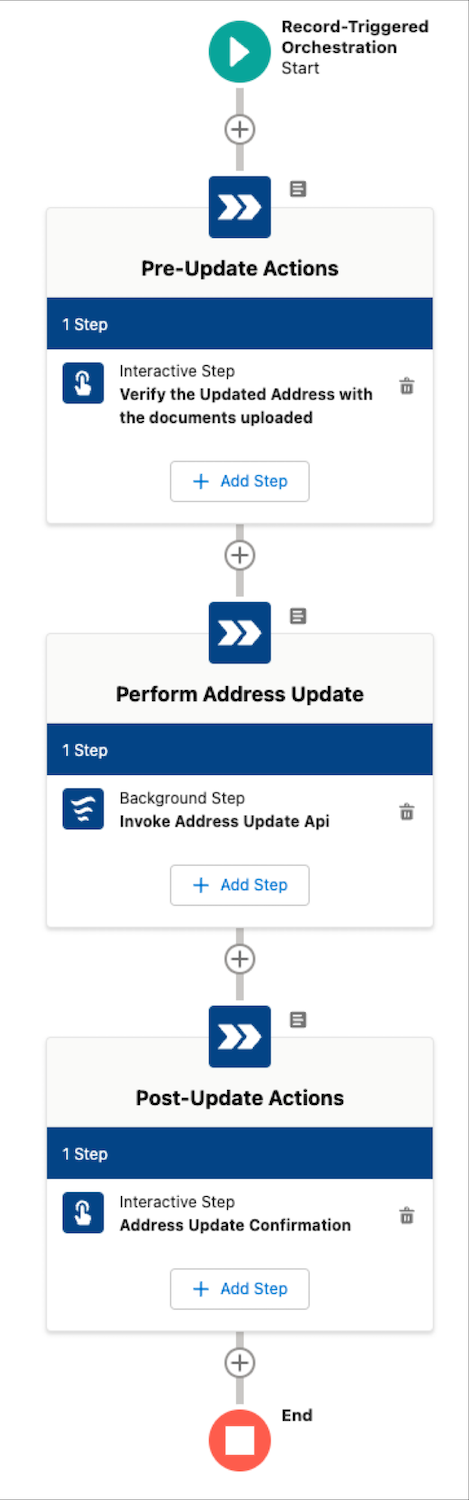
This flow is performs the following actions:
- The flow is triggered as soon as the case is created for a service process request and a corresponding Service Catalog Request record is created.
- The first step is an interactive step that has a work item, which shows the details for the back-office agent to verify the address proof documents that are uploaded.
- After the manual work item action is completed, the flow orchestrator proceeds to the next step, which is a flow that runs in the background.
- The background flow calls the external API using the Data Consumption Framework to update the external banking system.
- After receiving the acknowledgment from the external banking system, the flow updates the Salesforce records, and closes the case created for this service process request.
