Use Service Process Studio to create a service process definition from end to end. The
Service Process Studio is a setup framework that helps you to create service process
definitions seamlessly. The studio takes you through a set of steps starting from providing
the basic details to associating a fulfillment flow.
Required Editions
Available in: Lightning Experience
Available in:
all
editions with the
Industry Service Excellence licenses
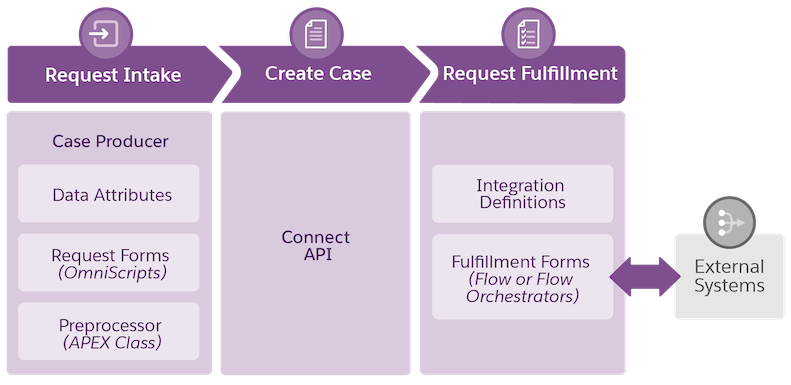
The following illustration helps you to understand the service process workflow and how each
of the building blocks of the Service Process Studio helps to design this workflow. Data
attributes, Omniscripts, screen flows, and preprocessors help you to design a streamlined
request intake process, and Flow or Flow Orchestrator, and Integration Definition help you to
design a fulfillment flow.
You can also use the Connect API to create a case from any third-party request intake
process. For example, if you have an established banking application that has its own request
intake process, the Connect API can be triggered from this request intake application. The
Connect API creates a case record, which is used to manage the lifecycle of a service process
request.
Service Process Studio Data Attributes Data attributes store information that a customer provides and later make it available for use in service processes.
Service Process Studio Request Forms A request form is an intake form that helps service agents to gather information from customers easily. Create a request form and associate it with a service process definition. Service agents can launch this request form from the Action Launcher component and get started with customer service operations quickly and efficiently.
Service Process Studio Preprocessors A preprocessor represents business logic that must be run before creating a case for a service process request. For example, business logic for a checkbook request rejects a new request if there's an active request pending.
Service Process Studio Fulfillment Flows A fulfillment flow represents the automation of the tasks required to complete a service process request after the case is created.
We use three kinds of cookies on our websites: required, functional, and advertising. You can choose whether functional and advertising cookies apply. Click on the different cookie categories to find out more about each category and to change the default settings.
Privacy Statement
Required Cookies
Always Active
Required cookies are necessary for basic website functionality. Some examples include: session cookies needed to transmit the website, authentication cookies, and security cookies.
Functional Cookies
Functional cookies enhance functions, performance, and services on the website. Some examples include: cookies used to analyze site traffic, cookies used for market research, and cookies used to display advertising that is not directed to a particular individual.
Advertising Cookies
Advertising cookies track activity across websites in order to understand a viewer’s interests, and direct them specific marketing. Some examples include: cookies used for remarketing, or interest-based advertising.