
You are here:
Add Dataset Links to a Decision Table
A decision table determines outcomes based on field values from different source objects. In a dataset link, you can map the decision table’s input fields with fields of different standard or custom objects.
Required Editions
| Available in: Lightning Experience |
| Available in: Enterprise, Performance, and Unlimited Editions with Loyalty Management or Rebate Management |
| User Permissions Needed | |
|---|---|
| To create a dataset link: | System Administrator |

The mapping informs the decision table of the field value to be evaluated by an input field. If you don’t map an input field to an object field, the decision table ignores the input field when it reads the rules.
You can only map object fields to input fields of the same data type. Also, you can’t map Picklist (Multi-Select) type input fields with Picklist (Multi-Select) type source object fields. You can map Picklist (Multi-Select) input fields with source object fields of the type Text, Picklist, or Lookup.
- Open the decision table that you want to add a dataset link to.
- On the Dataset Links card, click New.
-
Provide these details.
Field Value Name Enter the name of the dataset link. The API name is autopopulated based on the name you enter. Source Object Select the objects that contain the fields whose values that the decision table must evaluate.
You can select up to 5 source objects. If the decision table contains an input field to group the business rules, select a source object and a field for the source object.
Source Object Field Map the fields of the selected source objects with the decision table’s input fields. 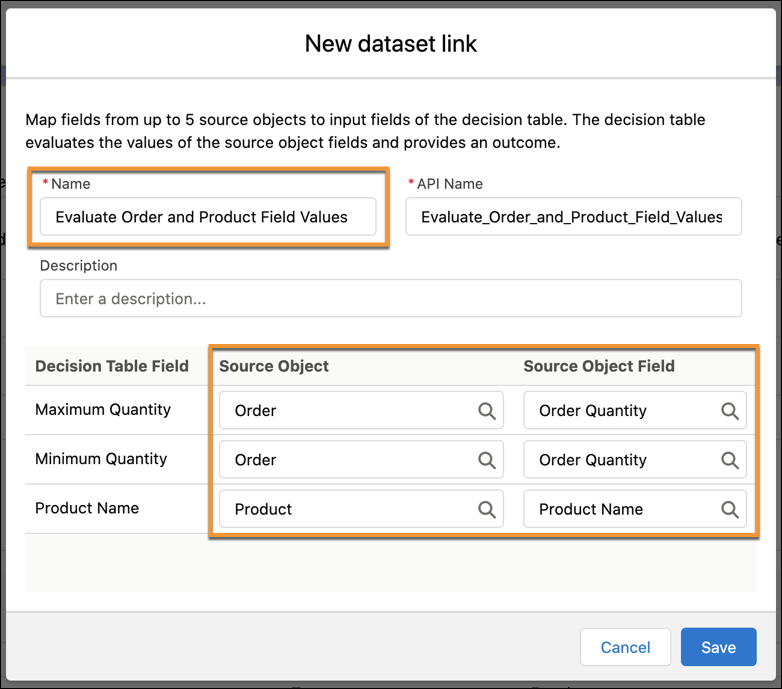
- Save your work.

A company wants to determine a discount on orders based on the product name and the order quantity. The business rules that the decision table uses to calculate the discount percentage are stored in the Order Discount custom object. These input fields are selected from the Order Discount custom object: Product Name and Quantity. In the dataset link, the Product Name field is mapped to the Product Name of the Product object. And the Quantity field is mapped to the Order Quantity field of the Order object. When the decision table evaluates an order to determine the discount, it evaluates the value stored in the Order Quantity field of the Order object. It also evaluates the value stored in the Product Name field of the Product object.
