
You are here:
Run a Batch Job
A flow is used to run batch jobs. After a batch job is activated, it appears as an action in the Flow Builder. Use the Batch Job action to schedule your batch job's runs.
Required Editions
| View supported editions. |
| User Permissions Needed | |
|---|---|
| To create a flow: | Manage Flows system permission |
| To run a flow: | Run Flows system permission |
| To run a batch job: | System Administrator profile |
Based on the business requirements of your batch job, add the Batch Job action to:
- A scheduled flow to run the batch job on a specific schedule.
- A triggered flow to run the batch job on triggers such as record creation or event completion.
- An autolaunched flow to run that batch job on external system triggers such as APIs.
-
Click
 , and select Setup.
- In the Quick Find box, search and select Flows.
- Click New Flow.
- Configure the flow.
-
Add the Action element at the specific point in the flow where
the batch job must run as part of the flow's business logic.
If the flow runs only the batch job, add the Action element only to the flow.
-
Complete these steps to configure the Action element for the batch job:
- Either search for the Batch Job action of the batch job by using its API name or find the action from the Batch Job category.
-
If your batch job or your business flow has input variables, specify their
values.
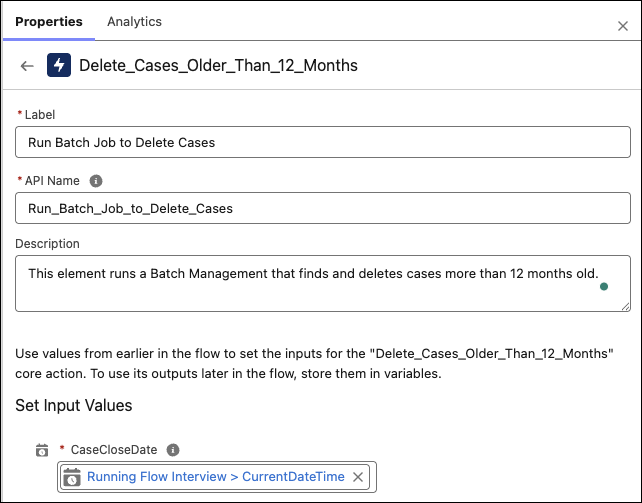
- Configure the remaining elements in the flow.
- Save and activate the flow.
- Can I Schedule Multiple Batch Jobs Using a Single Scheduled Flow?
Yes, you can create a single flow and associate multiple batch jobs with it. Each batch job can run independently or based on the results of a previous batch job in the same flow. A flow can't run multiple batch jobs simultaneously. Use the Wait element in the flow to run one batch job at a time. - Resume a Flow After a Batch Management Job Is Run
You can design a flow that has elements that are dependent on the results of a Batch Management job that's run in the same flow. The flow can be paused using a Wait element when the job is running and resumed after the run is complete. - What Happens if I Modify or Delete an Object Associated with a Batch Job?
If the associated object name or object field names are modified or deleted, the batch job fails. Delete the batch job and then create another batch job and specify the new or updated object. Or your admin can use the Metadata API to update the batch job definition for the object.
Did this article solve your issue?
Let us know so we can improve!
