
You are here:
Action Launcher
Add actions in the Action Launcher Lightning web component so that your users can search for and launch an action easily. Action Launcher helps your users to resolve customer requests and issues quickly and deliver better customer service. For example, users can initiate a fee-reversal flow or launch a service-order action from Action Launcher.
Required Editions
| Available in: Lightning Experience |
| Available in: Starter, Professional, Enterprise, and Unlimited Editions with the required add-ons |
Companion org users can use the Data Cloud Action Launcher actions. To enable and access Data Cloud features from your companion org, see Access Data Cloud One from a Companion Org.
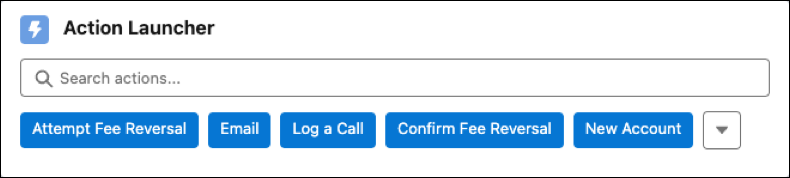
You can launch these types of actions through Action Launcher:
- Active screen flows, field service mobile flows, and autolaunched flows
- Aura components
- Button- and link-based actions or WebLinks
- Flow orchestrations
- OmniScripts
- Quick actions
Here are a few points to remember about actions.
- Autolaunched flows don’t require user input.
- Action Launcher supports record-based OmniScripts that are created using Salesforce Omnistudio and file-based or out-of-the-box OmniScripts.
To associate actions with a record page, create an Action Launcher deployment.

Warning This tool uses generative AI, which can produce inaccurate or harmful
responses. Before using, review the output for accuracy and safety. You assume responsibility
for how the outcomes of Einstein are applied to your organization.
- Action Launcher Add-Ons and Permissions
Users access Action Launcher in their Salesforce org through supported editions, add-ons, and permissions. - Create an Action Launcher Deployment
Create a deployment that includes the component settings for the Action Launcher component. The settings determine the actions, such as flows, flow orchestrations, Omniscripts, and quick actions, which users can initiate from the Action Launcher search results. The Action Launcher component includes RecordAction junction objects, which associate an action with the parent record. - Create an Action Launcher Prompt Template
Configure an Einstein prompt template to instruct the generative AI engine about how to derive the action's purpose from text, such as the case subject and description. - Add the Action Launcher Component to a Page
Make the Action Launcher component available to your users by adding the component to the required Lightning record page and selecting a deployment or service catalog. Users can then search for and launch the actions included in the deployment or the service processes included in the service catalog. - Use a Standard Action Launcher Deployment
Save the time and effort to configure Action Launcher for your contact center agents. The deployments come preconfigured with context objects, actions, and frequently used actions that you can easily modify to meet your business requirements. - Integrate Service Processes with Action Launcher
Help your contact center agents (CCAs) to search for and launch service processes instantly through Action Launcher. Service processes use OmniScripts and flows to provide a smooth and effortless customer service experience to CCAs. - Provide Access to OmniScripts
Give standard users or contact center agents (CCA) access to OmniScripts so that the users can see OmniScripts in the Action Launcher search results. - Recommended Actions Configuration
Action Launcher shows recommended actions based on semantic search or the meaning of search keywords. Recommended actions can also be based on context, deriving the appropriate purpose from record data, such as Case Subject and Description, or from customer conversation transcripts. To configure recommended actions, first set up the recommended actions admin settings. Next, you must create data streams to get actions and service processes from Salesforce objects, map these data streams to Data Model Objects (DMOs), and create search indexes for the DMOs. - Launch Actions
Complete your work quickly by launching actions easily from the Action Launcher component. - Launch Service Processes
Efficiently assist customers by quickly launching service processes from Action Launcher. - Methods for Using Recommended Actions
Action Launcher can recommend the best suited actions to resolve your customer's issues and requests. Action Launcher finds recommended actions based on your search keywords or by analyzing your customer interaction through messaging session or voice call channels. It can also find recommended actions by analyzing record data like the case subject and description. Identify the appropriate recommended action from the search results, and launch it to resolve the issue or request. - Configure Action Launcher in Your Experience Cloud Site
To help people launch actions through Action Launcher without logging in to Salesforce, add Action Launcher to your Experience Cloud site. - Edit an Action Launcher Deployment
Modify the type of actions, the context, and the actions available for your users in a deployment. - Delete an Action Launcher Deployment
Delete the deployments that are no longer required.
Did this article solve your issue?
Let us know so we can improve!
