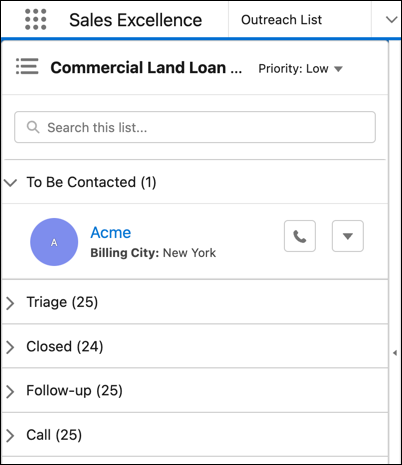
Help your sales or service agents get the most out of their
prospect engagements with Outreach List in the split view. Enable the agents to effortlessly and
efficiently cross-sell products, collect outstanding dues, and provide advisory services to
prospects, including existing customers.
Required Editions
Available in: Lightning Experience
Available in: Enterprise, Professional, Starter, and
Unlimited Editions
Outreach List contains a list of prospects that the agents can
engage with.
List creators assign the prospects to agents. The prospects can
belong to one or more actionable lists. Outreach List can easily scale from listing a few
hundreds to thousands of prospects.
Enable the Outreach List Tab Make the Outreach List tab available for agents so that they can access Outreach List.
Open Outreach List If the Outreach List tab isn’t visible in your split view console, open Outreach List from App Launcher or from the navigation menu.
View Prospects Prioritize your tasks for the day by looking at Outreach List. It’s a prioritized and consolidated list of active prospects that you must contact. Click a prospect in Outreach List to view the record details next to Outreach List.
Contact Prospects You can call a prospect directly from the record in Outreach List and increase the chance of converting them into a customer.
Change Engagement Status After contacting a prospect, you can update the engagement status instantly and keep the prospect's record up to date.
We use three kinds of cookies on our websites: required, functional, and advertising. You can choose whether functional and advertising cookies apply. Click on the different cookie categories to find out more about each category and to change the default settings.
Privacy Statement
Required Cookies
Always Active
Required cookies are necessary for basic website functionality. Some examples include: session cookies needed to transmit the website, authentication cookies, and security cookies.
Functional Cookies
Functional cookies enhance functions, performance, and services on the website. Some examples include: cookies used to analyze site traffic, cookies used for market research, and cookies used to display advertising that is not directed to a particular individual.
Advertising Cookies
Advertising cookies track activity across websites in order to understand a viewer’s interests, and direct them specific marketing. Some examples include: cookies used for remarketing, or interest-based advertising.