
Loading
Set Up Trade Promotion Management
Table of Contents
Select Filters

          No results
          No results
          Here are some search tips

          Check the spelling of your keywords.
          Use more general search terms.
          Select fewer filters to broaden your search.

          Search all of Salesforce Help
          Track Your Spending with Fund Management

          Track Your Spending with Fund Management

          A fund holds money that serves as the promotion budget for either a customer, customer-category combination, or customer-brand combination. After KAMs (Key account managers) get their sales targets, FMs (Finance Managers) allocate a budget to the KAMs. KAMs can use their budget (fund) to pay for activities such as marketing campaigns, introduce new products, and placing displays that can help them achieve their sales targets. KAMs link the funds allocated to them to individual promotion tactics and transfer money from one fund to another.
          Required Editions

          Available in: Lightning Experience

          Available in: Enterprise and Unlimited Editions where Consumer Goods Cloud is enabled

          KAMs receive their budget in one of the following ways.

          • Fixed Fund: KAMs receive a fixed amount as a budget for the planning cycle, either for a customer or for a customer-product level (category or brand).
          • Rate-Based Fund (RBF): KAMs receive a flexible amount that is based on the planned volume or revenue of the customer. RBF ensures a fair-share distribution of trade budget to retailers – a small retailer receives a smaller promotion budget than a large retail chain.

          After a fund is created, the total balance of the fund can still change. Two things that impact the total balance of a fund are.

          • Fund transactions: KAMs can create fund transactions to transfer the amount of one fund to another. The balance of the related funds changes only after transactions are approved.
          • RBFs: Additional amount that gets added to an account’s funds based on the planned volume or revenue.

          The KPI definitions used in funds drive all fund-related calculations. A few KPIs that are used in funds are:

          • Actual Deposits
          • Approved Withdraws
          • Actual RBF

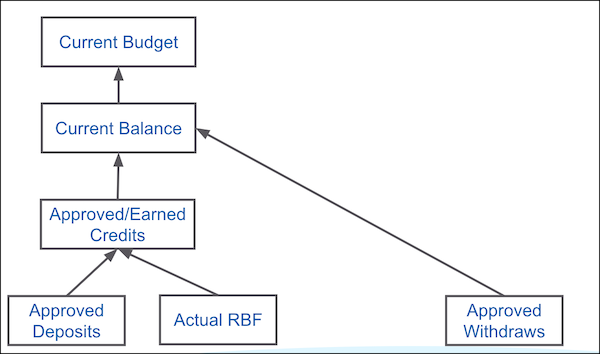
          KPIs give KAMs the actual picture of their budget and the balance. Balance is the amount allocated to a KAM, and budget is the amount they can still spend. Here’s an example that explains how budget and balance are calculated using KPIs.

          Fund KPIs

          The approved deposits and the actual RBF are the additional amount that gets added to a fund. These earnings minus the withdrawals from the current balance is the current budget, which is the amount that KAMs can still use.

          • Fund Types
            A fund can either be allocated for a customer or for a customer-product combination.
          • Fixed Funds
            You can set up fixed funds for a customer, a customer-category combination, or a customer-brand combination. To set up fixed funds, first create a fund template, and then use the template to create funds. Create funds manually or import them using Salesforce Data Loader. To save time and reduce the potential for errors, import funds.
          • Rate-Based Funds
            To set up flexible funds that depend on the volume and revenue planned for a customer, create rate-based funds (RBFs). Every RBF is linked to a customer and a fund type. The fund type of an RBF is determined from the RBF template that’s used to create the RBF. View the sum of the actual and the remaining RBF funds for a customer in a customer’s fund.
          • Fund Transactions
            Use fund transactions to add money to your fund or transfer money from one fund to another.
          • Overspending Funds
            If a customer fund doesn’t have enough money for an event, the key account manager (KAM) can overspend the fund. However, overspending is possible for an account only if an overspend percentage is defined in the Customer Extension of the account.
           
          Loading
          Salesforce Help | Article