
You are here:
Settle Promotion Costs with Claims Management
After the tactics of a promotion are executed, retailers send payments requests (claims) as compensation for the expenses they incurred for executing the planned tactics. You can either manually create claim records or import these records from a third-party system.
Here’s the end-to-end claim process.
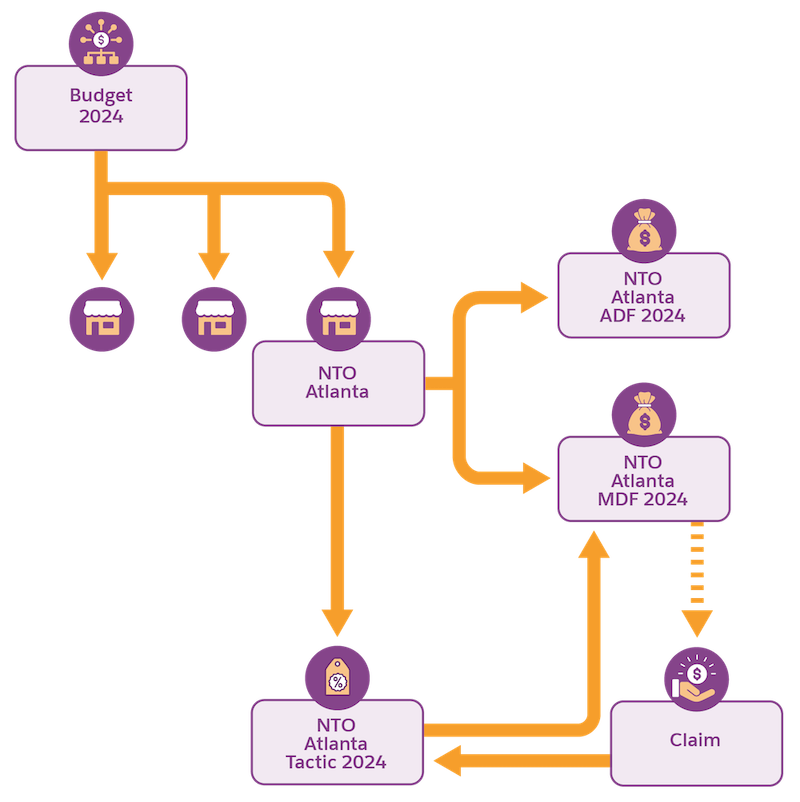
Promotion costs often differ significantly from what was planned to the actual cost when the promotion is executed. To make sure that you have the correct costs captured, assign tactics and enter their payout amounts to a claim, which can either be manually created or imported from a third-party system. The system then detects the funds from which payouts for tactics are adjusted. After a claim is created, evaluate, validate, and update the tactic payouts, and submit the claim approval.
You can accept the full claim, adjust the claim, or accept the claim as a partial payment of a tactic—expecting the retailer to send another claim for the remaining amount. You can set up a claim approval process so that the payment to the retailer is released only after a claim is approved. For easy handling of claims, you can combine or link claims.
There are several types of claims. Here are the most important ones.
- Deduction: The tactic amount is paid by initiating a short pay on an open invoice. You pay the amount after deducting the amount requested from the total invoice amount. Typically, deductions are imported from third-party systems and evaluated in TPM.
- Credit Memo and Check Request: These payment types are manually initiated in TPM. Claims are sent to a key account manager (KAM), and then they create claims to initiate the payments.
You can import a claim if the claim type is Deduction. When you import a claim, evaluate the claim and make sure to associate tactics with it. Then, distribute costs to products and funds and finally close the claim. You can import only single claims, which don’t have references to other claims.
When you create a claim, select an anchor, which represents the account making the claim. The Planning Anchor represents the account plan level in TPM and the Claim Anchor represents the references of the claim in your financial system. For example, NTO Atlanta is a Planning Anchor. NTO Store 201, which is a child node in NTO Atlanta’s account plan hierarchy and actually receives the claim, is the Claim Anchor. When a claim is imported, the Planning Anchors of a claim aren’t imported and are automatically determined based on the account plan hierarchy.
Here are the roles and responsibilities for users dealing with claims:
- Master data admin: Creates, edits, and deletes claims templates.
- Finance managers: Creates, edits, and imports claims regardless of any sharing rules.
- KAMs: Reads, creates, edits, and imports claims.
- Business admin: Deletes claims.
- Claim Tactics, Claim Tactic KPIs, and Claim Tactic Funds
After you create or import a claim, manually link tactics to the claim. The funds related with the linked tactics are automatically allocated to the claim. Products and KPIs for a claim-tactic appear on the Spend Planning tab on the tactic details page. - Creating Claims
Create claims using claim templates, which represent the claim type. - Evaluating and Closing Claims
After a claim is created or imported from a third-party system, evaluate the claim to check whether the claim is valid. Make sure that you reject any non-promotional cost that’s added to the claim. Sometimes, when you import a claim, tactics aren’t linked, so make sure to link tactics to claims. The system detects funds based on the assigned tactics. You can adjust the cost for each claim tactic product, and finally submit the claim for approval. The tactic claim amount is considered as paid only when the claim is approved. - Claim Adjustment
To revert a claim already processed by a third-party system, you can adjust a claim. For example, if a duplicate claim record exists, the claim is adjusted as Claim Reversal to make sure that the financial numbers are accurate. - Claim Approval Process
The claim approval process controls when a claim gets approved and can be considered by other processes. Only approved claims are considered by other processes, such as pulling tactic-product payouts into the promotion P&L. - Claim Calculations
Trade Promotion Management considers three main aspects during claim-tactic calculations: the relevant period, the products that are valid during the relevant period, and manual input validation. - Downloading Claims Data
To use claim tactic KPIs such as payout amount, in third-party systems, use the Payment API to extract KPI values for each product and product level for every claim tactic. You can extract up to 60 KPIs per claim.
