
Loading
Salesforce now sends email only from verified domains. Read More
Set Up Trade Promotion Management
Table of Contents
Select Filters

          No results
          No results
          Here are some search tips

          Check the spelling of your keywords.
          Use more general search terms.
          Select fewer filters to broaden your search.

          Search all of Salesforce Help
          Main Objects in Advanced Promotions

          Main Objects in Advanced Promotions

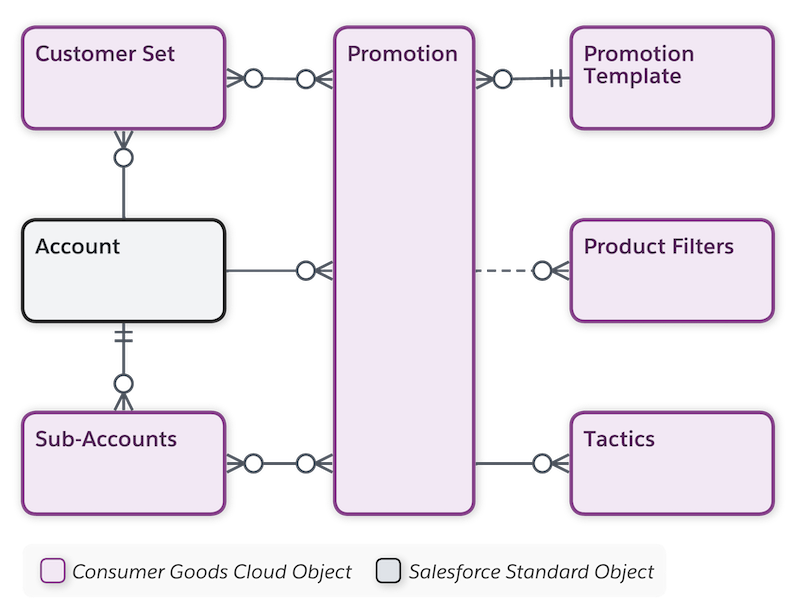
          Use the Advanced Promotions objects to increase revenue and market share for your product through Temporary Price Reductions (TPR), coupons, or in-store displays. Create multiple short-term or long-term promotions for customers or products at a national or regional level. A Key Account Manager (KAM) can plan, run, and monitor promotions in TPM. Products in a promotion are defined through the product resolution using various product filter expressions.
          Required Editions

          Available in: Lightning Experience

          Available in: Enterprise and Unlimited Editions where Consumer Goods Cloud is enabled

          The image shows the objects to manage advanced promotions.

          Objects under Advanced Promotions

          This table lists the main objects in Promotions.

          Object API Name Description
          Account Account Stores information about your customers. An account can be a retailer, distributor, wholesaler, or consumer.
          Attachments or Files cgcloud__Promotion_Attachment__c Stores additional information about an account.
          Customer Sets cgcloud__Account_Set__c Set of customers who perform similar activities, such as promotion, pricing, or activities. A customer set can be created manually, integrated through an external system, or added via segmentation rules.
          KPI cgcloud__KPI_Definition__c Indicators to assess the performance of an account. KPI can be a single monetary, volume, or % measure shown in account plan, advanced promotion, or claim. For example, actual volume, base volume, or target revenue.
          KPI Sets cgcloud__KPI_Set__c

          A list of individual KPIs.

          A KPI set is mapped to a business process by using the business templates. For example, the list of KPIs shown in an account plan is based on the KPI set selected in the customer template. Similarly, for payments or funds, the KPI set is mapped to the payment template or fund template, respectively.

          KPIs at a parent level are read-only and are the aggregations of all child KPIs.

          Promotion Templates cgcloud__Product_Template__c Template to create a promotion. Promotion Template determines the type of promotion your key account manager (KAM) wants to create. Before a KAM creates a promotion, a business admin creates the promotion template.
          Sales Org cgcloud__Sales_Organization__c

          Business segments to structure your data and business processes by your organizational unit. For example, one sales org for the EMEA region and another sales org for the APAC region.

          Base business segmentation on geographical territories, product division, or account team.

          Each business template is related to a sales org. Records created using the templates are available only for the related sales org.

          Sub-Accounts cgcloud__Sub_Account__c Subset of accounts whose KPIs add to the parent account KPIs in the account plan. For example, volume for supermarkets or hypermarkets.
          Tactic cgcloud__Tactic__c Stores information on promotional tasks carried out by retailers to increase sales. Tactics incur cost to manufacturers. For example, advertisement tactic or display tactic.
           
          Loading
          Salesforce Help | Article