
Main Objects in Customer Master
Customer Master objects store information about customer hierarchies, contacts, users, roles, and relationships.
Required Editions
Available in: Lightning Experience Available in: Enterprise and Unlimited Editions where Consumer Goods Cloud is enabled |
The image shows the objects to manage account information.
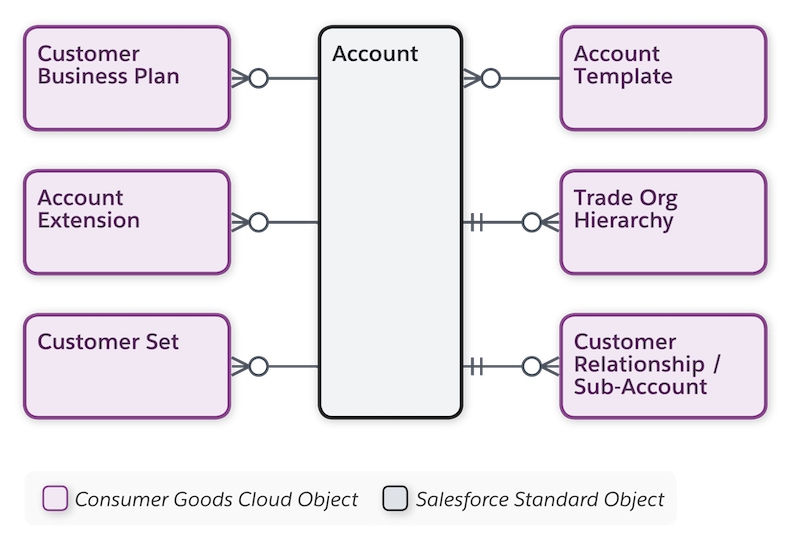
This table lists the main objects in Customer Master.
| Object | API Name | Description |
|---|---|---|
| Account | Account | Stores information about your customers. An account can be a retailer, distributor, wholesaler, or consumer. |
| Attachments or Files | cgcloud__Promotion_Attachment__c | Stores files for promotions in these formats. Each file can have a maximum size of 25 MB.
|
| Customer Extension | cgcloud__Account_Extension__c | Stores additional account information such as account classification, status, complex pricing configuration, account roles, and Trade Promotion Management(TPM)-specific information, such as:
Customer extension details are used during TPM business processes such as funds, claims, or promotions. |
| Customer Relationship | cgcloud__Account_Relationship__c | Specifies the relationship between two customers:
For example, if Customer A is the delivery recipient and Customer B is the bill-to party, for orders that are shipped to Customer A, bills are sent to Customer B. You can set the validity for the role in the Customer Extension object. |
| Customer Template | cgcloud__Account_Template__c | Template to create an account. The KPI Set and the product aggregation level attributes in customer template affect the behavior of the promotions |
| KPI | cgcloud__KPI_Definition__c | Indicators to assess the performance of an account. KPIs can be one monetary, volume, or percentage measure shown in an account plan, advanced promotion, or claim. For example, actual volume, base volume, or target revenue. |
| KPI Sets | cgcloud__KPI_Set__c | A list of individual KPIs. A KPI set is mapped to a business process by using business templates. For example, the list of KPIs shown in an account plan is based on the KPI set selected in the customer template. Similarly, for payments or funds, the KPI set is mapped to the payment template or fund template, respectively. KPIs at a parent level are read-only and are the aggregations of all child KPIs. |
| Product Manager | cgcloud__Product_Category_Share__c | A user assigned as a product’s manager. A product’s manager can plan promotions for the product. |
| Promotion Attachment Link | cgcloud__Promotion_Attachment_Link__c | Junction object that references between promotion and promotion attachment. |
| Sales Organization | cgcloud__Sales_Organization__c | Business segments to structure your data and business processes by your organizational unit. For example, one sales org for the EMEA region and another sales org for the APAC region. Base business segmentation on geographical territories, product division, or account team. Each business template is related to a sales org. Records created using the templates are available only for the related sales org. |
| Sub-Account | cgcloud__Sub_Account__c | Subset of accounts whose KPIs add to the parent account KPIs in the account plan. For example, volume for supermarkets or hypermarkets. |
| Trade Org Hierarchy | cgcloud__Account_Trade_Org_Hierarchy__c | Stores relationships between your accounts as parent-child relationships. Hierarchies can be based on location or on characteristics that define an account's business strategies. For example, one headquarter (NTO - Atlanta) manages multiple stores and several headquarters of different regions with a managing unit above them (NTO - Co). You need Trade Org Hierarchy to plan for TPM activities at the parent level. Child accounts inherit the activities from the parent account. The relationships are time dependent and are valid for the defined time frame. |
| Week or Day Distribution Profiles | cgcloud__Week_Day_Share_Profile__c | Stores customer information about the breakdown of product or category deliveries for each day of the week. Weekly profile is updated when rates are changed during the week or during mid-week promotions. |
