Use the objects in Product Assortment to create and maintain product assortments within
stores. Assortments provide continued product distribution, brand awareness, and sales over time.
A sales manager or KAM maintains product assortments in the desktop version of Salesforce or
integrates them via Enterprise Resource Planning (ERP).
Required Editions
Available in: Lightning Experience
Available in: Enterprise and Unlimited Editions where Consumer Goods
Cloud is enabled
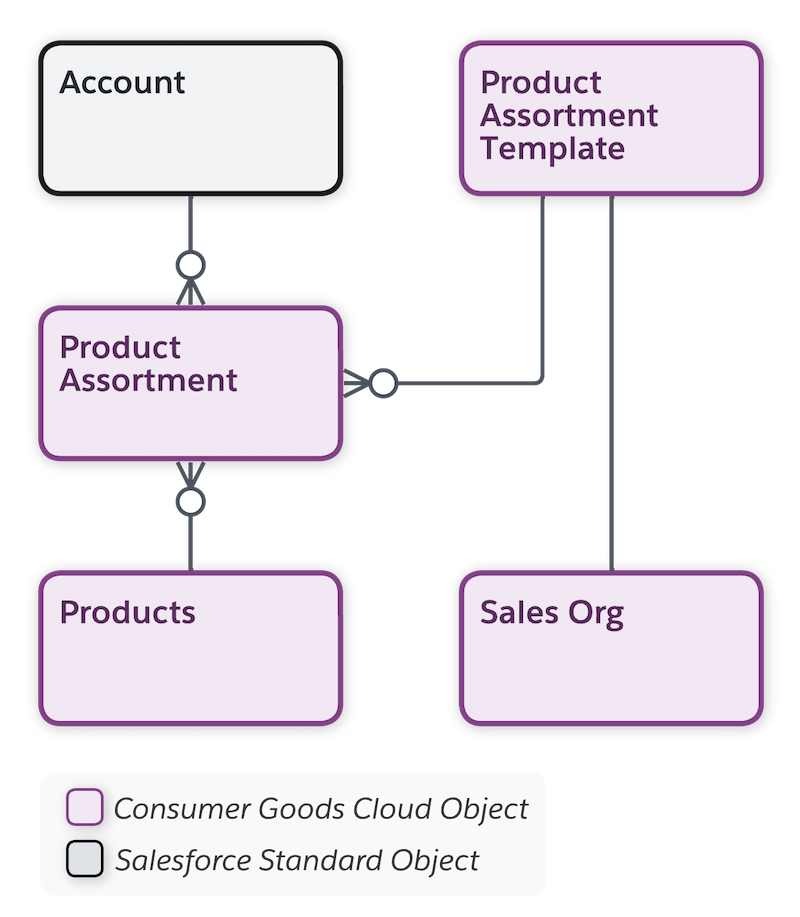
The image shows the objects to manage product assortments.
This table lists the main objects in Product Assortment.
Object
API Name
Description
Account
Account
Stores information on customers. An account can be a retailer, distributor,
wholesaler, or consumer.
Product Assortment
Assortment
Stores information on products grouped for a specific purpose, such as eligibility for
sale in a specific store. One assortment can have products from various product
categories.
Product Assortment Template
cgcloud__Product_Assortment_Template__c
Template to create product assortments. The sales org that a product assortment is
available in depends on the sales org of the template that’s used to create the product
assortment.
Sales Org
cgcloud__Sales_Organization__c
Business segments to structure your data and business processes by your organizational
unit. For example, one sales org for the EMEA region and another sales org for the APAC
region.
Base business segmentation on geographical territories, product division, or
account team.
Each business template is related to a sales org. Records created using
the templates are available only for the related sales org.
Did this article solve your issue?
Let us know so we can improve!
Loading
Salesforce Help | Article
Cookie Consent Manager
General Information
Required Cookies
Functional Cookies
Advertising Cookies
General Information
We use three kinds of cookies on our websites: required, functional, and advertising. You can choose whether functional and advertising cookies apply. Click on the different cookie categories to find out more about each category and to change the default settings.
Privacy Statement
Required Cookies
Always Active
Required cookies are necessary for basic website functionality. Some examples include: session cookies needed to transmit the website, authentication cookies, and security cookies.
Functional Cookies
Functional cookies enhance functions, performance, and services on the website. Some examples include: cookies used to analyze site traffic, cookies used for market research, and cookies used to display advertising that is not directed to a particular individual.
Advertising Cookies
Advertising cookies track activity across websites in order to understand a viewer’s interests, and direct them specific marketing. Some examples include: cookies used for remarketing, or interest-based advertising.