
You are here:
Use Source Field Aliases in Expression Sets
Use field aliases to use object fields as variables in expression set conditions.
Required Editions
| Available in: Lightning Experience |
| Available in: Enterprise, Unlimited, and Developer Editions for clouds that have Business Rules Engine enabled |
| User Permissions Needed | |
|---|---|
| To create a field alias: | System Administrator |
| To use a field alias as a variable in an expression set: | Rules Engine Designer |
| To run an expression set that uses field aliases: | Rules Engine Runtime |
-
Open the expression set version in Expression Set Builder.
For more information, see Manage Expression Sets
 Note You can modify only inactive expression set versions.
 - Add a step element that supports defining a formula or a condition.
-
Use field aliases either as variables in the formula or as conditions in a selected element
including business elements:
- Use field aliases in formulas:
- In the Formula field of the selected step element, search for and select the name of the
object alias to view the object's field aliases.
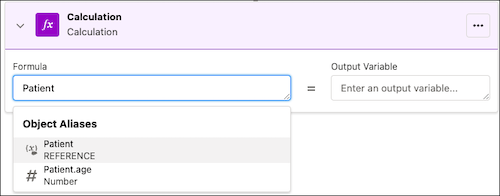
 Tip To see the object aliases available in an expression set, click
 , and then
expand Object Aliases.
, and then
expand Object Aliases. - Select a field alias.
- Select an output variable.
Note You can’t use field aliases as output variables. - In the Formula field of the selected step element, search for and select the name of the
object alias to view the object's field aliases.
- Use field aliases in conditions:
- In the Resource field of the selected step element, scroll down to the Object Aliases section.
- To view the field aliases under an object alias, select the object alias.
- Select a field alias.
- Select an operator.
- In the Value field, enter a supported variable, constant, or field alias.
- Use field aliases in formulas:
- Save your changes.
Did this article solve your issue?
Let us know so we can improve!
