
You are here:
Contract Types
Contract Type is a custom object that specifies the type of the contract document. Using the Contract Type object, you can manage different types of contracts within one org. You can configure each contract type to provide access to the appropriate users, define stages and approvals for contracts, define clauses and templates specific to each contract type, and specify other parameters, such as DocuSign reminders. You can have different types of contracts with different state models, templates, clauses, DocuSign, such as nondisclosure agreements, sales contracts, and so on.
Your company may have three different lines of business who use Contract Life Cycle Management. You can create a different contract type for each line of business and configure the appropriate access and options. You can also use contract types to specify a contract’s purpose. For example, you might have sales contracts, nondisclosure agreements, and partnership agreements.
If you do not want to use different contract types, Vlocity provides the default contract type. You can also clone the default contract type to create a new contract type to use.
A contract record can belong to only one contract type. When you create a Contract record, Vlocity CLM automatically assigns a contract type to it, based on the Contract record type. You can associate a contract type with a Contract record type, creating a parent relationship. A Contract record type can have only one Contract Type object as its parent, but a Contract Type object can have multiple Contract record types as its children.
The following image shows the relationships between Contract Record type, Contract Type, users or profiles, Contract State Model, Vlocity Actions, and the contract life cycle.
You can restrict clauses and templates for use in specific contract types. For example, you can use Template 1 in Contract Type A & Contract Type B, but not Contract Type C.
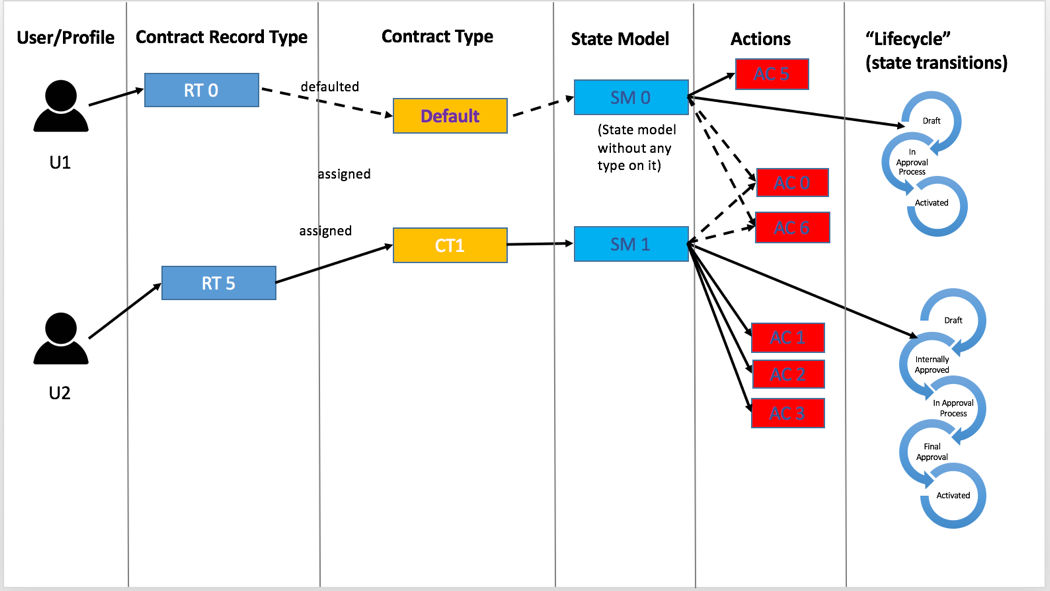
When a Contract record is created, Vlocity CLM derives the contract type from the Contract record type. If a Contract record type does not have a parent contract type, or if the Contract record does not have a record type, Vlocity CLM automatically associates the Contract record with the default contract type. When the contract type is assigned, Vlocity CLM derives the Contract State Model and contract life cycle. Vlocity CLM uses the settings for the contract type to control the Contract record.
The diagram above shows contract type functions:
User 1
-
User 1 can access Contract record type RT0.
-
Contract record type RT0 can be associated with a contract type, but, because it’s not, Vlocity CLM associates it with the default contract type. When User 1 creates a Contract record of the RT0 Contract record type, the Contract record is automatically associated with the default contract type.
-
The default contract type uses the Contract State Model SM0. When User 1 creates a contract with the default contract type, the Contract State Model SM0 is used for the Contract record.
-
The Contract State Model SM0 consists of the states Draft, In Approval Process, and Activated.
-
Vlocity Action AC5 is associated with the Contract State Model SM0. This action is available for Contract records of the default contract type if the filter conditions defined in the action are met.
-
Vlocity Actions AC0 and AC6 are actions with which Contract State Models are not associated. These actions are available to all Contract State Models, including SM0 and SM1. These actions are visible from all Contract records of any contract type, if the filter conditions defined in the actions are met.
User 2
-
User 2 can access Contract record type RT5.
-
Contract record type RT5 is explicitly assigned with Contract Type CT1. When User 1 creates a Contract record with the Contract Type RT5, the Contract record is automatically associated with the CT1 Contract Type.
-
The Contract Type CT1 is associated with the Contract State Model SM1. This Contract State Model has the states Draft, Internal Approved, In Approval Process, Final Approval, and Activated.
-
The Contract State Model SM1 is associated with Vlocity Actions AC1, AC2, and AC3. These actions are available for Contract records of the CT1 Contract Type if the filter conditions defined on the actions are met.
-
Vlocity Actions AC0 and AC6 are actions with which no Contract State Model is associated. These actions are available to all Contract State Models, including SM0 and SM1. These actions are visible from all Contract records of any contract type if the filter conditions defined on the actions are met.
-
These are associated with a contract life cycle that includes the states Draft, In Progress, and Activated.
When you create a clause or document template, it is available to use with all contract types. You can restrict a clause or document template for use only with specific contract types. A document template that is restricted for use can be assigned only to Contract Document records of the specified contract types. A clause that is restricted for use can be assigned only to document templates that are available for the specified contract types.
- Defining a Contract Type
When you define a contract type, you configure it. When you create a contract that uses that contract type, the contract document inherits the configuration. You can configure the following options on the Contract Type object: - Cloning a Contract Type
When creating a new contract type, Vlocity recommends cloning an existing contract type to start the process. - Associating a Contract Type with the Contract State Model
You can associate a contract type with a Contract State Model.
