
You are here:
Generic DocuSign API
You can use the Generic DocuSign API to send one or more generated documents for eSignature. Your generated documents can be associated with either standard or custom objects.
The standard objects supported are Order, Opportunity, and Quote. To customize it to support other objects, see the instructions in Set Up Generic Documents For DocuSign eSignature for Custom Objects.
Overview
Before you begin, make sure that you have already set up the Contract DocuSign configuration. The Generic DocuSign API uses some of the same configurations as the Contract DocuSign. To set up the Contract DocuSign configuration, see the instructions in Setting Up DocuSign Integration.
You can then invoke the API and use it to implement different functionalities.
Invoke the API
You can use this API to implement a functionality in any one of the following:
-
Apex with a custom class
-
an Omniscript
-
an Integration Procedure
Apex Custom Class
To use the API with an Apex custom class, follow this structure for invoking methods:
// initialize the parameters
String methodName = '[name method to invoke]';
Map<String, Object> inputMap = new Map<String, Object>();
Map<String, Object> outputMap = new Map<String, Object>();
Map<String, Object> optionsMap = new Map<String, Object>();

// setup input parameters for the method to be invoked
inputMap.put('[expected parameter 1]', [parameter value 1]);
inputMap.put('[expected parameter n]', [parameter value n]);

// setup options parameters for the method to be invoked
optionsMap.put('[optional parameter 1]', [parameter value 1]);
optionsMap.put('[optional parameter n]', [parameter value n]);

// instantiate the generic api
VlocityOpenInterface2 voi = new GenericDocuSignIntegrationService();

// invoke the method
voi.invokeMethod(methodName, inputMap, outputMap, optionsMap);

// log result
System.debug('outputMap: ' + JSON.serialize(outputMap));
Omniscript
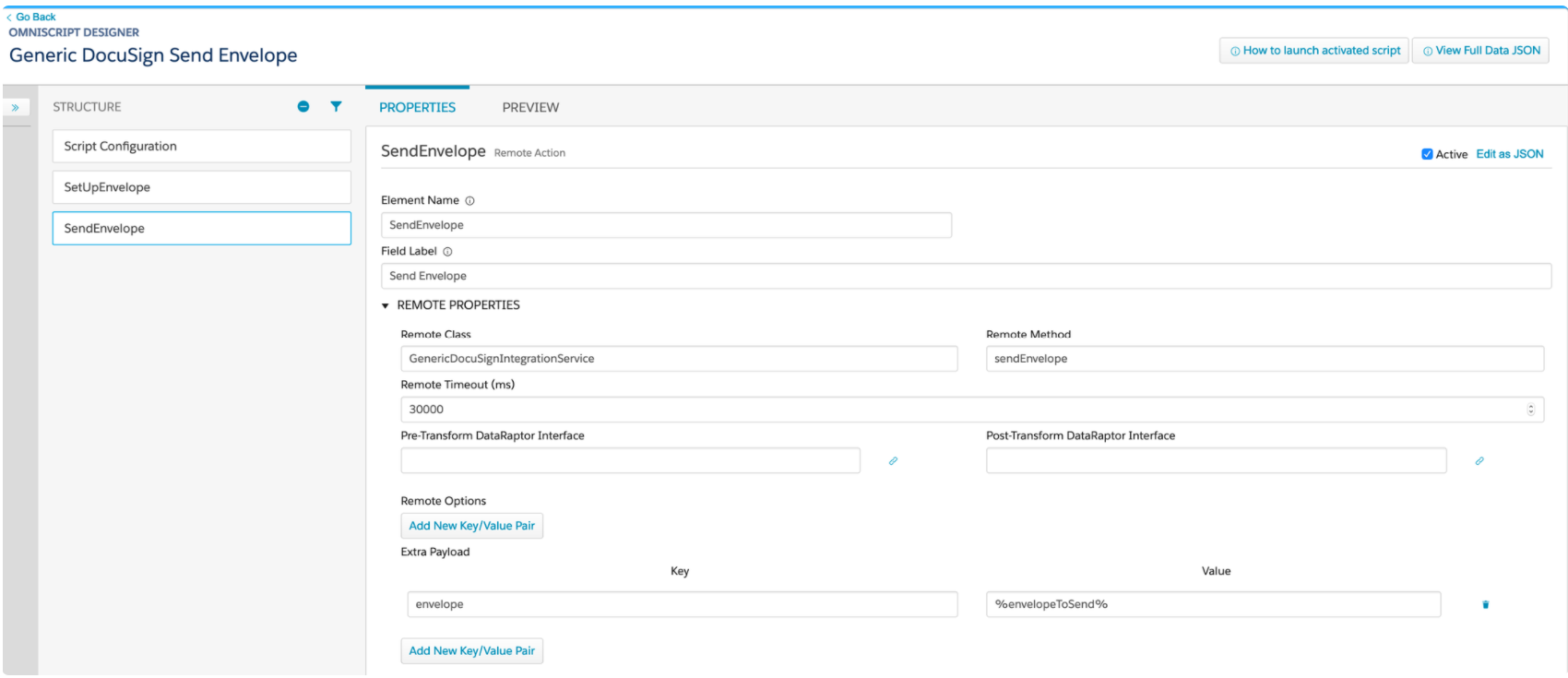
To use the API in an Omniscript, set up a Remote Action with the following parameters:
In the Remote Properties section:
Remote Class |
GenericDocuSignIntegrationService |
|---|---|
Remote Method |
Any method supported by the API, for example, sendEnvelope, getRecipients, getDocuments |
Extra Payload > Key |
envelope |
Extra Payload > Value |
The Omniscript parameter defined to contain the expected envelope structure. This is a JSON String that follows the expected Generic DocuSign envelope structure. |
Integration Procedure
To use this API in an integration procedure, you must define a Remote Action in it. Set the following fields to define the Remote Action:
Remote Class |
GenericDocuSignIntegrationService |
|---|---|
Remote Method |
Any method supported by the API, for example, sendEnvelope, getRecipients, getDocuments |
Send Only Additional Input |
Select this to ensure unnecessary IP inputs are not sent |
Additional Input |
envelope %envelopeToSend%, the variable containing the Generic DocuSign envelope structure |
Implement Functionality
The API implementing class is GenericDocuSignIntegrationService. To access the API, call invokeMethod along with the following parameters.
global with sharing class GenericDocuSignIntegrationService
    implements VlocityOpenInterface2
{
  ...
  ...
  Object invokeMethod(
      String methodName,
      Map<String, Object> inputMap,
      Map<String, Object> outputMap,
      Map<String, Object> optionsMap)
  {
    ...
    ...
  }
  ...
  ...
}
Parameter |
Description |
|---|---|
methodName |
The method you want to call. |
inputMap |
Map instance that contains the parameter(s) required by the invoked method to execute properly. If you do not submit the required parameter(s), the invoked method throws an exception. |
outputMap |
Map instance where the execution results are stored. |
optionsMap |
Map instance where additional execution options can be stored. |

Map parameters may be empty but cannot be null when passed.
Methods
The following methods let you view documents, recipients, notification settings, and work with envelopes.
Method |
Description |
Link |
|---|---|---|
|
Use this method to view a list of document recipients. |
|
|
Use this method to view a list of documents sent for eSignature. |
|
|
Use this method to view reminder and expiration notification settings. |
|
|
Use this method to enable a new DocuSign transaction. |
|
|
Use this method to expire or void envelopes associated with an object. |
|
|
Use this method to send an ad hoc request to DocuSign to update the envelope status. |
Checks for Successful Execution
When the invoked method executes successfully, the outputMap parameter contains the following properties:
Property |
Description |
|---|---|
|
Boolean property set to |
|
One or more key-value pairs set by the invoked method as return values. |
Checks for Errors
When the invoked method does not execute successfully, the outputMap parameter contains the following information:
Property |
Description |
|---|---|
|
Boolean property set to |
|
String property set to the specific exception that occurred, for example, |
|
A message describing the nature of the exception encountered. |
Supported JSON Envelope Structure
The JSON envelope structure below specifies the different properties that can be used in defining a DocuSign envelope.
You can use it as a JSON string or as a Map of objects which can be submitted as parameter when invoking the sendEnvelope method of the Generic DocuSign API.
{
	"parentId": "",
	"emailSubject": "",
	"emailBody": "",
	"recipients": {
		"signers": [{
				"name": "",
				"email": "",
				"routingOrder": "",
				"recipientId": "",
				"signerRole": "",
				"emailNotification": {
					"emailSubject": "",
					"emailBody": "",
					"supportedLanguage": ""
				}
			},
			...
		],
		"inPersonSigners": [{
				"name": "",
				"email": "",
				"routingOrder": "",
				"recipientId": "",
				"signerRole": "",
				"signerName": ""
				"emailNotification": {
					"emailSubject": "",
					"emailBody": "",
					"supportedLanguage": ""
				}
			},
			...
		],
		"certifiedDeliveries": [{
				"name": "",
				"email": "",
				"routingOrder": "",
				"recipientId": "",
				"signerRole": "",
				"emailNotification": {
					"emailSubject": "",
					"emailBody": "",
					"supportedLanguage": ""
				}
			},
			...
		],
		"carbonCopies": [{
				"name": "",
				"email": "",
				"routingOrder": "",
				"recipientId": "",
				"signerRole": "",
				"emailNotification": {
					"emailSubject": "",
					"emailBody": "",
					"supportedLanguage": ""
				}
			},
			...
		]
	},
	"documents": [{
			"name": "",
			"sourceId": "",
			"fileExtension": "",
			"sourceType": "",
			"documentId": ""
		},
		...
	]
	"notification": {
		"useAccountDefaults": "",
		"reminders": {
			"reminderEnabled": "",
			"reminderDelay": "",
			"reminderFrequency": ""
		},
		"expirations": {
			"expireEnabled": "",
			"expireAfter": "",
			"expireWarn": ""
		}
	}
}
Property |
Description |
|---|---|
parentId |
id of the parent object [ Quote | Order | Opportunity | others ] |
emailSubject |
subject of the email that will be sent to all recipients |
emailBody |
email message sent to all recipients |
recipients |
map of different recipients |
signers |
array of signer recipients |
-name -routingOrder -recipientId -signerRole -accessCode (optional) |
-name of the recipient -email address of the recipient -specifies the routing order of the recipient in the envelope -unique id used by the tab element to indicate which recipient to -indicates the index or order of the signer in the signature tabs -specifies the access code a recipient has to enter to validate identity |
emailNotification(optional) |
complex type that has information for setting the language for the recipients email information (if provided for one recipient it overrides the emailSubject and emailBody, also you must provide emailNotification for all recipients) |
-emailSubject -emailBody -supportedLanguage |
-email subject -email message sent to recipient -simple type supported language: en, fr, ja, ko, ... |
documents |
array of documents to send |
-name -sourceId -fileExtension -sourceType -documentId |
-name of the document -object id of the document -file extension type [ DOCX | PDF ] -object type of the document object [Attachment | Content (for ContentVersion)] -unique identifier for the document; assign simple numbers (1, 2, 3, …) as value |
notification |
optional notification settings |
useAccountDefaults |
indicates whether or not the Account defaults for notifications should be used by the envelope [ true | false ] |
reminders |
reminder settings |
-reminderEnabled -reminderDelay -reminderFrequency |
-indicates whether or not a reminder is sent -an integer specifying the number of days after the recipient receives the envelope that reminder emails are sent to the recipient -an integer specifying the interval in days between reminder emails |
expirations |
expiration settings |
-expireEnabled -expireAfter -expireWarn |
-indicates whether or not the envelope is no longer available for signing after the specified number of days after it was sent -integer specifying the number of days that a sent envelope remains active before it expires -integer that specifying the number of days before the envelope expires that an expiration warning email is sent to the recipient; if set to 0 (zero), no warning email is sent |
Sample Invocation Using JSON Envelope Structure
String envelopeJson = '{"parentId":"0Q06g000000F0aLCAS","recipients":{"signers":[{"name":"Test 01","email":"vlocity_test01@yopmail.com","routingOrder":"1","recipientId":"1","signerRole":"1","emailNotification":{"emailSubject":"Test","emailBody":"Test Body","supportedLanguage":"en"}}]},"documents":[{"name":"test.pdf","sourceId":"0686g000009B5ftAAC","fileExtension":"PDF","sourceType":"Content","documentId":"1"}]}';

Map < String, Object > input = new Map < String, Object > ();
Map < String, Object > output = new Map < String, Object > ();
Map < String, Object > options = new Map < String, Object > ();

input.put('envelope', envelopeJson);

// instantiate the generic api
VlocityOpenInterface2 voi = new GenericDocuSignIntegrationService();

// invoke the method
voi.invokeMethod('sendEnvelope', input, output, options);

// log result
System.debug('outputMap: ' + JSON.serialize(output));- getRecipients Method
This method delegates the task, by default, to the Vlocity Open Interface (VOI) classDefaultDocuSignRecipientSelectorthat queries from the Contact object and returns a list of recipients. - getDocuments Method
This method delegates the task, by default, to the VOI classDefaultDocuSignDocumentSelectorthat queries from both the ContentVersion and Attachment objects. The class expects an input parameterobjectIdthat refers to the object whose documents are to be fetched. - getNotificationSettings Method
This method returns reminder and expiration notification settings for a specific standard (Order, Opportunity, and Quote) or custom object configured to use the generic DocuSign feature. - sendEnvelope Method
This method enables a new DocuSign transaction. When a contract document is available to send for eSignature, the org can programmatically send it to DocuSign. Vlocity CLM notifies the recipients and can include a message. You can configure who the recipients are, where in the contract they sign, and label and other text used. - voidEnvelope Method
You can use this method to expire or void an envelope in DocuSign that has had no action taken on it. This method manually expires an envelope/envelopes associated with an object. - updateEnvelope Method
This method lets you query for updates to an envelope/envelopes in intervals under 15 minutes. A scheduled job periodically polls DocuSign for updates made on all the envelopes sent and persists them on the organization’s envelope and recipient objects. These scheduled jobs can be set to poll at a minimum of only 15 minute intervals. To set shorter intervals for polling, use this method.
