
You are here:
Sample Contract Lifecycle
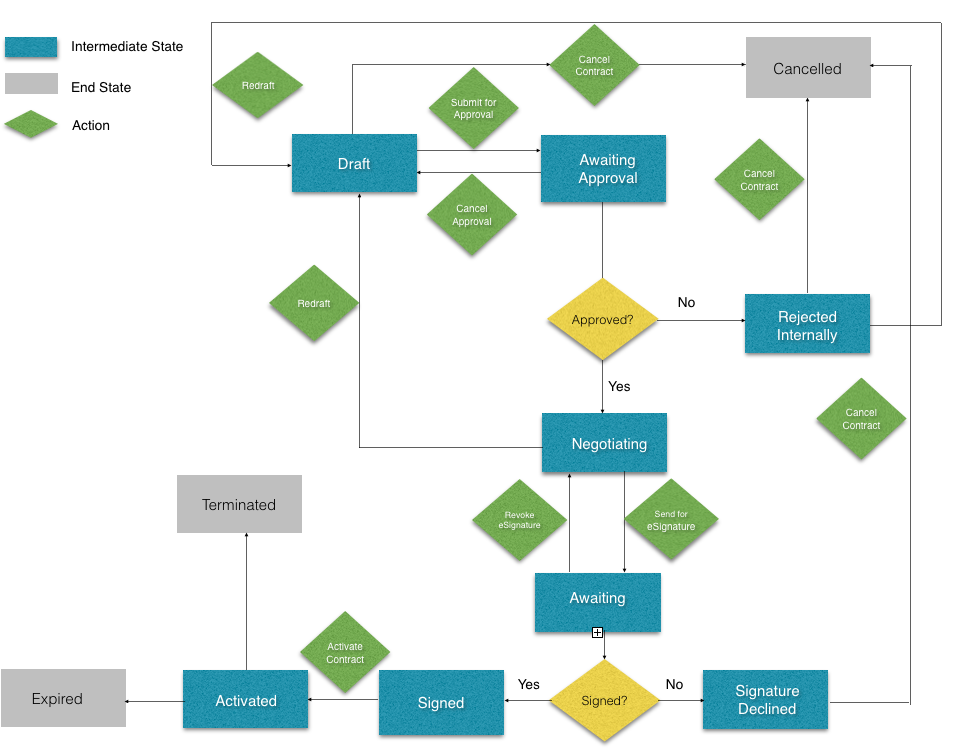
View a sample contract life cycle diagram.
-
Blue rectangles represent intermediate states.
-
Gray rectangles represent end states.
-
Green diamonds represent actions.
-
Yellow diamonds represent decisions.
Contract Lifecycle Workflow
-
Draft the contract.
-
Submit the contract for approval or cancel the contract.
-
If you cancel the contract, the life cycle ends.
-
If you submit the contract for approval, go to step 3.
-
-
The contract goes into Awaiting Approval status. Approve or reject the contract.
-
If the contract is rejected, it's canceled. The life cycle ends.
-
If the contract is approved, go to step 4.
-
-
Negotiate the contract.
-
Send the contract for eSignature. The contract goes into Awaiting status.
-
Activate the contract. The contract goes into Activated status.
