
You are here:
Set Up Generic Documents For DocuSign eSignature
You can send documents generated from objects other than contract, such as quote, order, or opportunity, for eSignature through DocuSign.
You can use a sample Omniscript called GenericDocuSign/sendEsignature that you can add to record pages through Vlocity actions or add to another CLM Omniscript. You can send one or more documents at a time, and you can also send large-sized documents (large sized is considered to be over 7MB).

To send documents generated from the Contracts object, you use a different process. For details, see Submitting a Contract for eSignature.
If you want to send documents generated from a custom object, you must complete additional setup tasks. See Set Up Generic Documents For DocuSign eSignature for Custom Objects.
See the following workflow for sending generic documents for eSignature through DocuSign:
- Set up the DocuSign email account for generic documents.
- Set up Vlocity actions to standard objects that you want to use (opportunity, order, quote).
- Add Vlocity actions to the record pages to use generic DocuSign functionality.
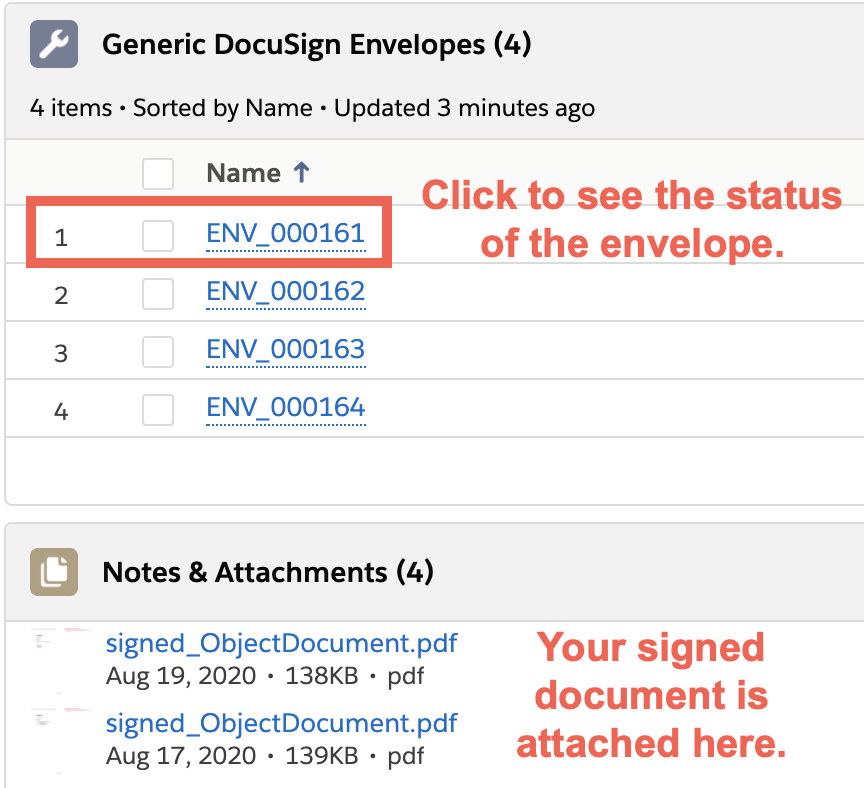
- Add the Generic DocuSign Envelope section to pages so you can see the status of the signatures.
- Set up an Apex job to update the envelope status. For details, see Scheduling a DocuSign Job to Poll for Document Signed Status.
- Generate documents that you want signed by using one of the CLM Omniscripts or upload documents into the Notes & Attachment section. For details about Omniscripts, see CLM Omniscripts Overview.
- Launch the GenericDocuSign/sendEsignature Omniscript, which sends your documents for eSignature.
- After the Generic DocuSign Envelope Status displays as Completed, you can view the signed document in the Notes & Attachments section.
- Set Up the DocuSign Email Account for Generic Documents
For generic documents, you need to set up the DocuSign email account for the system admin user profile. - Set Up Vlocity Actions to Standard Objects
For generic documents, set up Vlocity actions for DocuSign for standard objects (opportunity, order, quote). - Add Vlocity Actions To Record Pages
You can add the following Vlocity actions to record pages to help with your workflow. - Add Generic DocuSign Envelopes To Record Pages
To track the progress of your eSignatures, you can add the Generic DocuSign Envelopes section to record pages. - Using the GenericDocuSign/sendEsignature Omniscript
The sendEsignature Omniscript sends one or more generic documents (not generated from contracts) to DocuSign for eSignatures. You can send documents generated from other objects, such as quote, order, or opportunity, or send documents from custom objects. - DocuSign Configuration Settings for Generic Documents
Use this table to change any settings related to sending your generic documents for eSignature through DocuSign. - Set Up Generic Documents For DocuSign eSignature for Custom Objects
You can send documents generated from custom objects for eSignature through DocuSign. - clmOsGenericDocuSignSendEnvelope Lightning Web Component
This Lightning Web Component is an OmniscriptBaseMixin component that sends documents for eSignature through DocuSign using the DocuSign API. - clmOSGenericSelectableItems Lightning Web Component
This Lightning Web Component is an OmniscriptBaseMixin that returns a list of generic objects. In this case, the LWC lists documents for sending eSignatures to DocuSign. These documents are attached to an object. - clmOsSelectRecipients Lightning Web Component
This Lightning Web Component is an OmniscriptBaseMixin that returns a list of contacts, and adds the routing number, recipient role, and recipient type for sending eSignatures to DocuSign. - Generic DocuSign API
You can use the Generic DocuSign API to send one or more generated documents for eSignature. Your generated documents can be associated with either standard or custom objects.
