You are here:
Set Up Object Permissions for Document Generation
Vlocity recommends that you set up a permission set for document generation, and assign it to the guest user profile. This is the best practice instead of adding these configurations directly to a profile.
You can create other permission sets depending on your business needs, and combine all of them to create one permission group for the guest user.
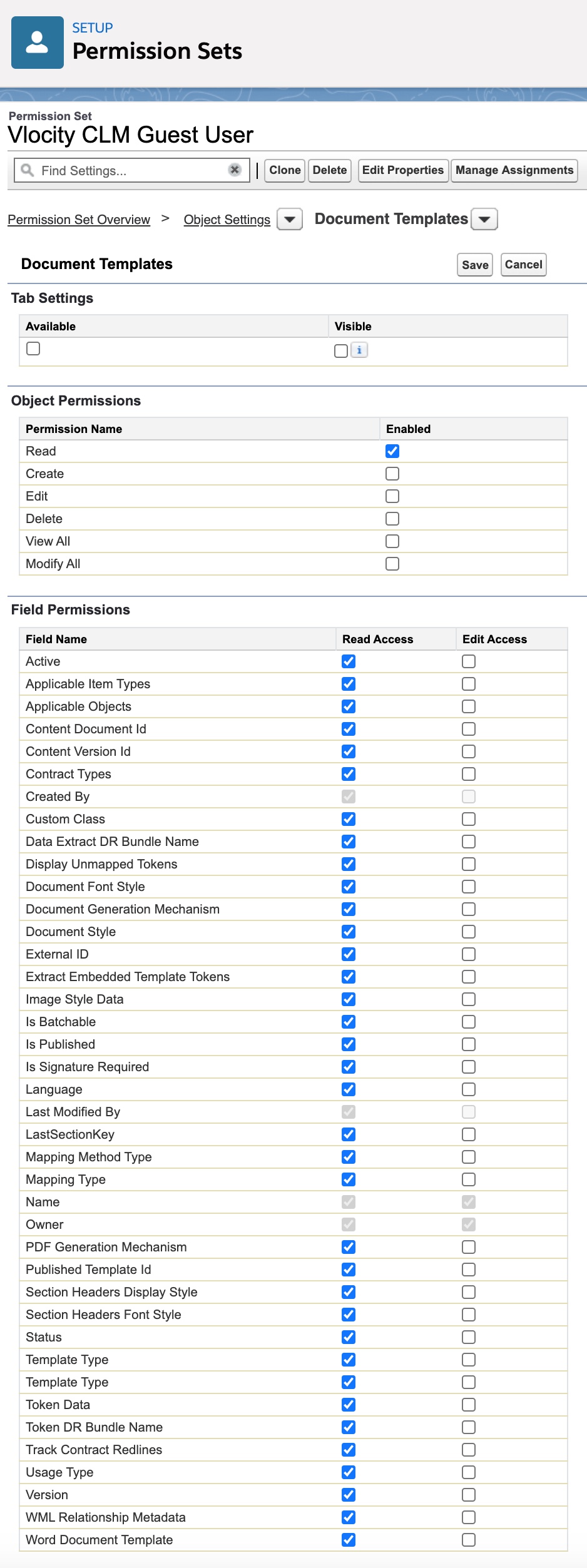
The guest user requires access to Document Templates and Document Template Sections for document generation. Vlocity recommends that you create a permission set and assign it to the guest user profile.

You can use the Vlocity Installation Assistant to create the document templates permission set automatically if you don't want to manually create it by completing the following procedure.
In the Vlocity Installation Assistant, go to the step called "Create Guest User Omniscript Permission Set" and click Complete Step. Vlocity automatically creates this permission set for you. However, you must still add the document generation permission set to the guest user profile.
- From Setup, in the Quick Find box, enter Permission.
- Click Permission Sets.
- Click New.
- In the Label field, enter a name (Example: Vlocity CLM Guest User).
- Keep the API Name default.
- Click Save.
- Click Object Settings.
- Click Document Templates.
- Click Edit.
- In the Object Permissions section, select the Read checkbox.
- In the Field Permissions section, select Read access for all the fields.
- Click Save.
- Repeat Steps 7–11 for Document Template Sections.