
You are here:
Search for Docx Content Version IDs from Developer Console
The PDFConvertLwc Omniscript uses the ID of either a previously generated .docx or .pptx document to convert Microsoft Word and Microsoft PowerPoint documents into .pdf files.
You can get the content version IDs of the.docx and .pptx files from Developer Console.
- Click the gear icon, and then click Developer Console.
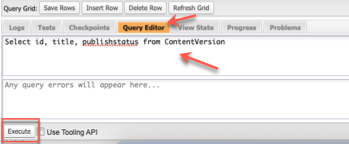
- Scroll down to the Query Grid, and then click the Query Editor tab.
- In the blank field, paste the Select id, title, publishstatus from ContentVersion query.
-
Click Execute.
The query results appear.
- Copy the IDs that you want to convert to .pdf by using the multiPDFConvert Omniscript. For more information, see Using the docGenerationSample/multiPDFConvertLwc Omniscript
Did this article solve your issue?
Let us know so we can improve!
