You are here:
Server-Side Document Generation Integration Procedures in CLM
The docGenerationSample/singleDocxServersideLwc Omniscript calls one of three Integration Procedures depending on its Service Function setting. Each of these Integration Procedures calls a different method of the DocumentServiceGateway Apex class by using different parameters.
The generated document gets attached to the Notes & Attachments section under the Related tab of your object.


Server-Side document generation is only supported in customer orgs and it isn't enabled by default. To enable this feature, see Enable Server-Side Document Generation Setting for the Salesforce Industries Package.
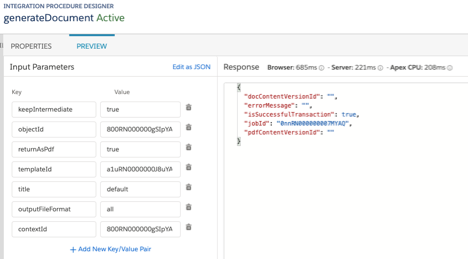
DocumentServiceGateway_DocGeneration Integration Procedure
The docGenerationSample/singleDocxServersideLwc Omniscript calls the
DocumentServiceGateway_DocGeneration Integration Procedure if its Service
Function setting is Server Side Document Generation.
This Integration Procedure invokes the generateDocument method of the DocumentServiceGateway Apex class. This method generates a .docx, .pptx, or .pdf document depending on the specified input parameters.
The input that's passed to the method includes these parameters.
Input Parameter | Passed In | Description |
|---|---|---|
objectId |
input |
ID of an object such as a Contract, Order, or Quote. |
templateId |
input |
Document Template ID. |
contextId |
input |
ID of an object such as a Contract, Order, or Quote. |
title |
options |
Optional title for the generated document. |
outputFileFormat |
options |
Output file format: either |
keepIntermediate |
options |
Indicates whether to keep the intermediate .docx or .pptx file
when generating a .pdf output: either |
returnAsPdf |
options |
Indicates whether to generate a .pdf output: either
|
The output that's passed back to the DocumentServiceGateway_DocGeneration Integration Procedure includes these parameters.
Output Parameter | Description |
|---|---|
docContentVersionId |
ID of the generated document in .docx or .pptx format. |
pdfContentVersionId |
ID of the generated document in .pdf format. |
isSuccessfulTransaction |
Indicates whether the Document Generation Process completed
successfully: either |
errorMessage |
Error message if the Document Generation Process didn't complete successfully. |
jobId |
ID of the completed Document Generation Process |
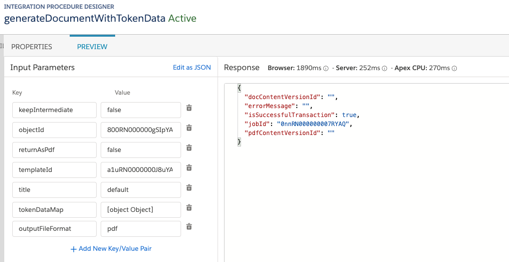
DocumentServiceGateway_DocGenerationWithTokenData Integration Procedure
The docGenerationSample/singleDocxServersideLwc Omniscript calls the
DocumentServiceGateway_DocGenerationWithTokenData Integration Procedure if its
Service Function setting is Server Side Document Generation w/ Token
Data.
This Integration Procedure invokes the generateDocumentWithTokenData method of the DocumentServiceGateway Apex class. This method generates either a .docx, .pptx, or .pdf document depending on the specified input parameters and token data.
The input that's passed to the method includes these parameters.
Input Parameter | Passed In | Description |
|---|---|---|
objectId |
input |
ID of an object such as a Contract, Order, or Quote. |
templateId |
input |
Document Template ID. |
tokenDataMap |
input |
Sample data to use instead of data from the template's Omnistudio Data Mapper. |
title |
options |
Optional title for the generated document. |
returnAsPdf |
options |
Indicates whether to generate .pdf output: either
|
keepIntermediate |
options |
Indicates whether to keep the intermediate .docx or .pptx file
when generating a .pdf output: either |
outputFileFormat |
options |
Output file format: either |
The output that's passed back to the DocumentServiceGateway_DocGenerationWithTokenData Integration Procedure includes these parameters.
Output Parameter | Description |
|---|---|
docContentVersionId |
ID of the generated document in .docx or .pptx format. |
pdfContentVersionId |
ID of the generated document in .pdf format. |
isSuccessfulTransaction |
Indicates whether the Document Generation Process completed
successfully: either |
errorMessage |
Error message if the Document Generation Process didn't complete successfully. |
jobId |
ID of the completed Document Generation Process. |
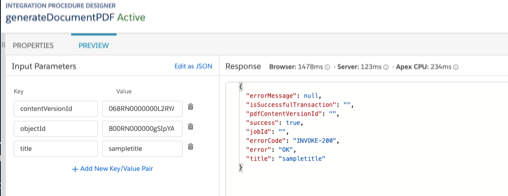
DocumentServiceGateway_DocGenerationPDF Integration Procedure
The docGenerationSample/singleDocxServersideLwc Omniscript calls the
DocumentServiceGateway_DocGenerationPDF Integration Procedure if its Service
Function setting is Server Side PDF Generation.
This Integration Procedure invokes the convertToPDF method of the DocumentServiceGateway Apex class. This method generates a .pdf document based on either a previously generated .docx or .pptx document.
The input that's passed to the method includes these parameters.
Input Parameter | Passed In | Description |
|---|---|---|
objectId |
input |
ID of an object such as a Contract, Order, or Quote. |
contentVersionId |
input |
ID of the generated document to convert to .pdf. |
title |
options |
Optional title for the generated document. |
The output that's passed back to the DocumentServiceGateway_DocGenerationPDF Integration Procedure includes these parameters.
Output Parameter | Description |
|---|---|
pdfContentVersionId |
ID of the generated document in .pdf format. |
jobId |
ID of the completed Document Generation Process. |
title |
Title of the generated document. |
success |
Indicates whether the Document Generation Process completed
successfully: either |
error |
Error message if the Document Generation Process didn't complete successfully. |
errorCode |
Error status code if the Document Generation Process didn't complete successfully. For example, INVOKE-200, and INVOKE-500. |