
You are here:
Using Contract Lifecycle Management
Typically, a business administrator creates contract document templates and clauses. Other users can create and edit actual contract documents. Typically, you create contracts from Opportunities, Orders, or Quotes as a part of the CPQ flow.

Guest users cannot create contracts.
Contract Documents Manager is a Visualforce page that provides access to the contract document versions and their attached files. Versions are listed in descending order, from newest to oldest. You can perform contract document operations on contract document versions. Contract document operations are Vlocity Actions, which are driven by the Contract State Model.
The Contract Document Manager includes the following:
-
Figure 1: Active document version
-
Figure 2: Document operations
-
Figure 3: Attached files
-
Figure 4: older document versions
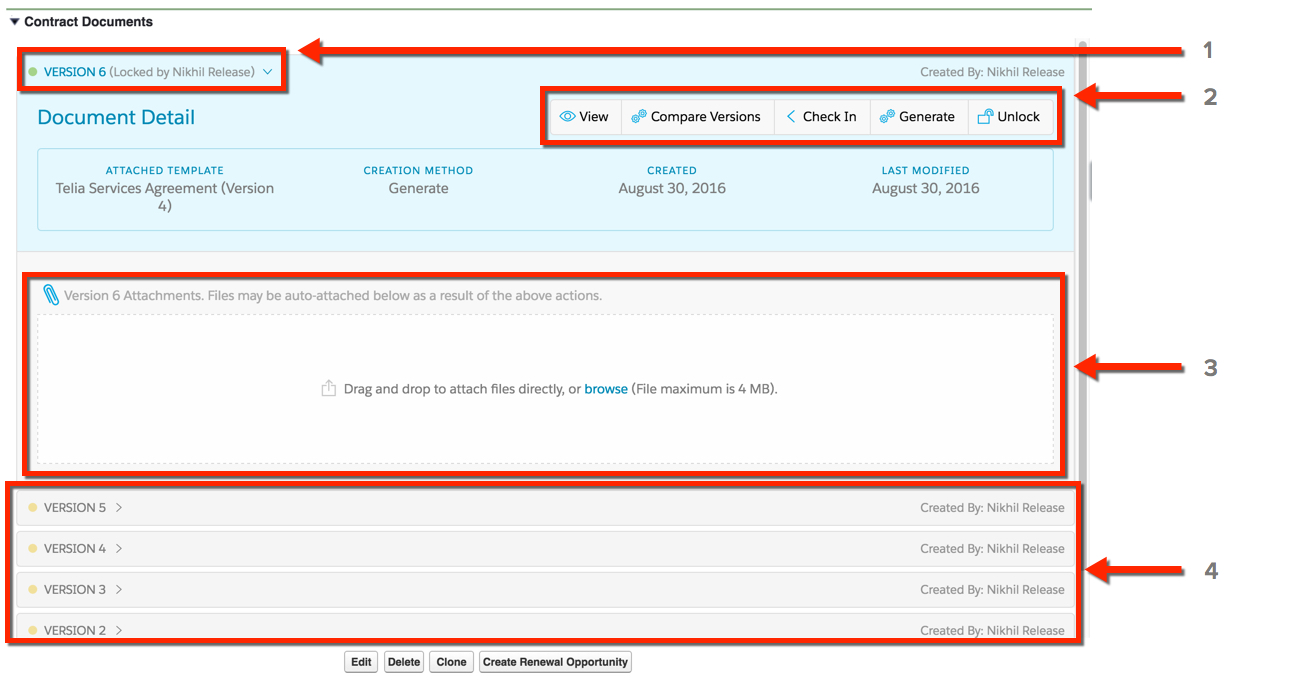
Contract Document Manager provides security and abstraction. The contract document itself comes from the Notes and Attachments section of the contract document version. You can control who can perform an operation and under what conditions.
- Previewing a Contract
You can preview a contract in HTML format. You can also generate a PDF or Microsoft Word document from the HTML document and attach that document to the Contract object. You can do this for both active and inactive versions of the contract document. - Submitting a Contract for Approval
Use the Contract State Model for approval and its transitions. Approvals can happen using email, the Vlocity web app, or the Vlocity mobile app. - Submitting a Contract for eSignature
DocuSign manages the contract document signature flow. After DocuSign gathers the signatures, DocuSign sends the signed contract document back. Vlocity CLM can automatically attach the signed contract document to the latest version of the contract. Vlocity CLM and DocuSign are integrated to use eSignatures. - Renewing a Contract
Vlocity CLM can generate renewal notifications before contract expiration. - Setting a Contract For Auto Renewal
You can save time by setting a contract for auto renewal using a scheduled apex job. The RenewContractBatchJobScheduler job can be initiated towards the end of a contract's current term to automatically extend the term. An email notification is sent to the customer based on the renewal notification setting. - Terminating a Contract
You can terminate a contract for reasons that the contract administrator specifies. - Why Do I Receive Apex Errors When Changing a Contract Status?
The Vlocity State Model (also referred to as the Vlocity Contract Model) is a feature that allows organizations to implement contract status transitional validation to ensure that contracts comply with complex processes and industry regulations.
