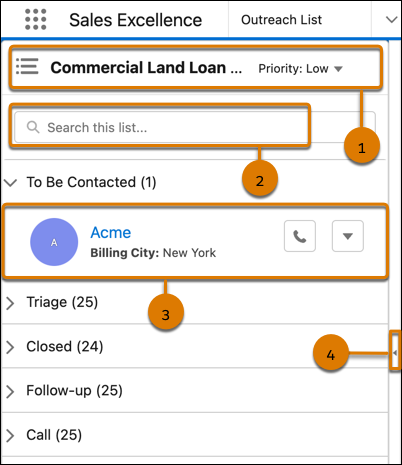
Prioritize your tasks for the day by looking at Outreach
List. It’s a prioritized and consolidated list of active prospects that you must contact. Click
a prospect in Outreach List to view the record details next to Outreach List.
Required Editions
Available in: Lightning Experience
Available in: Enterprise, Professional, Starter, and
Unlimited Editions
Outreach List shows the prospects assigned to you in accordion view. Each section
indicates the engagement status of the prospects in the selected actionable list and the
number of prospects in the section. Accordion view lets you expand and collapse Outreach List
sections to quickly find and focus on what you're working on without having to scroll through
a long list of prospects. List creators specify the order in which prospects are listed in
Outreach List.
Note If a prospect is assigned to you, but you don't have access to the
prospect's record, Outreach List doesn't show the prospect. This scenario causes a mismatch
between the number of prospects shown in the section title and the actual number of
prospects listed in the section. Contact your list creator to get access to the prospect's
record.
To open an actionable list, click the header portion (1) of Outreach List, and then
search for or select an actionable list. The actionable lists are grouped by
priority.
To search for a prospect, type the prospect’s name in the search box and either press
Return or
Enter,
or click outside the search box. You can clear the search results by clicking in the search box
(2).
Each prospect record (3) in the list includes:
Name of the prospect. To view the prospect’s details next to Outreach List, click
the prospect's name.
Go through the prospect's details before contacting
them.
Sort by field and value. Focus your efforts on the most important prospects.
If
the list creator doesn't sort prospects or sorts prospects by name, the sort field and
value aren’t shown.
To collapse Outreach List and see the record details more clearly, click (4). To
expand the list again, click .
Did this article solve your issue?
Let us know so we can improve!
Loading
Salesforce Help | Article
Cookie Consent Manager
General Information
Required Cookies
Functional Cookies
Advertising Cookies
General Information
We use three kinds of cookies on our websites: required, functional, and advertising. You can choose whether functional and advertising cookies apply. Click on the different cookie categories to find out more about each category and to change the default settings.
Privacy Statement
Required Cookies
Always Active
Required cookies are necessary for basic website functionality. Some examples include: session cookies needed to transmit the website, authentication cookies, and security cookies.
Functional Cookies
Functional cookies enhance functions, performance, and services on the website. Some examples include: cookies used to analyze site traffic, cookies used for market research, and cookies used to display advertising that is not directed to a particular individual.
Advertising Cookies
Advertising cookies track activity across websites in order to understand a viewer’s interests, and direct them specific marketing. Some examples include: cookies used for remarketing, or interest-based advertising.