
You are here:
Automatic Data Refresh in Data Streams
You can use automatic data refresh to import data from a third-party technical vendor or to have data sent automatically via email or FTPS/SFTP. Automatic data refresh allows you to avoid uploading your data manually each time new data must be ingested into the data stream.
Using automatic data refresh you configure your schedule frequency and other settings related to your data refresh automation in TotalConnect and API data streams. You can define automatic data refresh in two places.

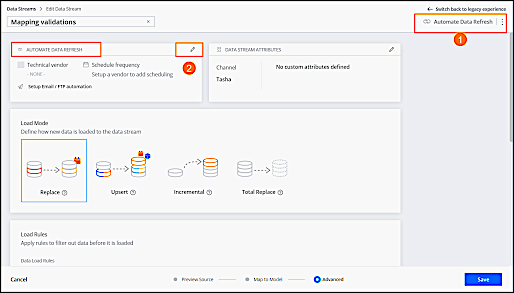
You can click the Automate Data Refresh button at the top-right corner of the Data Stream window, which appears throughout the entire data ingestion process (1). Or when defining or editing advanced settings, click the Edit icon (2).
- Import Data via Technical Vendor
Importing data via technical vendors schedules the data stream to update automatically via a remote server. This method tells the platform to import files from remote servers according to the delivery method of your choice. The settings are dynamic and based on the technical vendor you select. Typically, you use this method when you want to retrieve data from an external source and have it update automatically. Available for TotalConnect data streams. - Send Data via Email to the Data Stream
This method allows you to send files via email to the data stream. Every data stream has its own unique email address and can accept attachments or files downloaded through links. - Upload Files Using FTPS or SFTP
This method allows you to upload files into a TotalConnect data stream by using an FTPS or SFTP connection. Available for TotalConnect Data Streams
