
You are here:
Upsert Data Load Mode
The upsert data load mode inserts new data by updating main entity keys that exist in previous files. With this mode, two actions are performed: update and insert. Measurement data linked to main entity keys that exist in the previous file is updated, and then new main entity keys are inserted as new rows of data.
These tables show what happens when using Upsert mode.
Existing data

Uploaded file

Blue cells represent data different from the existing data.
After Upsert load mode is applied
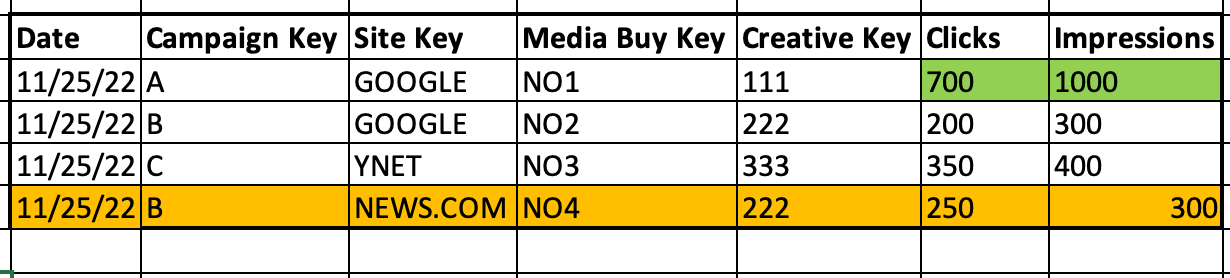
Green cells represent updated data, while orange cells represent new keys that were inserted into the data.
For the keys existing in the platform, the measurement data updates to the values included in the recent file that was uploaded. For example, the measurement values for Media Buy Keys NO1 and NO3 were updated. New keys were inserted to the data, for example Media Buy Key NO4.
To determine whether to update or insert a row, these items are considered:
- The data's date
- The Main Entity key
- The entities that are linked to the Main Entity key in a many to many connection
