
You are here:
Mapping Validations
TotalConnect and API data streams offer enhanced mapping validations during the Map to Model stage of data ingestion. The mapping validations allow you to check if there are errors or irregularities with your mapping. They also provide details on how you can rectify errors.
Three validation messages can appear during validation: mapping errors, mapping warnings, and model relationship errors. Errors are in red and warnings are in yellow. You can see each of these messages in the pop-up on the left of your mapping, under Validations.
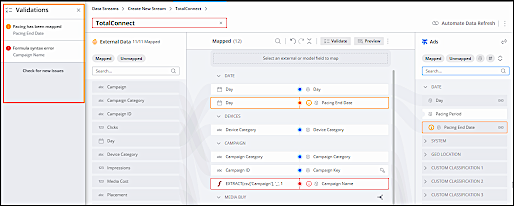
Validation Mapping
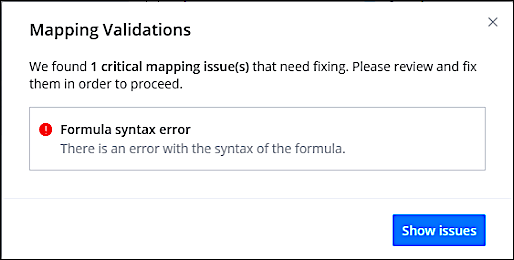
Mapping errors indicate that one or more of your mapped fields has critical mapping issues that must be fixed before you can save your data stream. To get more information and see how to fix an error, click the error on the left side.
Here’s an example of a mapping error indicating that an entity key mapping is missing:
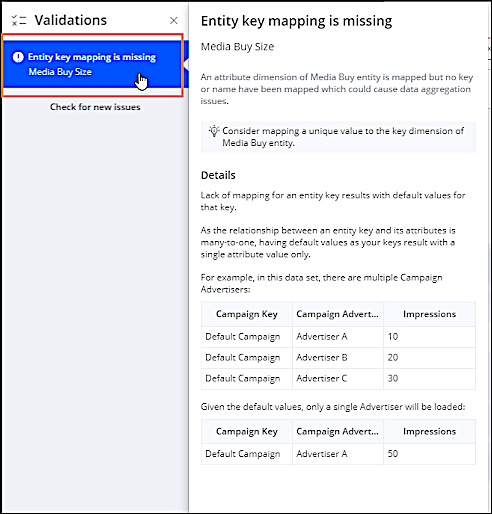
This error occurs when you have mapped attributes, but you haven’t mapped the entity key. In the above example, you have mapped the Media Buy Size attribute but you’re missing the Media Buy Key or Media Buy Name. In order to fix this error, you must map either the Media Buy Key or Media Buy Name.
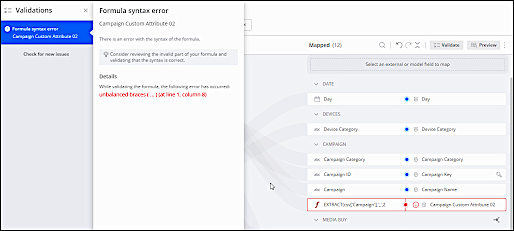
Mapping errors also show you when there’s an issue with the syntax of a mapping formula you added.
Here’s an example of a mapping formula that’s missing a parenthesis at the end:

Validation Mapping Warnings
Mapping warnings indicate less critical scenarios and affect data in your data stream. Unlike mapping errors, which prevent you from saving a data stream, you can save your data stream with mapping warnings.
Here’s an example of a mapping warning that indicates an external field that doesn’t exist in the source file was mapped to a data model field:
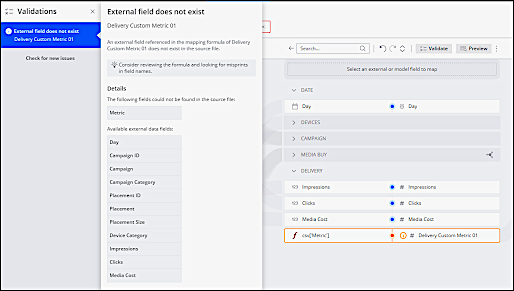
If a measurement field doesn't exist in the source file, it’s replaced with nulls whenever not present. This scenario doesn’t cause any critical issues, but it’s something that to be aware of.
Validation Model Relationship Errors
Model relationship errors indicate that there are critical entity-relationship errors with one or more of your mapped fields that must be fixed before you can save your data stream. For example, the “Key attribute relationship error” indicates that there are multiple Attribute Display Name values associated with the same Key Display Name value, which causes data aggregation issues.
To get more information about a model relationship error and how to fix it, click the error on the left side.
Validation After Fixing Errors
After you address mapping errors or warnings, you can ensure that your new mapping is correct by clicking “Check for new issues”. As soon as you see the “No mapping issues were found” message, you can rest assured that the changes you made rectified any mapping errors or warnings.
