
You are here:
Lead Stage Dimension
The Lead Stage, one of the attributes of the Lead Entity, is a type 2 dimension from the CRM leads data stream type. Over its life-span, it evolves and changes until it hopefully converts to an Opportunity.
Each of the new Stage values and the Dates on which these changes have taken place is what constitutes the history of its attribute values:

Unlike the behavior of type 1 dimensions that can only hold one value (per Entity Key), a type 2 dimension can retain a full history of its attribute values due to how it’s stored in the database. Each Lead Key is broken-down into additional rows. Each row holds the new Lead Stage value alongside the date on which this change occurred, the Modified Date. These additional rows are identified by a unique Lead Detail ID. It’s the same Lead Key over multiple rows with different Lead Detail IDs:
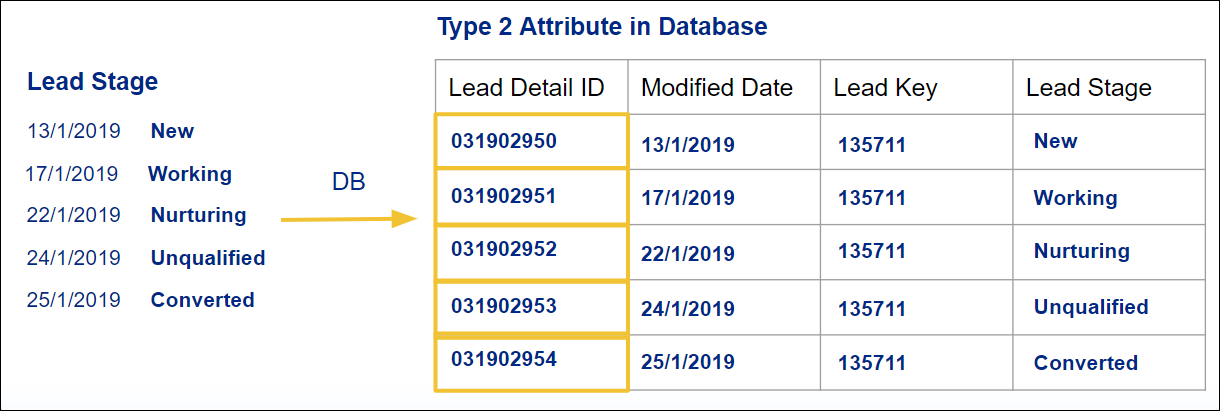

Querying your data for a certain date range always returns the last updated Stage value for the last Modified Date within the selected date range, not a list of all the values leading up to the last Modified Date. To use the earlier dataset as an example, querying for Lead Key 135711 from 1/1/2019 to 22/1/2019 doesn’t return 3 values: 'New', 'Working' and 'Nurturing', but rather only the updated (last) value for that date range, for example,‘Nurturing’.
