
You are here:
Navigate the Marketing Cloud Intelligence Platform
The Marketing Cloud Intelligence platform is divided into four tabs. Here you can explore the different tabs.
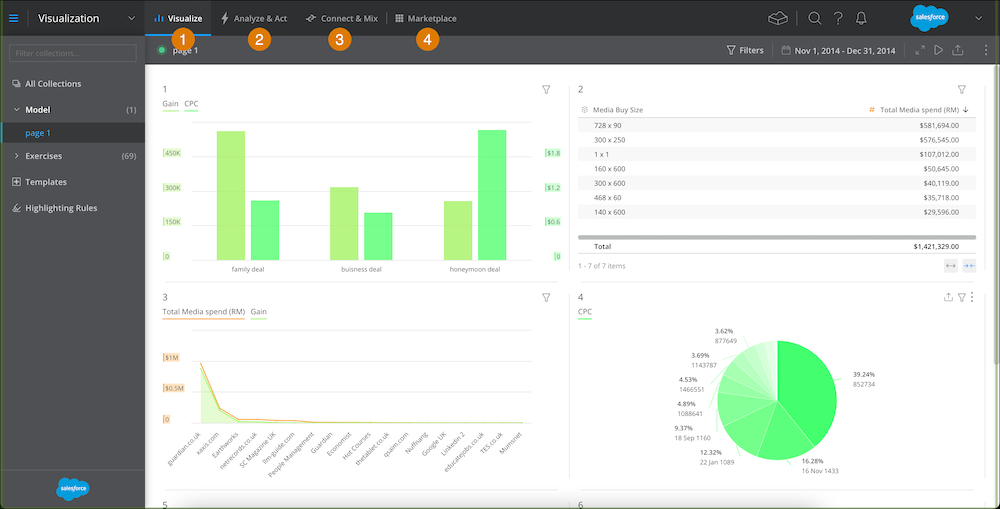
- Visualize — (1) Visualize your data. Create collections, with dashboard and app pages, bring the data to life with widgets and customize the views with filters.
- Analyze & Act — (2) Analyze your data, and share the actionable insights through reports. Measure KPIs with goals and actions.
- Connect & Mix — (3) Import your data via data streams so you can classify and manipulate your data. Here you can use any of the offered methods: API connectors, TotalConnect, LiteConnect. After you import the data you can manipulate it with the various features available in the Connect & Mix tab.
- Marketplace — (4) An ecosystem with Marketing Cloud Intelligence apps that offer a wide range of solutions developed based on real use cases and customer feedback.
When you click a new tab, the left menu bar changes to display the available actions for the tab you selected. For example, when you click the Visualize tab, the left menu bar shows your collections, dashboard pages, and templates.
Did this article solve your issue?
Let us know so we can improve!
