Manage and Reset Multi-Factor Authentication Settings in Marketing Cloud Intelligence at the
User Level
All users must have a registered MFA method to access the Marketing Cloud
Intelligence platform directly. Admins can reset an MFA recovery process for users that lost, want
to change or add an authentication method. Users can also reset MFA from their Profile.
Required Editions
User Permissions Needed
To manage and reset MFA settings:
Admin with Manage Account Users permissions
To the right of the navigation bar, click the dropdown arrow, and then click
Manage Users.
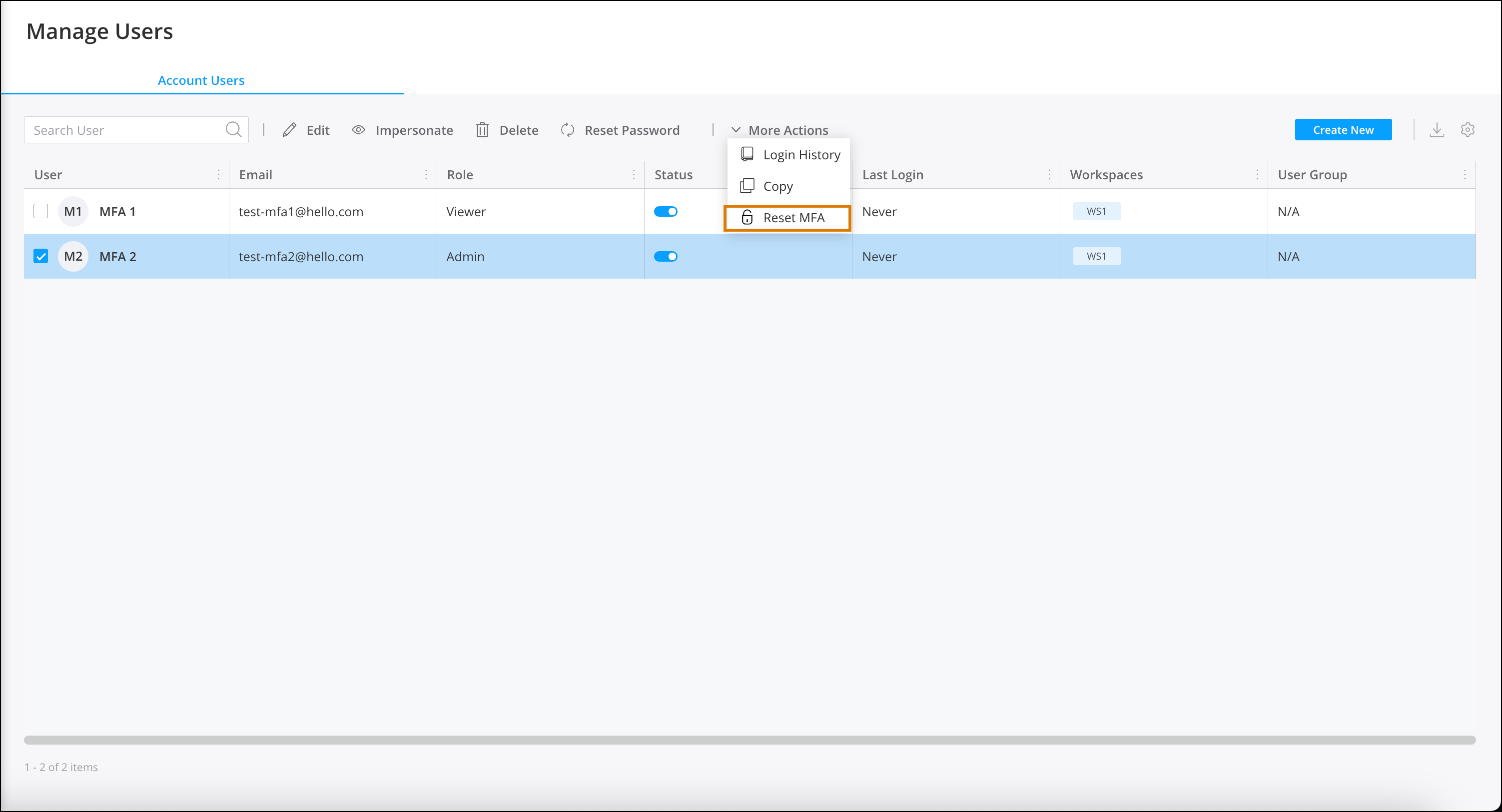
Select the user, click More Actions, and then click Reset
MFA.
The user is prompted to register a new verification method the next time they log in.
Recovery can be reset for one user at a time.
Note If MFA wasn’t enabled for the user you won’t see the option Reset
MFA, rather Enable MFA.
To add the MFA column to the user table, click the settings icon, then click
Show / Hide columns, and select MFA.
There are three MFA statuses available.
Registered—the user successfully registered an authentication
method and uses MFA to log into Intelligence.
Enabled—the user is required to use MFA. In the next login the
user is prompted to register for MFA.
Disabled—the user isn’t utilizing MFA to log into Intelligence.
For example, a user using SSO to log into Intelligence.
We use three kinds of cookies on our websites: required, functional, and advertising. You can choose whether functional and advertising cookies apply. Click on the different cookie categories to find out more about each category and to change the default settings.
Privacy Statement
Required Cookies
Always Active
Required cookies are necessary for basic website functionality. Some examples include: session cookies needed to transmit the website, authentication cookies, and security cookies.
Functional Cookies
Functional cookies enhance functions, performance, and services on the website. Some examples include: cookies used to analyze site traffic, cookies used for market research, and cookies used to display advertising that is not directed to a particular individual.
Advertising Cookies
Advertising cookies track activity across websites in order to understand a viewer’s interests, and direct them specific marketing. Some examples include: cookies used for remarketing, or interest-based advertising.