Generate Media Names with the Media Naming Builder
Create consistent campaign, placement, and creative names that match your naming
conventions using the Media Naming Builder. Instead of manually generating names using other third
party tools, add hundreds of names instantly based on your naming convention patterns and avoid
data discrepancies.
Required Editions
User Permissions Needed
To install the media naming builder:
Admin
You can also install the Media Naming Builder via the Marketplace as an app. For more
information, see Media Naming Builder App.
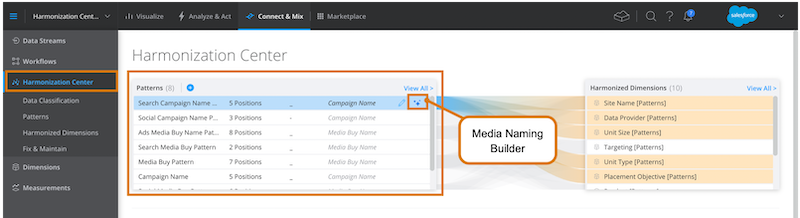
On the Connect & Mix tab, select Harmonization Center.
To install the Media Naming Builder, roll over a pattern and click the Media
Naming Builder icon.
The Media Naming Builder installs and is ready for use.
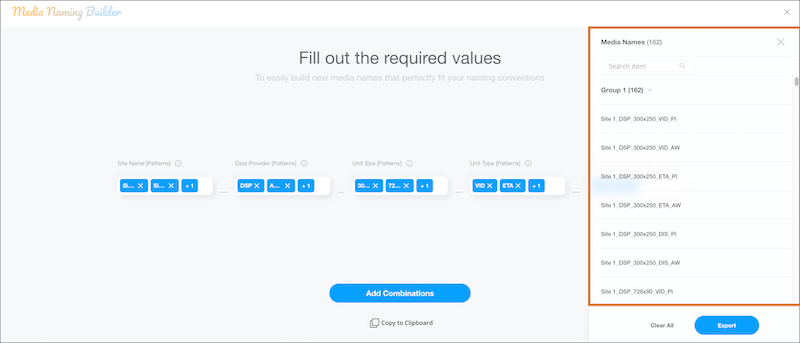
Enter the required values, and build your media name. If a validation file was used when
creating the pattern, select the values from the dropdown list. If not, manually enter the
values.
Click Add Combinations.
A list of all the combinations appears on the right-hand side. One group is created for
all the combinations.
Add more combinations as needed.
If you add another combination it appears as a new group under the first one.
After you’re done building names, click Export.
An Excel file of your names is created. Use caution when changing the names in the Excel
file, because your changes can affect your patterns.
Did this article solve your issue?
Let us know so we can improve!
Loading
Salesforce Help | Article
Cookie Consent Manager
General Information
Required Cookies
Functional Cookies
Advertising Cookies
General Information
We use three kinds of cookies on our websites: required, functional, and advertising. You can choose whether functional and advertising cookies apply. Click on the different cookie categories to find out more about each category and to change the default settings.
Privacy Statement
Required Cookies
Always Active
Required cookies are necessary for basic website functionality. Some examples include: session cookies needed to transmit the website, authentication cookies, and security cookies.
Functional Cookies
Functional cookies enhance functions, performance, and services on the website. Some examples include: cookies used to analyze site traffic, cookies used for market research, and cookies used to display advertising that is not directed to a particular individual.
Advertising Cookies
Advertising cookies track activity across websites in order to understand a viewer’s interests, and direct them specific marketing. Some examples include: cookies used for remarketing, or interest-based advertising.