
You are here:
Media Planning Center App
The Media Planning Center enables advertisers to create plans for strategic allocation of advertising budget. It facilitates budget allocation at a high level, for entities such as channels, platforms, or strategy.
With the Media Planning Center you get full and immediate access to all historical actuals related to budgeted entities. This app uses past performance in order to forecast what the future performance is likely to be, and suggests more cost effective budgeting decisions. There’s no need to import or export data, since all of your historical actuals and planned budget are connected in one place.
It’s important to note that the Media Planning Center app is used at the first stage of the media planning process. It doesn’t replace platforms or tools that are used at a later stage to create media plans that are at the IO (Insertion Order) or IO-Like level.
In this diagram you can see the Media Planning Center’s positioning in the media planning
process: 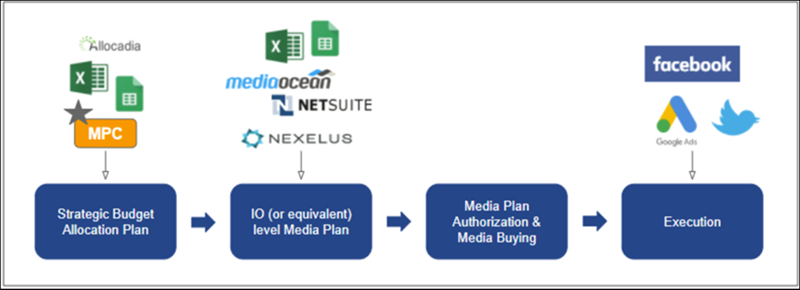
There are no technical prerequisites for using the Media Planning Center app and you don’t need the Media Transparency Center or the Media Pacing app to use it.

Here’s a video about the Media Planning Center app Scenario Planning:
- Set Up the Media Planning Center App
The Media Planning Center app manages media plans, analyzes spending, and optimizes budget. - Underlying Entities in the Media Planning Center App
A maximum of 9 underlying entities are created with the Media Planning Center app. - Run the Media Planning Center App
Use the Media Planning Center to create a strategic budget allocation plan. - EMI Budget Allocator
The Media Planning Center EMI Budget allocator is a tool used to automatically produce a recommended media budget scenario. Using AI-based forecasting and optimization algorithms, the EMI Budget Allocator offers an optimal suggestion on how to split your allocated budget, across your channels, platforms, and overall strategy.
