
You are here:
Media Transparency Center FAQ
Read our FAQ to learn about the most common Media Transparency Center questions and answers.
- What's the difference between Actualized Cost and IO Actualized Cost (By Day)? What's the use case for using each one?
- How can I view the cost of entities on a level lower than IO in case of a FLAT rate type IO?
- How do I create an IO with a Cost Type / Target Type that doesn’t exist in the platform?
- When slicing Delivery Data on IO Dimensions it seems the Delivery Data values are higher than what would be expected. Why is this happening?
- When slicing delivery data on IO Dimensions I see data under an IO named 'Other'. What caused this situation and why is there Delivery Data connected to this IO?
- What is the calculation for Recalculated Cost in the Datorama platform? Based on the margin rate I'm charging, I'm expecting to see different results.
- How do I connect delivery data to an IO?
- What is the Actual Value column in the Margin Adjustment Tool and how is it being calculated?
What's the difference between Actualized Cost and IO Actualized Cost (By Day)? What's the use case for using each one?
The Actualized Cost Measurement is used to display actualized cost for entities on levels lower than an IO, for example, Media Buy. Its calculation is based on maintaining the ratio between the entity's recalculated cost to the recalculated cost of the entire IO. The calculation is as follows:

The Actualized Cost by day Measurement presents the Recalculated cost until the point when the IO reached its budget, and from that point and on it will show 0 cost.
The choice between the two actualized Measurements depends on the type of Entity you’re using in your view and the information you’re trying to visualize:
- For Date Entities (Day, Week, and so on) you can use either one of the Measurements, depending on what you want to see. Remember that currently IO Actualized Cost (By day) must be presented with a Date Dimension.
- For any other Entity (Media Buy, Site, and so on) use Actualized Cost.
How can I view the cost of entities on a level lower than IO in case of a FLAT rate type IO?
Since FLAT Rate Type IOs don't base their cost on Delivery Data, the cost for each entity is approximated by the ratio between the number of the relevant Entity's Impressions and the total number of Impressions delivered during the IO's date range.
The calculation is as following:

Note that 'IO Recalculated Cost' doesn't hold any value in case of a 'FLAT' Rate Type IO. If you want to aggregate the cost of a 'FLAT' Rate Type IO with other IOs, use 'Actualized Cost'.
How do I create an IO with a Cost Type / Target Type that doesn’t exist in the platform?
First, set a Custom Cost Type from the Media Transparency Center tab under the Workspace's settings. Choose the relevant Measurement from the drop-down list.
The calculation is Measurement*Rate. Select the display name for this Custom Cost Type / Target Type and click Save.
Custom Cost Types can only be based on Native Measurements (that is, Measurements that are mapped via a Data Stream). In case you want your Cost Type to be based on a Calculated Measurement, you need to create it during the mapping process with the TotalConnect formulas.
The new Custom Cost Type is available in the drop-down list in the IO Management tab along with platform Cost Types. In case you are using TotalConnect to create your IOs, you will need to use the function COSTTYPE () or TARGETTYPE() in the relevant fields in order to map your IO correctly. These functions perform a lookup to the available Cost Type / Target Type in Marketing Cloud Intelligence.
For example, if my data is as following:
| IO Key | IO Name |
Cost Type |
IO Rate |
|
|---|---|---|---|---|
| Generic Key no. 1 | Generic IO no. 1 | CPCV | 1.5 | 100 |
The formula to use to map the 'Cost Type' dimension is: COSTTYPE(csv['Cost Type'])
It isn’t possible to verify a formula that contains the COSTTYPE function by clicking 'Validate Formula' in the mapping screen. Test the logic of your formula before adding the COSTTYPE function and then testing the results of the full formula in a Pivot Table.
When slicing Delivery Data on IO Dimensions it seems the Delivery Data values are higher than what would be expected. Why is this happening?
This can happen if a Media Buy is connected to more than one IO at a given point in time. This isn’t an expected behavior, but if this does occur, the Delivery Data of the Media Buy will be used to calculate the cost for any IO that it's connected to.
When slicing delivery data on IO Dimensions I see data under an IO named 'Other'. What caused this situation and why is there Delivery Data connected to this IO?
The IO named 'Other' is an entity's instance created just for the sake of the view, it represents the Delivery Data that isn't connected to any IO at the requested date range.
What is the calculation for Recalculated Cost in the Datorama platform? Based on the margin rate I'm charging, I'm expecting to see different results.
First, you need to know the differences between Markup and Margin. These two terms are commonly being misused and are the key to understanding the calculation that Marketing Cloud Intelligence uses in the 'Media Transparency Center'.
- Margin
- The ratio between the additional costs added on top of the basic Media Cost and the Recalculated Cost, the final amount the client pays (considering the capped cost, if there’s one)
- Markup
- The ratio between the additional costs added on top of the basic Media Cost, and the basic Media Cost.
Marketing Cloud Intelligence uses Margin to calculate the additional costs added over the Media Cost. If you want to calculate according to Markup, please contact our support team with the relevant details (Workspace ID).
The calculation for Recalculated Cost in the Intelligence platform is as follows:

For example, if your data is:
IO Name |
Media Cost |
IO Margin Rate |
|---|---|---|
Generic IO no. 1 |
100 $ |
0.2 |
The 'Recalculated Cost' will be calculated as follows:

There are two common ways to connect Delivery Data to an IO, both of which are based on creating a connection between the 'IO Key' and the relevant Entity in the Delivery Data. You can either connect the keys with Media Transparency Center or with TotalConnect.
What is the Actual Value column in the Margin Adjustment Tool and how is it being calculated?
The Actual Value is calculated as follows:
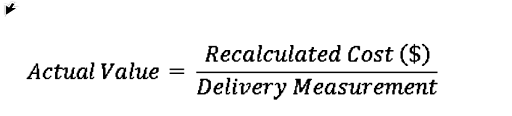
The Delivery Measurement is inherited from the Target Cost Type set for the IO. For example, if the Target Cost Type is CPA, the Delivery Measurement would be Conversions. The actual value is colored according to the Target Value set in the IO settings.
For example, if you had a Target Value of 1 and your Cost Type is CPC, your Recalculated cost is $10 and you have 5 clicks, your actual value will be 2 more than your target value. Therefore it is colored red.
