
You are here:
Cascading Filters
Cascading filters allow you to apply a filtering component such as a page filter or an interactive filter widget to other interactive filter widgets. After you apply a cascading filter, the list of values in the selected interactive filters widgets are filtered to only contain values that are relevant to the selected value.
You can only apply cascading filters within the same entity hierarchy, from the top hierarchy to the lower hierarchies. The campaign entity and its attributes (campaign name and campaign advisor) can filter the media buy entity and its attributes (media buy name and type). However, the media buy entity and its attributes can’t filter the campaign entity and its attributes.
In the table, the filtering entity can filter level 1 and level 2, and filtered entity level 1 can only filter level 2.
| Filtering Entity | Filtered Entity level 1 | Filtered Entity level 2 |
| Campaign | Media Buy | |
| Sites | Media Buy | |
| Channels | Media Buy | |
| Channels | Web Analytics Site | Web Analytics Tag |
| Channels | Social Element | Social Post |
| Channels | Email Campaign | |
| Channels | Generic Entities 1–5 | |
| Products | Media Buy | |
| Products | Web Analytics Site | Web Analytics Tag |
| Products | Social Element | Social Post |
| Products | Email Campaign | |
| Products | Generic Entities 1–5 | |
| Custom Classification 1 | Media Buy | |
| Custom Classification 1 | Web Analytics Site | Web Analytics Tag |
| Custom Classification 1 | Social Element | Social Post |
| Custom Classification 1 | Email Campaign | |
| Custom Classification 1 | Generic Entities 1–5 | |
| Custom Classification 2 | Media Buy | |
| Custom Classification 2 | Web Analytics Site | Web Analytics Tag |
| Custom Classification 2 | Social Element | Social Post |
| Custom Classification 2 | Email Campaign | |
| Custom Classification 2 | Generic Entities 1–5 | |
| Social Element Traffic Source | Social Element | Social Post |
| Products | Opportunity | |
| Client | Company | Opportunity |
| GEO | Company | Opportunity |
| GEO | Lead |
Here’s an example:
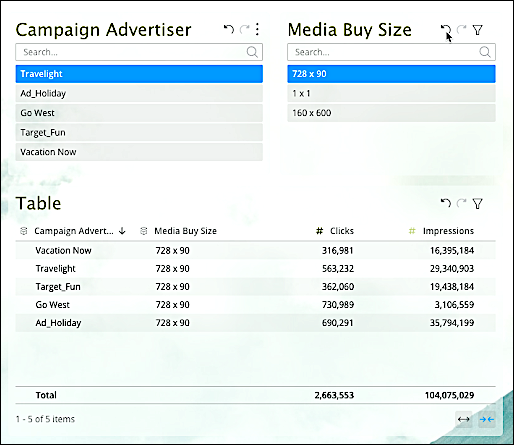
The Media Buy Size interactive filter widget has the Cascading Filter checkbox selected, and it’s included in the Apply to Specific Widgets list in the Campaign Advertiser interactive filter widget. The value selected in the Campaign Advertiser interactive filter widget affects the values in the Media Buy Size interactive filter widget.
In the table above, the Media Buy Size interactive filter widget alone affects the widget. Media Buy Size is the only widget in the Apply to Specific Widgets list in the Campaign Advertiser interactive filter widget. In the table, you see campaign advertiser values other than Travelight, the filter in the Campaign Advertiser' interactive filter widget. That’s because the Campaign Advertiser interactive filter is applied to the Media Buy Size interactive filter alone. It doesn’t affect any other widgets on the page.

- Cascading filters don’t apply to interactive date filters.
- Cascading filters don’t work if the interactive filter widget the filters are applied to is set to Set Values Manually.
- Activate Cascading Filters
You can activate cascading filters in widgets.
