You are here:
Einstein Send Time Optimization Dashboard
Visualize optimal predicted send times for email addresses or contacts in a Marketing Cloud Engagement tenant or for all contacts in a business unit. Find out when subscribers are most likely to engage with your messages and insight about your Enterprise’s data quality, which fuels Einstein’s predictions.
To access the Einstein Send Time Optimization (STO) dashboard, go to Einstein, and click Einstein Send Time Optimization. Then choose the message channel dashboard you want.
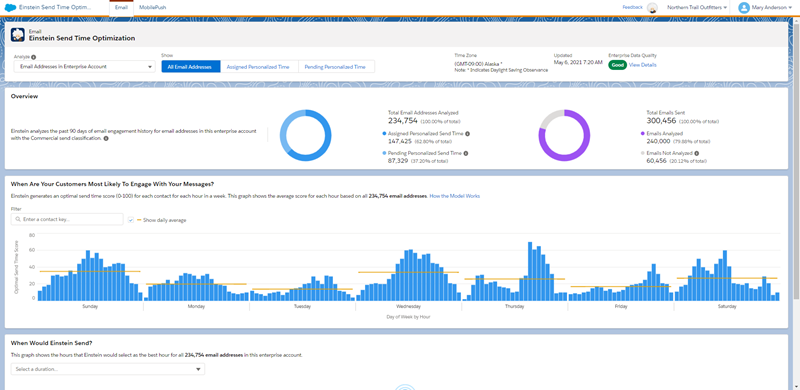
Use the Einstein Send Time Optimization dashboard to view optimal send times by day or by hour. Optimal send times are based on how many contacts are predicted to engage with the message you send. Or view optimal send times across the days and hours in a week. Knowing the optimal send time by hour or day can help you choose the best time for batch sends.
- Total Email Addresses Analyzed shows the total number of contacts in the business unit or unique email addresses in the tenant. On the mobile dashboard, the Total Contacts Analyzed metric shows the same information.
- Assigned Personalized Send Time shows how many contacts or email addresses Einstein can suggest a send time for.
- Pending Personalized Send Time shows how many contacts Einstein needs more data to suggest a send time for. These unmodeled subscribers receive messages according to a generalized model that is derived from sending data in your Enterprise.
- Data Quality shows 1–5 dots, with the filled dots indicating your Enterprise’s data quality score for email or mobile sending. Expand the section to access the scores that are considered when generating your data quality score and tips to improve it. Find out more about data quality scores on the Gauge Your Enterprise Data Quality page.
- The When Are Contacts Likely to Engage with Messages section shows the delivery
times during the week when contacts are most likely to engage with your messages.
Einstein assigns a prediction score to each email address or mobile contact.
Einstein gives a 0–100 probability score for all 168 hours in a week. The prediction
score anticipates the best hour of the week to send to a contact. This chart
aggregates the prediction scores that Einstein assigns to each contact. The chart
aggregates scores so it can show the single hour-day combination with the highest
probability to promote message engagement. To find the optimal send time for a
single contact, enter a contact key.
 Important Searching for the optimal send time for a single contact is available in the Enterprise-level parent business unit only. Users in child business units can’t access this data in other business units.
 - The When Would Einstein Send section shows the total number or contacts or email addresses in your business unit or Enterprise account. This section also shows the optimal send times by hour for a day or for all days of the week.
- If you update the Enterprise-level Time Zone for Einstein Send Time Optimization in Setup, the updated Time Zone on the Dashboard can take up to a week to appear. The time zone setting for the Enterprise level is separate from the Business Unit time zone. Changing the Business Unit time zone doesn’t affect the Einstein Send Time Optimization dashboard time zone.