
You are here:
Multi-Org Examples
These Marketing Cloud Connect for Marketing Cloud Engagement scenarios show guidelines for disconnecting and reconnecting multi-org accounts.
Multiple Business Units Connected to Multiple Orgs
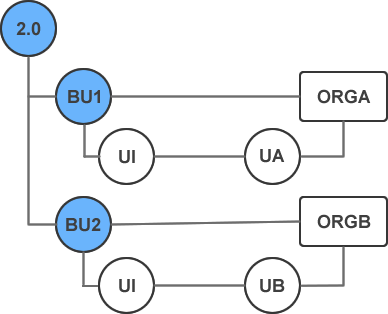
In this example, both business units, BU1 and BU2, belong to the same Enterprise 2.0 account. Each business unit is connected to a unique Sales or Service Cloud org, ORGA and ORGB, using connected app authentication. A user has access to the following:
- BU1 and BU2 through Engagement user account, U1.
- ORGA through Sales or Service Cloud user account, UA.
- ORGB through Sales or Service Cloud account, UB.
If BU1 and ORGA are disconnected, U1 and UA are disconnected. However, if BU2 and ORGB remain connected, and U1 remains connected to UB through BU2, then BU1, ORGA, U1, and UA can reconnect.
Multiple Business Units Connected to a Single Org
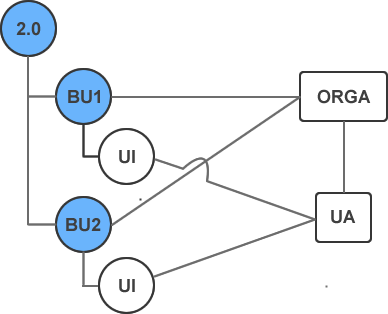
In this example, both business units, BU1 and BU2, belong to the same Enterprise 2.0 account. Both business units are connected to the same Sales or Service Cloud Org, ORGA, using connected app authentication. A user, U1, has access to both business units. Because both business units are connected to ORGA, U1 must be connected to the same Sales or Service Cloud user account, UA.
If BU1 and ORGA are disconnected, U1 and UA are disconnected in BU1. U1 remains connected to UA in BU2. BU2 remains connected to ORGA. BU1, ORGA, U1, and UA can reconnect using the multi-org connection rules.
Other Scenarios
Business units can’t be connected or disconnected independently of the parent account in non-multi-org accounts. Disconnecting the parent account disconnects all child business units and connected users.
The ability to disconnect an Engagement account from the Sales or Service Cloud account is only available for Enterprise 2.0, Core, and Lock & Publish accounts. Install Marketing Cloud Connect package version 5.493+. The Marketing Cloud Connect account must use connected app authentication.
