You are here:
Bounce Mail Management in Email Studio
Learn about bounce mail management in Email Studio for Marketing Cloud Engagement.

As a user, you can’t control bounces, but you can understand how a subscriber acquires a bounced status and the consequences of having too many bounces.
Definition
Bounces are messages that ISPs send back to Engagement to explain why they can’t deliver your email. When an email can’t be successfully delivered, the application labels the subscriber as Bounced.
Types of Bounces
The subscriber's email server either accepts or bounces an email when it's sent. If the email server accepts the email, the subscriber's status remains Active in Engagement. If the email server rejects the email, the subscriber's status changes to Bounced.
Soft Bounce
A soft bounce occurs when the email server rejects the email due to a seemingly temporary condition, such as a full inbox. When that happens, the system retries sending the email to the subscriber every 15 minutes for 72 hours, for up to 288 tries. Only after the system stops attempting to retry does a subscriber appear in your tracking as Bounced. When a bounce appears in tracking, it’s official and doesn’t change.
The 288 retries don’t count as bounces. Instead, the full count of unsuccessful retries equates to one soft bounce. If the system attempts delivery 288 times and the message bounces each time, the subscriber's status is set to Bounced. If the email is delivered during the 288 attempts and the subscriber opens the email, the subscriber's status is set to Active. Also, a bounced subscriber can find an old email from you in their inbox and open it, which returns their status to Active.
Not every message to a soft-bouncing recipient is retried 288 times. Some bounces can happen immediately and be permanent as it relates to that particular message, but we consider them soft bounces for tracking purposes. Examples of this type of soft bounce that show up faster include these types of ISP responses:
- The mailbox exceeds the maximum allowed storage
- The user account is over its quota
- The mailbox is full
- The mailbox is disabled
- The mailbox is temporarily disabled
- The mailbox is disabled and not accepting messages
After Engagement receives the third soft bounce for a subscriber, their status is set to Held.
This table describes the causes of a soft bounce.
| Cause | Definition | Possible Cautions and Resolutions |
|---|---|---|
| Inactive Account | The address is temporarily unavailable as the recipient's mailbox is inactive or temporarily disabled | The subscriber's email account is temporarily inactive or disabled. Mailboxes can be disabled for several reasons, including infrequent use, change of address, delinquency, or dispute. These errors could be temporary or permanent. We recommend sending messages to these subscribers in the short term to monitor acceptance, and then contacting the subscriber through other methods to confirm the address. |
| Mailbox Full | Recipient's mailbox is full or has exceeded storage allocation | Your recipient's mailbox is full or it has exceeded its storage allocation. A full mailbox is usually from infrequent use, a temporary change in email checking habits, or an address change. Mailbox full errors are a warning sign. Consider contacting the subscriber through alternative means to confirm that you’re mailing to a valid and frequently checked address. |
| Temporary Domain Failure | Temporary failure at the receiving domain | The subscriber's mailbox isn’t currently accepting messages. Resolve this temporary issue before future sends. Continue to monitor deliverability for this subscriber. Consider contacting this subscriber through alternative means if these deliverability issues persist. |
| Other | Mailbox temporarily unavailable or indecipherable bounce message received | The subscriber's mailbox isn’t currently accepting messages. Resolve this temporary issue before future sends. Continue to monitor deliverability for this subscriber. Consider contacting this subscriber through alternative means if these deliverability issues persist. |
Block Bounce
A block bounce occurs when the email server rejects the email because of a lack of authentication, or if the domain or IP address appears on a blocklist. A subscriber who receives a block bounce is retried in the next email send.
This table describes the causes of a block bounce.
| Cause | Definition |
|---|---|
| Complaint | Your email is blocked due to complaints |
| Blacklist | The IP address is on a blocklist |
| Content | The message was filtered due to content |
| URL Block | Any emails containing your URLs are blocked |
| Authentication | The message lacks required authentication |
Technical Bounce
A technical bounce occurs when the email server rejects the email due to technical errors, such as a data format or network error. When a subscriber experiences a technical bounce, they’re retried in the next email send.
This table describes the causes of a technical bounce.
| Cause | Definition |
|---|---|
| Server Too Busy | Receiving email server is temporarily overwhelmed with delivery attempts from you and other senders |
| Data Format Error | Email is rejected due to formatting or line length errors |
| Network Error | Connection lost or timed out during delivery line length errors |
Hard Bounce
A hard bounce occurs when the email server rejects the email due to permanent conditions. This bounce typically results when user unknown or domain not found errors occur. What happens next depends on the subscriber's status. If the subscriber's status was already Active, their status now changes to Bounced. No more attempts are made to send this email campaign to this subscriber, and the subscriber is retried in your next email campaign. Every email send is considered an email campaign regarding bounce handling.
If the subscriber's status was already Bounced, which indicates they had experienced a bounce previously, the application treats the bounce differently. If the subscriber bounces in the first or second email campaign, they retain the Bounced status and are retried in your next email campaign. No further attempts are made for this current email campaign.
If this email campaign is the third campaign in which the subscriber bounced, the application checks when the first bounce message was received for this subscriber. If fewer than 15 days have passed since the first bounce message was received, the subscriber retains the Bounced status and is retried in your next campaign. No further attempts are made for this current email campaign. If the bounce occurred more than 15 days before the first bounce message, the subscriber status changes to Undeliverable unless the bounce is from a trusted domain. A trusted domain is one in which Engagement trusts the ISP or receiver's bounce feedback implicitly. For example, if hotmail.com is a trusted domain and Hotmail's feedback is that an address is bad, the status automatically changes to Undeliverable. They system doesn’t wait for the address to bounce three times over 15 days. If the bounce comes from any other domain, a subscriber receives three bounces to acquire an Undeliverable status. The application doesn’t attempt delivery to this subscriber in any future campaigns.
Current trusted domains include Gmail.com, Hotmail.com (including all active Hotmail country domains like Hotmail.fr), and some smaller regional mailbox providers. If you'd like a copy of all current trusted domains, reach out to mc-deliverability@salesforce.com.
This table describes the causes of a hard bounce.
| Cause | Definition | Possible Cautions and Resolutions |
|---|---|---|
| Domain Unknown | The domain is bad or non-existent | Sending to unknown domains is a result of poor data capture methods, old data, or questionable data sources. Sending to old lists can also increase the likelihood of mailing to dead domains, as domains that are no longer active are represented on old lists. To avoid receiving a high number of "Domain Unknown" errors, we recommend sending a test send to 10% of your regular mailing volume. You can assess the results from the test send without exceeding the acceptable bounce and complain rates and make a reasonable risk assessment before proceeding with a larger send. |
| User Unknown | Address is invalid or failure is permanent per bounce message | Industry statistics indicate that up to 33% of email addresses become invalid over 12 months. Receiving the User Unknown error indicates that the address is no longer active or has never been an active email address. Because of the high turnover rate of email addresses, sending to subscribers regularly decreases the possibility of a sudden spike on a specific campaign. If mailing to an old subscriber list, we recommend sending a random 10% test to avoid a sudden increase in bounces. This error could also be the result of poor data capture methods. If so, we recommend requiring subscribers to enter their email address twice |
| Bad Address Syntax | Email address invalid | The email contains incorrect syntax. For example, you left out the "@" symbol or didn't include a domain name (like "examplecom" instead of "example.com"). Check your email address syntax and correct any errors you see. |
| High Unknown Address Percentage | Email is blocked due to the high quantity or percentage of unknown or inactive addresses on your list | The subscriber's ISP has flagged your IP address for sending too many messages that got blocked. The ISP sees that you sent emails to people that didn't accept them. To make improvements, see the section on Best Practices. |
| Other | Address is invalid or failure is permanent per bounce message |
If you have subscribers in a list who continually receive hard bounces, you can remove them from your list.
Unknown Bounce
An unknown bounce occurs when the email server rejects the email and doesn’t provide an identifying error code. An unknown bounce is treated like a soft bounce.
Reactivating Bounced Subscribers
If a subscriber address is in a bounced status but renders images in an email, or if the subscriber clicks a link in an email, their status changes to Active. The bounce count for that subscriber address is set to zero. Imports that specify an Active status automatically resets the bounce count to 0 for any subscriber that is included in the import with an active status.
Bounce Tracking
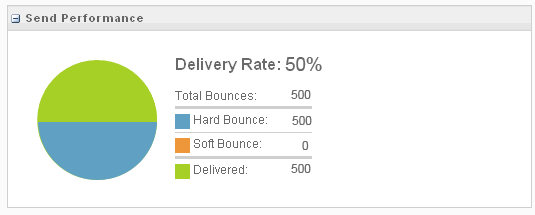
Engagement tracks your bounces in the tracking area of the email message.
SMTP Bounce Codes
If you run a Bounce Event Extract File, there’s an SMTP Code column that lists a code related to each bounce. View valid values for SMTP reply codes (GreenEnd).
Bounces for Integrated Solutions
Bounces for Engagement integrated products are handled the same way as they are in Engagement. The same rules apply, but sometimes, only the record of a bounce is passed back to the integrated solution. It doesn’t include whether it’s a hard or soft bounce. The system only records the date and time of the event.
Unsubscribed Status
Although unsubscribed subscribers got that status not because of a bounce, in the context of Bounce Mail Management, a subscriber acquires a status of Unsubscribed in these ways:
- The subscriber clicks an unsubscribe link in an email or chooses to be unsubscribed in a profile center
- The subscriber reports an email as spam to an ISP with which Engagement has a feedback loop (AOL, Hotmail, Comcast, and others)
- The subscriber's address is manually changed to Unsubscribed by a Salesforce Engagement user
Subscriber Status
A subscriber's email status is one of the fields that you can include when you export individual subscriber data or export an entire subscriber list. You can use the status field to filter your subscriber searches. Your subscriber workspace uses color-coded icons to indicate subscriber status.
Each subscriber has one of these statuses:
| Color Code | Status | Explanation |
|---|---|---|
|
Active | A subscriber who meets either of these criteria has a status of Active:
|
|
Bounced (Returned) |
A subscriber who meets these criteria has a status of Bounced:
|
|
Held (Undeliverable) | A subscriber who meets these criteria has a status of Held (Undeliverable):
|
|
Unsubscribed | A subscriber who meets any of these criteria has a status of Unsubscribed:
|
| Deleted | A subscriber who meets either of these criteria has a status of Deleted:
|


Diagram
The diagram illustrates the bounce process, showing how a subscriber address status changes from active, to bounce, to undeliverable.